Author: rishhsoni@gmail.com

  • RevOps vs Sales Ops vs Marketing Ops vs CS Ops

    RevOps vs Sales Ops vs Marketing Ops vs CS Ops

    Understanding what each function owns and where they overlap

    The language around commercial operations has become harder to follow than the underlying work.

    A growing company may have Sales Operations, Marketing Operations, Customer Success Operations, Revenue Operations, Deal Desk, Sales Strategy, Business Operations, and several systems or analytics teams working around them. Their job descriptions often use much of the same vocabulary: process, data, systems, planning, forecasting, productivity, automation, reporting.

    From the outside, the distinctions can look artificial.

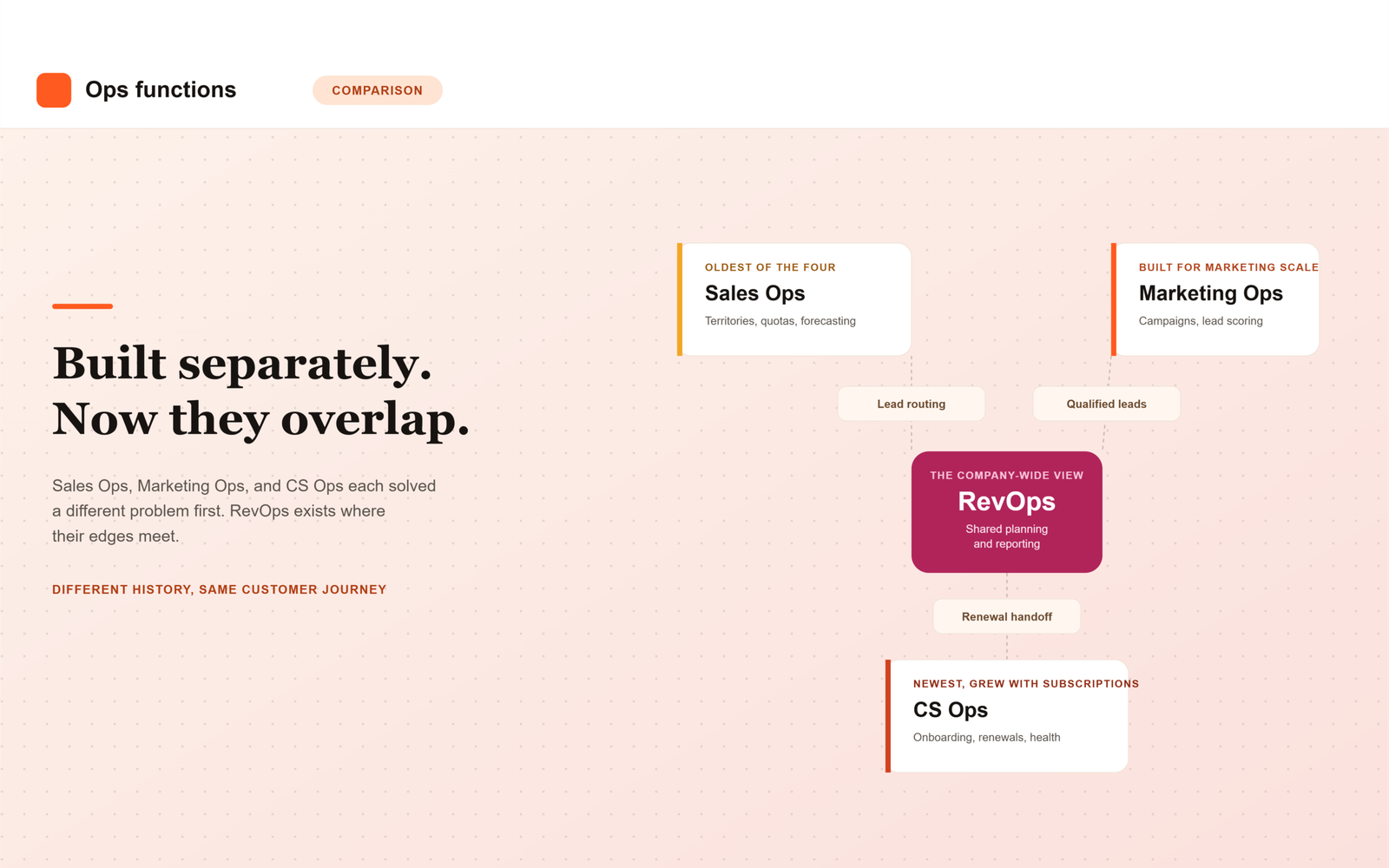
    There is a reason for the overlap. These functions did not emerge from a single organizational model. They developed at different times to solve different operating problems, usually inside departments that had become large enough to need specialist support.

    Sales Operations came first. Marketing later built its own operations capability as marketing became more dependent on data and technology. Customer Success Operations developed as post-sale work became more structured, particularly in recurring-revenue businesses. Revenue Operations appeared later, partly because companies were finding that the specialist teams could work well inside their own areas while the full customer journey remained fragmented.

    It helps to look at that history before trying to draw neat ownership boundaries.

    Sales Operations grew around the needs of the sales force

    Sales Operations has the longest history of the four. Salesforce traces the formal function to Xerox in the 1970s, when J. Patrick Kelly created a team to handle planning, forecasting, territory design, compensation, and other work required to run an increasingly complex sales organization.

    The basic problem has changed less than the technology around it.

    Once a company employs more than a small number of salespeople, someone has to decide how accounts should be divided, how many sellers are required, how targets should be allocated, how opportunities are tracked, and how management should interpret the pipeline.

    Territories alone can become complicated. A company might divide accounts by geography, industry, size, product, existing relationship, or some combination of these. The design affects hiring, compensation, customer ownership, and the likelihood that good opportunities receive attention.

    Forecasting creates another body of work. Sales managers need a common way to describe the status of opportunities. Senior management needs an estimate of likely future sales. Those estimates depend on the quality of the underlying sales process and the discipline with which people maintain it.

    GitLab’s public Sales Operations documentation gives a useful picture of the function in practice. Its team works on sales processes, policies, systems, reporting, territories, field support, and go-to-market planning.

    This is familiar Sales Ops territory. The team is close to sellers and sales management because most of its work begins with the question of how the sales organization should operate.

    That proximity matters. A territory model may look balanced analytically and still fail because experienced sellers know that two apparently similar regions behave very differently. A required opportunity field may improve reporting while making little sense in the actual sales conversation. Good Sales Ops usually requires frequent contact with the people whose work it is organizing.

    Some responsibilities move in and out of the function depending on the company. Sales compensation might sit with Finance. Deal Desk may be part of Sales Ops in one organization and RevOps in another. Sales enablement may be closely connected or entirely separate.

    There is no standard boundary that every company follows.

    Marketing developed a different operating problem

    The modern marketing organization produces large amounts of activity and data before a salesperson becomes involved.

    A potential customer might attend an event, visit the website several times, subscribe to a newsletter, download a research report, respond to an advertisement, or join a webinar. Each interaction may enter a different system.

    Someone has to make those systems usable.

    Marketing Operations usually works on the infrastructure behind marketing execution: automation, campaign setup, databases, tracking, lead processes, reporting, and the technology connecting these activities.

    HubSpot describes the function broadly around the people, processes, and technology that support marketing strategy, including planning, workflow development, campaign analysis, data management, and performance measurement. GitLab’s Marketing Operations charter places similar emphasis on marketing technology, standardized processes, data quality, and systems management.

    The difference from Sales Ops becomes easier to see in day-to-day work.

    A Marketing Ops manager might spend time fixing campaign attribution, improving the process for handling webinar registrations, cleaning duplicate contact records, redesigning lead scoring, or deciding how data should move between the marketing automation platform and the CRM.

    A Sales Ops manager may use some of the same systems and data while worrying about a different set of questions: account ownership, pipeline quality, seller capacity, or whether a manager’s forecast is realistic.

    The distinction is clear enough while the work remains inside each department. It becomes less clear when Marketing decides that a person is ready for Sales.

    At that point, the two operating systems meet.

    Marketing may have a rule saying that a lead becomes qualified after a certain combination of actions. Sales may discover that the rule generates too many weak opportunities. Marketing Ops can adjust the scoring model, but Sales has information that matters to the change. Sales Ops understands territories and account ownership, which in turn affects where qualified leads should go.

    The work is shared because the process itself crosses the departmental boundary.

    Customer Success Operations appeared later

    Customer Success became a major organizational function much later than Sales or Marketing, particularly with the growth of software subscriptions and other recurring-revenue business models.

    In these businesses, the first sale may represent only part of the value of the customer relationship.

    A customer needs to begin using the product, adopt it successfully, receive enough value to remain, and eventually decide whether to renew. Some customers expand. Others reduce spending or leave.

    Customer Success teams eventually encounter many of the same operating challenges that Sales and Marketing faced earlier.

    Accounts need to be assigned. Managers need to understand how many customers each Customer Success Manager can reasonably handle. Onboarding processes need some consistency. Customer information sits in several systems. Renewal dates need to be visible before they become urgent. Leaders want to identify accounts that may be at risk.

    CS Ops grew around these needs.

    Gainsight describes Customer Success Operations as supporting CS organizations through systems, analytics, process development, and program management. GitLab’s CS Ops team works on customer-success systems, reporting, customer journeys, product-usage analytics, renewals, and operational planning.

    Much of the work concerns scale.

    A good Customer Success Manager may notice that a particular customer has stopped using an important part of the product and decide to intervene. CS Ops looks across the customer base and asks whether similar signals can be identified systematically.

    The team may also help determine which customers should receive high-touch service, which can be supported through more standardized programs, and how renewal activity should be organized.

    As with the other functions, these decisions often extend beyond the department itself. Renewal revenue matters to Finance and company forecasting. Expansion may return the customer to Sales. Product-usage information may change how Marketing defines a strong prospective customer.

    The customer may be “post-sale,” but the commercial relationship is still active.

    Why the boundaries get messy

    A diagram of the customer lifecycle makes ownership look straightforward.

    Marketing generates demand. Sales closes business. Customer Success manages the relationship afterward.

    Real companies rarely work that cleanly.

    Marketing continues to influence existing customers. Customer Success may identify an expansion opportunity that requires a salesperson. Sales may remain involved in a large account long after the original contract is signed. Finance can influence pricing and renewal terms. Product usage can become relevant to both Sales and Marketing.

    Even relatively simple processes can require several operations teams.

    Suppose Marketing generates an inbound request from a company that is already a customer.

    Marketing Ops controls the system that captured the request. Sales Ops may own the rules determining which salesperson handles the account. CS Ops may know that the customer is currently in a sensitive renewal conversation. Sending the request directly to a new-business seller without considering the existing relationship could create an awkward customer experience.

    The system needs some way to recognize the situation.

    A similar issue appears when territories change. Sales Ops may redesign account ownership at the beginning of the year. Marketing’s routing logic must then reflect the new structure. If it does not, leads continue travelling according to last year’s rules.

    Neither function can complete the change entirely on its own.

    This kind of overlap occurs repeatedly: lead qualification, lead routing, account ownership, sales handoffs, renewals, expansion, forecasting, and customer data. The difficulty usually comes from different teams having legitimate interests in the same process.

    Where Revenue Operations enters

    Revenue Operations developed in part because companies needed a broader operating view across these specialist functions.

    Forrester’s work on RevOps describes Marketing Operations, Sales Operations, and Customer Success Operations as parts of a wider revenue system and focuses on the coordination of data, technology, processes, and planning across them.

    Annual planning shows why that broader view can be useful.

    Marketing may expect to generate a certain amount of demand. Sales may plan headcount and territories based on an expected number of opportunities. Customer Success may be preparing for a much larger customer base. Finance has revenue and cost assumptions of its own.

    Each team can create a credible plan based on its local information. The problems appear when the assumptions do not line up.

    Sales may expect more opportunities than Marketing believes it can produce. Customer Success may need to support a level of growth without the required capacity. Finance may assume a renewal rate that recent customer behavior does not support.

    These are the situations in which a RevOps team can be useful. It can bring together assumptions that otherwise live in separate planning processes and help management understand the operating implications of the revenue target.

    The same role appears in reporting.

    Marketing may report leads and opportunities created. Sales reports pipeline and bookings. Customer Success reports renewals and expansion. Finance has the official financial view.

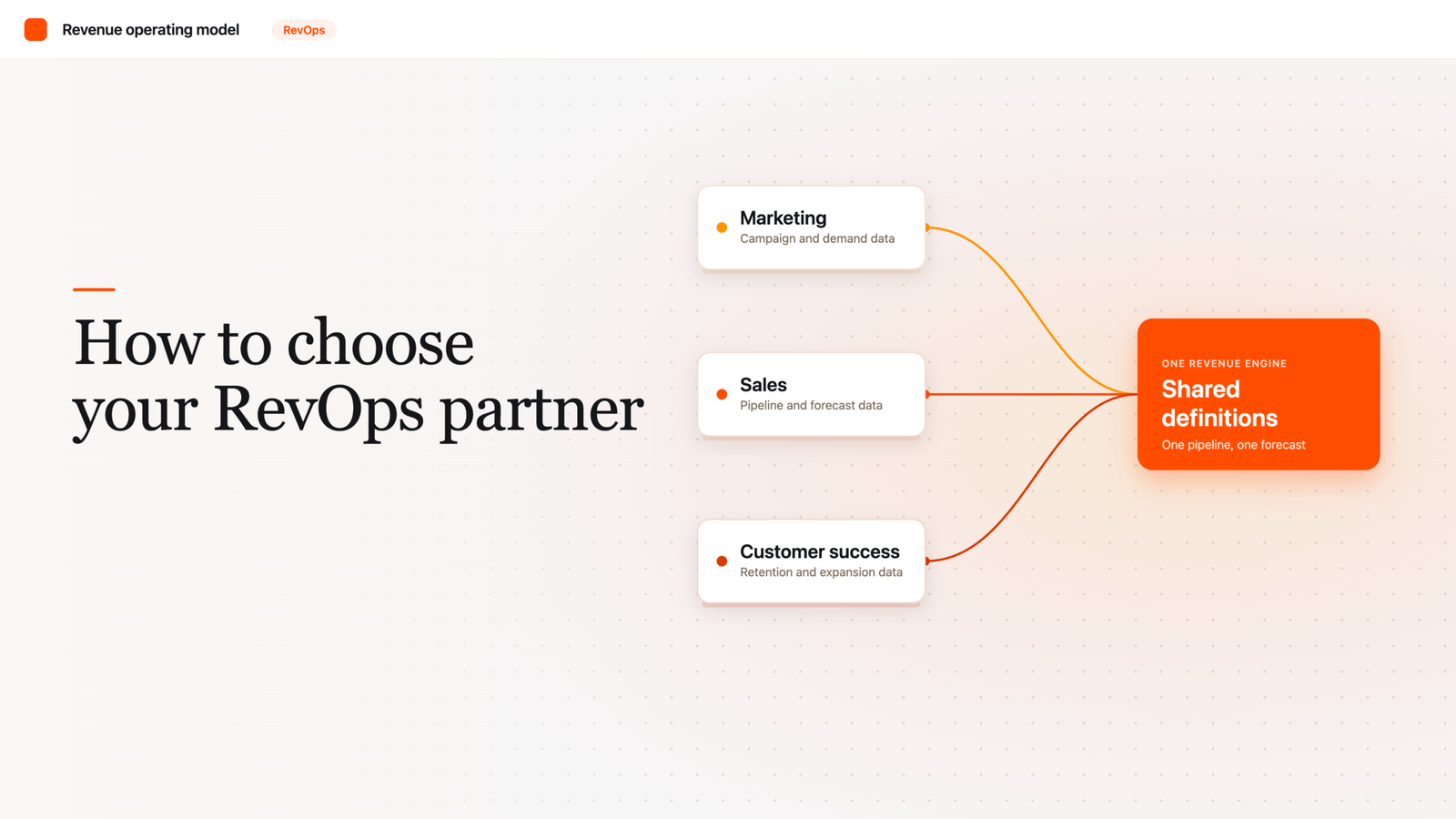
    A management team trying to understand the complete commercial picture needs those measures to connect. RevOps often works on that connection, sometimes through shared definitions, sometimes through common systems, and sometimes simply by bringing the operating teams into the same planning process.

    Not every company centralizes this work. Forrester has argued that Revenue Operations can exist as a coordinated capability even when Marketing Ops, Sales Ops, and CS Ops remain separate organizations.

    That model is common because the specialist teams still have substantial work that belongs inside their functions.

    GitLab shows how the overlap looks in practice

    GitLab is useful because its public handbook exposes much of the operating structure that other companies keep internal.

    Its Marketing Operations team manages marketing technology, processes, data quality, and systems. Sales Operations focuses on the sales organization, including policies, tools, territories, and sales execution. Customer Success Operations works on customer-success processes, systems, reporting, and renewals.

    On paper, these responsibilities can be separated easily.

    The handbook itself shows constant interaction between them.

    GitLab’s Sales Operations roles include collaboration with Marketing on lead-management processes. Marketing Operations manages systems whose outputs are used elsewhere in the commercial organization. Customer Success Operations works on renewal processes that eventually affect revenue forecasting and account planning.

    The teams remain distinct because they need specialist knowledge. The connections remain because customers and customer data move through more than one function.

    GitLab also places Sales Operations and Customer Success Operations within a broader Field Operations organization alongside Sales Strategy, Deal Desk, Sales Systems, and Data Intelligence.

    That structure is specific to GitLab. Another company might group the same work differently.

    The example is useful because it shows that operational design tends to develop around practical needs rather than around perfectly clean definitions.

    Ownership is often shared at the edges

    Some activities have a natural home.

    Sales territory design will usually sit close to Sales Ops. Marketing automation belongs naturally with Marketing Ops. CSM capacity planning is normally a CS Ops concern.

    Other activities are harder to place because the consequences spread across functions.

    Forecasting is one example.

    Sales managers usually produce views of the opportunities they expect to close. Sales Ops supports the process and systems behind those estimates. CS Ops may contribute renewal expectations. RevOps may assemble the broader commercial forecast. Finance may adjust or interpret it for the financial plan.

    Several groups can therefore “own forecasting” without doing the same work.

    Customer data has the same characteristic.

    Marketing needs campaign and engagement information. Sales needs accounts, contacts, opportunities, and pipeline history. Customer Success cares about product usage, customer health, support issues, renewal dates, and outcomes.

    A company still needs agreement on basic identifiers and definitions if those records are expected to describe the same customer.

    This is where many arguments about organizational ownership become unproductive. The useful level of detail is usually the specific decision being made.

    Who decides the sales territory? Who maintains the routing logic? Who defines a qualified marketing lead? Who decides when a customer becomes at risk? Who determines the renewal forecast category? Who can change a customer identifier used across several systems?

    The answers may be different even when all of these activities sit inside the same technology platform.

    Technical ownership and business ownership are often separate.

    A practical view of the boundaries

    The following map reflects common patterns rather than fixed rules.

    Area of workTypical operational homeCommon overlap
    Marketing automation and campaign operationsMarketing OpsRevOps on shared data and lifecycle rules
    Marketing data quality and attributionMarketing OpsSales Ops when measuring conversion into pipeline
    Lead qualificationMarketing OpsSales Ops and RevOps
    Lead and account routingSales Ops / Marketing OpsRevOps when company-wide rules are needed
    Territory designSales OpsFinance and RevOps during annual planning
    Quotas and seller capacitySales OpsFinance and RevOps
    Sales pipeline processSales OpsRevOps for company-wide definitions and reporting
    Sales forecasting mechanicsSales OpsRevOps and Finance
    Sales-to-CS handoffSales Ops / CS OpsRevOps when standardization spans the lifecycle
    CSM capacity and customer segmentationCS OpsRevOps during company planning
    Customer health and CS systemsCS OpsProduct, Sales, and RevOps depending on use
    Renewal operationsOften CS OpsSales Ops, RevOps, and Finance
    Expansion processCS Ops or Sales OpsRevOps when ownership crosses teams
    Shared customer definitionsRevOps / shared governanceAll specialist Ops teams
    End-to-end revenue reportingRevOpsMarketing Ops, Sales Ops, CS Ops, Finance
    Revenue capacity planningRevOps with FinanceAll specialist Ops teams

    The table becomes inaccurate as soon as it is treated as a template.

    A company in which Sales owns renewals will organize renewal operations differently from one in which Customer Success owns them. A channel business may have a large Partner Operations function that changes several of these responsibilities. A small company may place nearly everything in the hands of one Sales Ops or RevOps employee.

    The business model usually explains more than the title.

    Company size changes the answer

    Early-stage companies tend to have blurred operations roles because specialization would create more overhead than value.

    The first operations hire may manage Salesforce, prepare board reports, calculate commissions, clean marketing data, fix account assignments, and maintain renewal information. Whether the person’s title is Sales Operations or Revenue Operations often tells us less than the list of work on their desk.

    Specialization appears as the volume grows.

    Marketing eventually needs dedicated expertise in its technology and data. Sales requires more sophisticated territory, compensation, forecasting, and capacity work. Customer Success needs its own processes and systems as the customer base expands.

    The company gains deeper expertise, though coordination becomes harder.

    This is one reason RevOps often becomes more visible in later stages of growth. The business now has enough specialized operating teams that somebody has to maintain a view across them.

    Sometimes that leads to centralization under one RevOps leader. Sometimes the teams remain separate and share planning, data governance, and systems standards. Some companies use a hybrid arrangement.

    The right structure also changes over time. A centralized model can be useful while a company standardizes fragmented processes, then becomes unnecessarily heavy later. A decentralized model can preserve expertise and speed while creating duplicated technology and inconsistent definitions.

    Organizational design in this area is rarely permanent.

    How to tell whether the boundaries are working

    The quality of the structure becomes visible in routine situations.

    When Marketing changes the definition of a qualified lead, Sales should understand the consequence before the change goes live.

    When Sales redesigns territories, inbound routing should change at the same time.

    When a salesperson closes a customer, the post-sale team should receive the information it needs without reconstructing the entire sales history.

    When a renewal becomes uncertain, the change should eventually reach the revenue outlook.

    Managers should also know where to take a problem. If every cross-functional issue requires escalation to the Chief Revenue Officer, the operating model is probably incomplete. If teams routinely change shared processes without speaking to one another, the model has a different weakness.

    Some overlap is healthy. It forces functions to consider consequences outside their immediate department.

    The burden comes when the same decision has several owners, or none.

    What each function is really there to do

    Sales Ops, Marketing Ops, and CS Ops remain useful categories because the departments they support have genuinely different operating needs.

    Sales Ops spends most of its time making the sales organization easier to manage and more productive. Marketing Ops builds the systems and processes that allow Marketing to operate at scale. CS Ops provides similar operating support for the post-sale customer organization.

    Revenue Operations becomes relevant when the company needs a wider operating view across those functions.

    That wider view can involve shared planning, definitions, technology, customer data, lifecycle processes, forecasting, and reporting. The exact scope changes from company to company because the commercial model changes.

    There is little benefit in forcing every activity into one universal chart.

    A more realistic organization accepts that some work is local, some is shared, and some needs a common owner because several teams depend on the same decision.

    That is where the distinctions among RevOps, Sales Ops, Marketing Ops, and CS Ops become useful in practice.

    Frequently Asked Questions

    What’s the actual difference between RevOps, Sales Ops, Marketing Ops, and CS Ops?

    Sales Ops, Marketing Ops, and CS Ops each support one department: sales, marketing, and post-sale customer teams respectively, and grew up solving that department’s specific operating problems. RevOps sits above them, focused on the shared processes, definitions, and reporting that cross department lines, like lead handoffs, forecasting, and renewal visibility.

    Which came first: Sales Ops, Marketing Ops, or CS Ops?

    Sales Operations has the longest history, tracing back to Xerox in the 1970s. Marketing Operations developed later as marketing became more dependent on data and technology. Customer Success Operations is the newest of the three, emerging alongside the growth of subscription and recurring-revenue business models. Revenue Operations appeared after all three, once companies needed a broader view across specialist teams that were each working well on their own.

    Who owns lead routing, Sales Ops or Marketing Ops?

    Often both, which is exactly the kind of overlap that causes confusion. Marketing Ops typically controls the system that captures and scores the lead, while Sales Ops owns the rules for which salesperson or team receives it, based on territory and account ownership. When company-wide consistency is needed across both sides of that handoff, RevOps usually gets involved.

    Does a company need RevOps if it already has Sales Ops, Marketing Ops, and CS Ops?

    Not necessarily as a separate team. Some companies centralize this coordination under a dedicated RevOps function, while others keep Marketing Ops, Sales Ops, and CS Ops separate and share planning, data governance, and systems standards between them. Both models work; what matters is that somebody has responsibility for the decisions that cross departmental lines, like shared customer definitions and end-to-end revenue reporting.

    Why do these org structures vary so much between companies?

    Because the business model usually explains more than the title does. A company where Sales owns renewals will structure renewal operations differently than one where Customer Success owns them. A channel-based business may have a Partner Operations function that reshapes several other responsibilities. There’s no universal chart that fits every company, only common patterns.

    How does company size change how these functions are organized?

    Early-stage companies tend to blur these roles into one person handling everything from CRM administration to board reporting, since specialization would create more overhead than value at that size. As volume grows, Marketing, Sales, and Customer Success each need dedicated operating expertise, and RevOps typically becomes more visible at that later stage, once there are enough specialized teams that someone needs to maintain a view across all of them.
  • What Revenue Operations Actually Is

    What Revenue Operations Actually Is

    Scope, purpose, responsibilities, and why RevOps exists

    In 2025, Pearson made an organizational change that received far less attention than its investments in artificial intelligence or new products. The company brought several teams together under a dedicated Revenue Operations unit. Pearson said the change was intended to standardize sales processes, strengthen pipeline management, unify data sources, and make decision-making clearer and faster.

    The decision is interesting because Pearson already had the functions one would normally associate with producing revenue. It had sales teams, marketing teams, customer-facing groups, finance professionals, technology, and management. Creating Revenue Operations therefore raises a basic organizational question: what was missing?

    The answer is found in the way companies divide work.

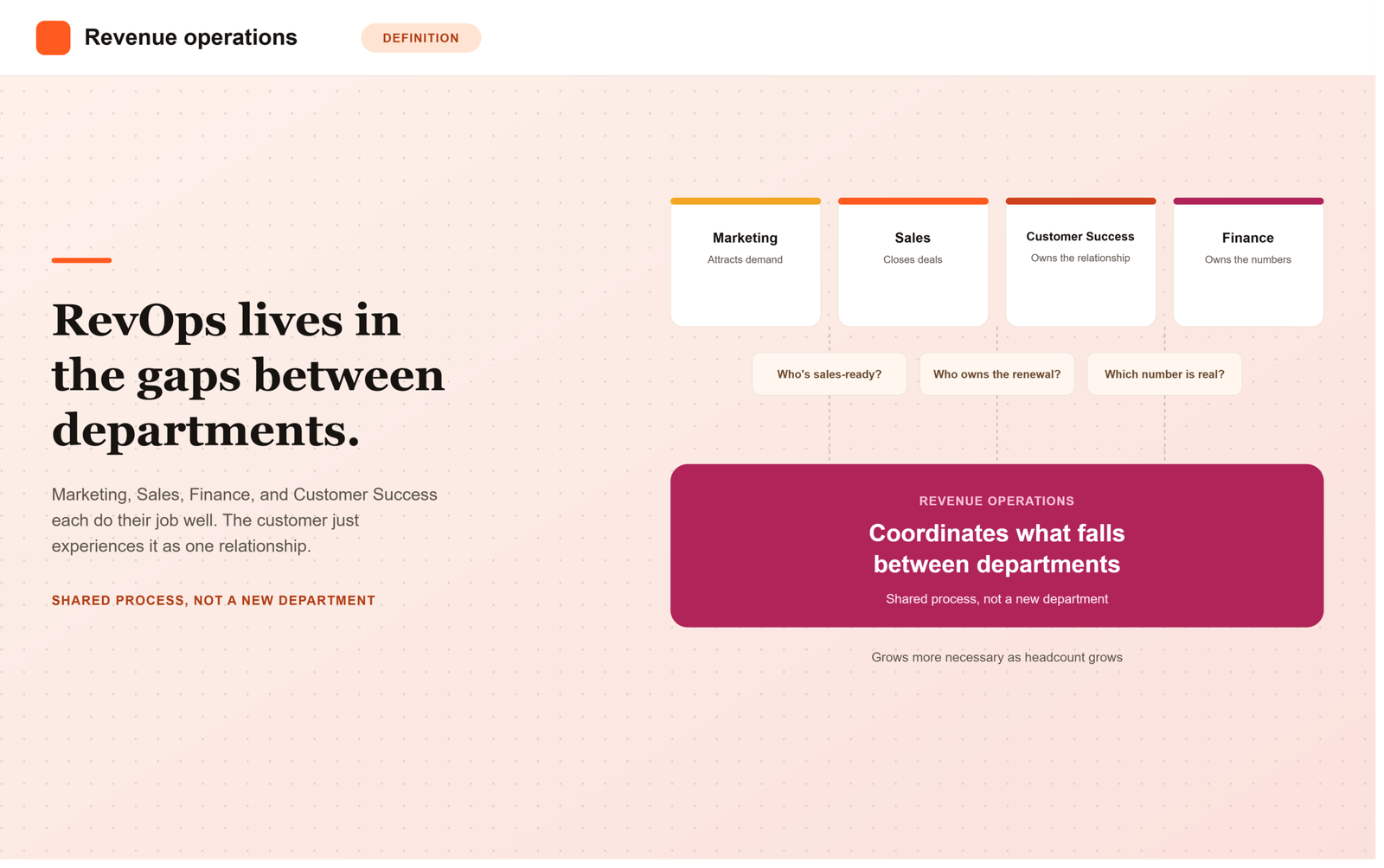
    A business usually organizes people according to expertise. Marketing attracts and develops potential customers. Sales manages commercial conversations and closes business. Finance deals with the financial consequences. Customer Success, service, implementation, or account-management teams take responsibility after the sale. Specialization makes each of these groups better at its own work.

    Customers do not move through a company in the same way that boxes appear on its organization chart. Their experience passes through several of those groups, often without knowing where one department ends and another begins. A person may respond to an advertisement, speak to a salesperson, negotiate a contract, receive an invoice, begin using a service, ask for support, and eventually renew. To the customer, it is one relationship.

    Inside the company, it can be six different processes.

    Revenue Operations grew out of that gap.

    The awkward spaces between departments

    Consider something as ordinary as a new sales inquiry. Marketing has to decide when a person’s interest is strong enough to justify a salesperson’s time. Sales then needs to know who should receive the opportunity. That may depend on geography, company size, product, existing relationships, or the salesperson’s capacity.

    None of this is especially difficult when a business has ten employees. People can talk to each other. Exceptions are remembered. A founder may know the history of every important account.

    The same arrangements become fragile when a company has several sales teams, thousands of customers, multiple products and several information systems. One region develops a different definition of a qualified opportunity. Another keeps a spreadsheet because the central system does not quite fit its needs. Marketing believes it has produced a strong pipeline; Sales believes much of it is unusable. Both can support their position with data.

    The problem continues further down the customer journey. A salesperson may agree to a special contract term without realizing how difficult it will be to administer. Information discussed during the sale may never reach the implementation team. Nobody starts work on a renewal because Sales believes Customer Success owns it and Customer Success believes the account manager owns it.

    Most of these failures are unremarkable when seen individually. One lead waits too long. One field is missing. One account is assigned to the wrong person. One contract takes four additional days to approve. Over time, the accumulated cost can be substantial, and much of it sits between conventional departmental responsibilities.

    Research firms have come to describe RevOps in similar terms. Gartner frames it as an end-to-end operating model spanning go-to-market functions, with shared processes and information across the revenue cycle. Forrester emphasizes the coordination of data, processes, technology, and people across the customer lifecycle.

    Those definitions are useful, although they can make the subject sound more abstract than it needs to be. RevOps deals with the practical consequences of having several departments participate in the same commercial relationship.

    What people in RevOps spend their time doing

    The work is often surprisingly ordinary.

    A RevOps team may decide how accounts are assigned to salespeople. It may define the stages in a sales process and determine what information is required before an opportunity can move from one stage to the next. It may establish rules for discounts or approvals. It can maintain the systems through which sales and customer information flows, build the process used for forecasting, or investigate why Marketing and Sales report different numbers for what appears to be the same activity.

    Some teams also work on renewals, sales compensation, territories, capacity planning, pricing processes, and customer handoffs. The precise list changes considerably from one company to another.

    A recent Zoom Revenue Operations role gives a sense of that range. Its responsibilities cover the path from demand generation and pipeline management through forecasting, quoting, billing, renewals, and expansion. The role also works with Sales, Marketing, Finance, IT, Legal, and customer-facing operations.

    A job description should not be mistaken for a universal definition of RevOps. It does reveal why the function can be difficult to explain. Many of its activities already existed somewhere in the company before anyone used the name Revenue Operations.

    Sales Operations, for instance, has long handled territories, forecasts, sales systems, quotas and sales-process design. Marketing Operations manages important parts of the marketing process and its supporting technology. Customer Success Operations performs similar work after a customer has purchased. Finance has always cared about pricing, contracts, forecasts and revenue.

    RevOps changes the field of view. An issue can begin in Marketing and show up later as a Sales problem. A sales decision can create a billing problem months afterward. A weak handoff at the time of purchase may later appear in customer-retention figures. Looking at each function separately makes these connections harder to see.

    This broader view is also where the boundaries of RevOps become less tidy. There is no universal organization chart that every company should copy. Some firms place Marketing Operations, Sales Operations and Customer Success Operations under one leader. Others keep those teams separate and use RevOps as a smaller coordinating group. In some businesses the function reports to the Chief Revenue Officer; elsewhere it may sit closer to Finance or the Chief Operating Officer.

    The practical arrangement depends on the company’s business model and history. A recurring-revenue software business faces different operating questions from an industrial manufacturer working through distributors. The former may devote considerable attention to renewals and account expansion. The latter may care more about channel ownership, pricing, inventory commitments, or dealer relationships.

    This variation is sometimes treated as evidence that RevOps lacks a clear definition. It may simply reflect the fact that operating problems differ.

    Why the function tends to appear during growth

    The need for RevOps often becomes noticeable after a company has already succeeded.

    Early growth can be held together by people. A strong sales manager remembers exceptions. A founder resolves disputes. Finance knows which unusual contracts need attention. Employees develop informal habits that compensate for gaps in the formal process.

    Headcount then increases. A second region opens. A new product line requires different expertise. One customer system is joined by another. People who designed the original process leave and their replacements inherit pieces of it without the original context.

    At some point, coordination that depended on familiarity has to become explicit.

    Pearson’s description of its own change is revealing here. The company placed Revenue Operations under a broader effort to create “execution synergies” and described the consolidation alongside work on operational systems and customer-centric execution. Elsewhere in the same report, Pearson says the new Revenue Operations team is intended to improve coordination between marketing, sales, and customer success operations.

    There is a familiar pattern behind this. Growing organizations acquire complexity in small increments. A new approval is introduced because a previous deal went wrong. A new field is added because management wants another report. A region creates its own process because the global one does not fit a local need. Another software product is purchased to solve a problem in the existing software.

    No single decision creates the complexity. A few years later, employees may need five systems and several manual workarounds to complete a task that once required an email.

    Revenue Operations can provide a place to examine that accumulation. Sometimes the answer is a new process. Sometimes an old process needs to be removed. The second outcome receives less attention, although it is often more valuable.

    Revenue targets eventually become operating questions

    Senior management may set a goal such as increasing revenue by 15 percent. The goal itself says little about how the additional revenue will appear.

    Perhaps the company needs many more new customers. Perhaps existing customers could purchase more. Perhaps customer losses are high enough that improving retention would have a larger effect than increasing new sales. The business may already have sufficient demand and lack enough sales capacity to handle it.

    Once the goal reaches the operating level, it produces a series of questions. How many credible sales opportunities are required? How long does a typical deal take? Does the company have enough people to work those opportunities? Which customer segments convert well? Are current renewal rates sufficient? Where are deals slowing down? What happens to margins as discounting increases?

    These questions cut across the information held by several departments. Marketing knows something about demand. Sales knows something about the active pipeline. Customer teams know something about retention and expansion. Finance has the financial view. RevOps often becomes the place where those pieces are assembled into a usable operating picture.

    Forecasting provides a good example. A forecast is easy to think of as a Sales responsibility because salespeople know the deals currently under discussion. Yet future revenue in many companies also depends on renewals, new demand entering the system, available selling capacity, pricing decisions, and the reliability of the stages used to classify opportunities.

    The mechanics of forecasting are therefore closely related to the mechanics of the commercial process itself. A beautifully designed forecasting model will still produce weak information when opportunities are poorly defined or updated inconsistently.

    The same is true of dashboards. Management teams sometimes respond to disagreement about numbers by asking for another report. RevOps is more useful when it traces the disagreement backward. Two dashboards may differ because teams use different definitions, because systems are not synchronized, or because one part of the organization has created a parallel process. Fixing the report leaves the cause untouched.

    Where RevOps can go wrong

    The function has its own failure modes.

    One is administrative expansion. A RevOps team adds fields, rules, approvals and required steps because each one appears reasonable in isolation. Salespeople gradually spend more time maintaining the process. Managers compensate by allowing workarounds. Data quality then worsens because employees no longer regard the official process as useful.

    Another is excessive attention to technology. Revenue teams now have access to a large market of customer-management, forecasting, sales-engagement, analytics, automation and artificial-intelligence products. These tools can remove significant amounts of manual work. They can also give organizations a sophisticated way to run a badly designed process.

    There is also a subtler risk. A RevOps team can become distant from the work it is organizing. A routing rule that looks efficient in a spreadsheet may create strange incentives for salespeople. A required field may appear essential to an analyst and feel meaningless to the employee expected to enter it fifty times a week. A centralized process may remove exactly the flexibility that made a particular local team effective.

    Good operations requires contact with operating reality. That means sitting with the people who use the process, watching where they work around it, and being willing to discover that the formal rule is causing the problem.

    This is one reason the quality of RevOps cannot be judged from the sophistication of its dashboards or the number of systems it manages.

    A useful test is much more mundane. When a good customer expresses interest, does that interest reach the right person? Can the salesperson find the information needed to act? Can a sensible deal move through approvals without unnecessary delay? Does the next team know what happened before the sale? Can managers understand likely revenue without spending half the meeting reconciling spreadsheets?

    These are ordinary questions. They are also close to the economic purpose of the function.

    The economic case is mostly about wasted motion

    Revenue growth receives attention because it is visible. Operational leakage is harder to see.

    A company spends money generating interest and then responds slowly. Salespeople pursue accounts that were never a good fit. Managers spend hours preparing reports that disagree. A customer enters implementation with expectations the delivery team did not know about. An avoidable pricing exception creates months of billing work.

    Every example consumes resources that have already been paid for.

    The cost is distributed across departments, which makes it difficult to recognize. Marketing sees campaign spending. Sales sees seller capacity. Finance sees discounts and billing. Customer Success sees churn. The connection between them may appear only after someone follows the customer or the revenue process from beginning to end.

    This explains some of the interest in RevOps among companies looking for more predictable growth. Gartner, for example, links the model with efficiency, reduced revenue leakage, and greater predictability across the customer lifecycle.

    Still, expectations should remain modest. Revenue Operations cannot compensate for a weak product, an unattractive market, poor sales leadership, or customers who simply do not want to buy. Its influence is on the quality with which the commercial organization turns opportunity into revenue and manages the customer relationship afterward.

    That quality matters more as the organization becomes difficult to coordinate by personal effort alone.

    A working definition

    The term Revenue Operations now covers enough activities that a definition can become either vague or excessively elaborate. For practical purposes, I would describe it this way:

    Revenue Operations is the function that designs and improves the shared operating processes through which a company finds customers, sells to them, and manages the commercial relationship over time.

    “Shared” carries much of the meaning. RevOps becomes relevant when several groups depend on the same information, when work passes from one team to another, or when a decision made in one function changes the economics or workload of another.

    This also explains why Sales Operations can remain perfectly useful inside a company that has RevOps. Sales still has operating problems that belong specifically to Sales. Marketing has its own. So does Customer Success. Centralizing every operating decision would simply create a new bottleneck.

    The distinctive contribution of RevOps lies in the areas where local optimization stops being enough.

    There are several ways to organize that work, and companies will continue to use the title inconsistently. That is not unusual for a relatively young management function. The more useful question is whether somebody has responsibility for understanding how the pieces of the commercial process interact.

    Pearson’s reorganization offers one answer. Another company may arrive at a different structure. What both are responding to is an old problem in management: specialization creates expertise, and expertise creates boundaries that then have to be coordinated.

    Revenue Operations is one contemporary way of doing that coordination for revenue.

    Frequently Asked Questions

    What is Revenue Operations (RevOps) in simple terms?

    Revenue Operations is the function that designs and improves the shared processes through which a company finds customers, sells to them, and manages the relationship afterward. It exists because a customer’s experience crosses Marketing, Sales, Customer Success, and Finance as one relationship, even though each department runs its own separate process internally.

    Why would a company create a RevOps team if it already has sales, marketing, and finance?

    Because those teams are organized around expertise, not around the customer’s actual journey. A lead can wait too long between Marketing and Sales, a special contract term can create billing problems Finance never anticipated, or a renewal can fall through because Sales and Customer Success each assume the other owns it. RevOps exists to manage those handoffs, not to duplicate the work each department already does well.

    Is RevOps the same thing as Sales Operations?

    No. Sales Operations handles problems that belong specifically to Sales, such as territories, quotas, and sales-process design. RevOps takes a broader view across Marketing, Sales, Customer Success, and often Finance, focusing on the shared processes and handoffs between those functions. Sales Operations continues to be useful even inside a company that also has RevOps.

    When does a company typically need to introduce RevOps?

    The need usually becomes noticeable during growth, not at launch. Early on, a small team can coordinate informally, a founder remembers exceptions and a manager resolves disputes directly. As headcount grows, new regions open, more systems get added, and that informal coordination stops working. At that point, the coordination that depended on people knowing each other has to become an explicit, designed process.

    Who does RevOps typically report to?

    There is no single standard. In some companies RevOps reports to the Chief Revenue Officer, in others it sits closer to Finance or the Chief Operating Officer. The right structure depends on the company’s business model, for example a recurring-revenue software business tends to focus RevOps heavily on renewals and expansion, while a company selling through distributors may focus it more on channel and pricing questions.

    What are the most common ways RevOps goes wrong?

    Three failure modes show up repeatedly: administrative expansion, where fields, rules, and approvals pile up until reps spend more time maintaining the process than selling; over-reliance on technology, where a sophisticated tool stack is used to run a badly designed process instead of fixing it; and distance from operating reality, where rules that look efficient on a spreadsheet create bad incentives for the people actually doing the work.

  • Best RevOps Services for Australian B2B SaaS

    Best RevOps Services for Australian B2B SaaS

    Australian B2B SaaS companies sell into one of the more demanding go-to-market environments in the world: a small domestic market that forces early international expansion, usually into the US and APAC simultaneously, across time zones that overlap awkwardly with both. That combination makes strong RevOps services less of a nice-to-have and more of a survival requirement once a company passes its first few million in ARR.

    This guide covers what to look for in a RevOps services partner if you’re an Australian B2B SaaS revenue leader, and how the local market context should shape your evaluation.

    Why Australian B2B SaaS Teams Have a Unique RevOps Problem

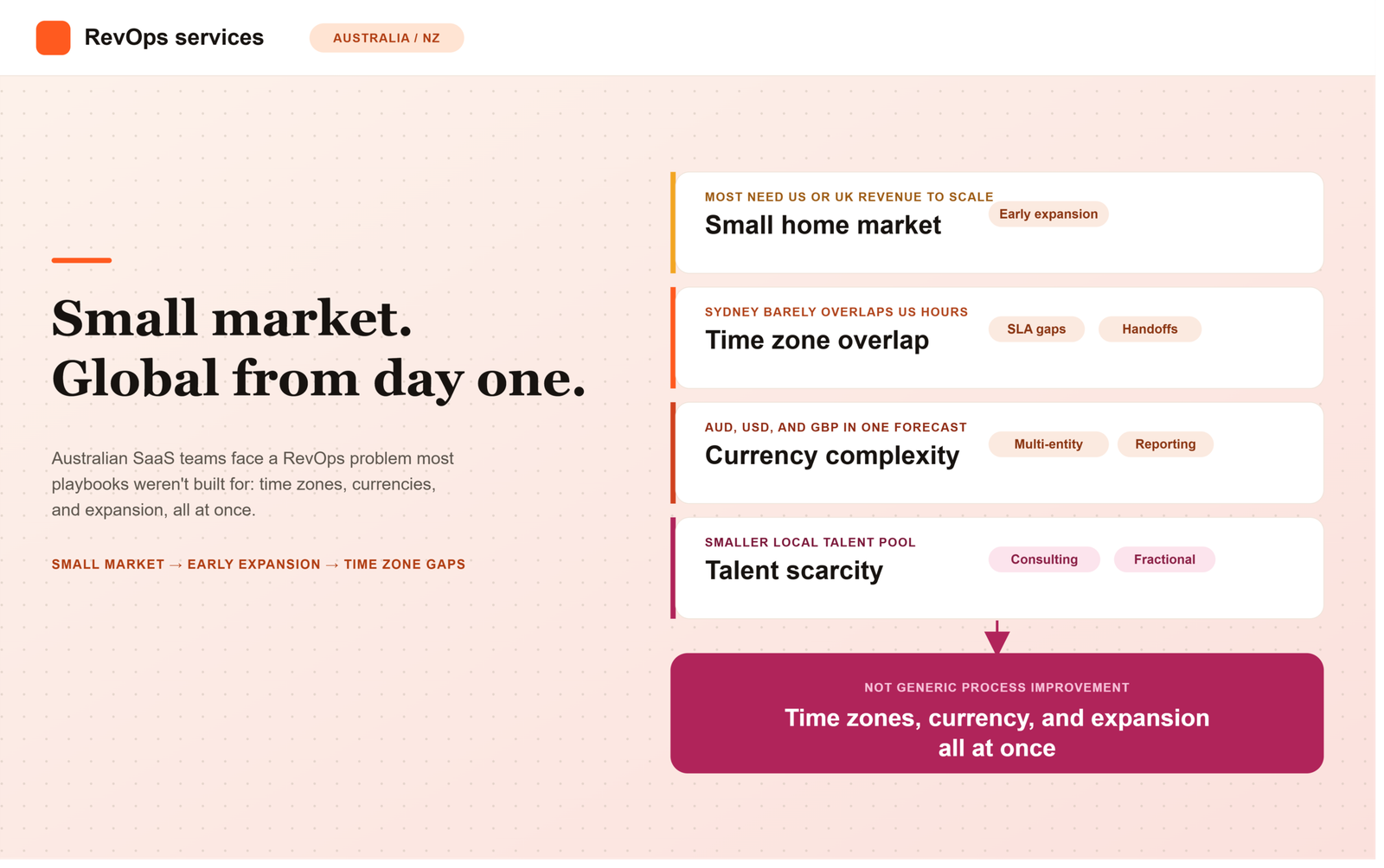
    • Small home market, early internationalization. Most Australian SaaS companies need US or UK revenue to hit venture-scale outcomes, often starting international expansion earlier than comparable companies in larger domestic markets.
    • Awkward time zone overlap. Sydney/Melbourne business hours barely overlap with US business hours, which creates real handoff and SLA problems between marketing, SDRs, and closing reps across regions.
    • Currency and reporting complexity. Multi-currency deals and ANZ-specific compliance and invoicing norms add friction that generic RevOps playbooks don’t account for.
    • Talent scarcity. The local RevOps talent pool is smaller than in the US or UK, which is a major reason Australian SaaS companies lean on consulting partners rather than building large in-house teams early.

    What Good RevOps Services Look Like for This Market

    1. Explicit Time Zone and Handoff Design

    A partner worth hiring should be able to describe, concretely, how they design SLAs and lead routing so a lead generated during Sydney business hours doesn’t sit for 10+ hours before a US-based rep sees it and vice versa.

    2. Multi-Currency and Multi-Entity Reporting

    If you’re billing in AUD, USD, and potentially GBP, your RevOps partner needs experience building forecasting and pipeline reporting that rolls up cleanly across currencies without manual reconciliation every board cycle.

    3. Sales and Marketing Alignment That Survives Time Zone Handoffs

    Alignment is harder to maintain when your marketing team, SDR team, and closing reps are spread across three time zones. Look for partners who build closed-loop attribution and shared lead definitions that hold up even when teams rarely overlap in real time.

    4. Familiarity With the ANZ-to-Global Expansion Playbook

    Ask any prospective partner how many Australian SaaS clients they’ve helped expand into the US specifically, this is a well-worn but specific playbook, and experience with it should be easy for them to demonstrate with real examples.

    Evaluation Checklist

    Criteria What to Look For
    Time zone design Concrete SLA and routing rules across ANZ/US/APAC hours
    Currency handling Multi-currency forecasting and reporting experience
    Expansion track record Prior work with Australian SaaS companies expanding into the US or UK
    Alignment tooling Ability to keep sales/marketing aligned across distributed teams
    Engagement flexibility Comfortable working async and outside standard AU business hours

    Fractional vs. Project Engagements

    Many Australian SaaS companies start with a project-based engagement, typically a CRM re-architecture or lead routing overhaul timed to a US expansion push, before moving to fractional, ongoing RevOps support once the international motion stabilizes. Given the smaller local talent pool, fractional support is often more cost-effective than trying to hire a full in-house RevOps function too early.

    Frequently Asked Questions

    What makes RevOps different for Australian SaaS companies?

    The core process work, forecasting, lead routing, CRM hygiene, is the same everywhere. What’s different is the operating environment: a small home market that forces early international expansion, time zones that barely overlap with the US, and multi-currency reporting that most generic RevOps playbooks aren’t built to handle.

    How much does RevOps consulting cost in Australia?

    Project-based engagements, such as a CRM re-architecture ahead of a US launch, are usually quoted as a fixed fee for a defined scope. Fractional support is typically billed monthly. Because the local talent pool is smaller, fractional consulting is often more cost-effective than hiring a full-time in-house RevOps lead too early.

    Should we hire a local Australian RevOps partner or one based in the US?

    What matters more than location is whether the partner has direct experience with the ANZ-to-US or ANZ-to-UK expansion playbook, including time zone handoff design and multi-currency reporting. A partner who understands Sydney-to-US SLA gaps firsthand is more valuable than one who only knows a single region well, regardless of where they’re headquartered.

    When should an Australian SaaS company invest in RevOps services?

    Most teams feel the need once they pass their first few million in ARR and start hiring SDRs or reps outside Australia. The clearest trigger is usually the moment leads generated in Sydney hours start sitting unworked for most of a US business day, that handoff gap is exactly what a RevOps partner should be brought in to fix.

    What’s the most common RevOps mistake Australian SaaS teams make when expanding overseas?

    Treating the expansion as a hiring problem rather than a systems problem. Adding US-based reps without first fixing lead routing, SLA rules across time zones, and multi-currency reporting just moves the same handoff gaps into a bigger, more expensive team.

    Is fractional or project-based RevOps better for a scaling ANZ SaaS company?

    Project-based work fits a defined, time-boxed problem, like rebuilding lead routing ahead of a US launch. Fractional support fits the stretch after that, when the international motion is live but still evolving and needs an ongoing owner. Many Australian companies use a project engagement to prepare for expansion, then shift to fractional support once they’re actually operating across regions.

    The Bottom Line

    For Australian B2B SaaS teams, the value of a RevOps services partner isn’t generic process improvement, it’s specifically solving the time zone, currency, and international expansion problems that come with building a global GTM motion from a small home base. Evaluate partners on that specific experience, not just general RevOps credentials.


  • Best RevOps Consulting Services for B2B SaaS

    Best RevOps Consulting Services for B2B SaaS

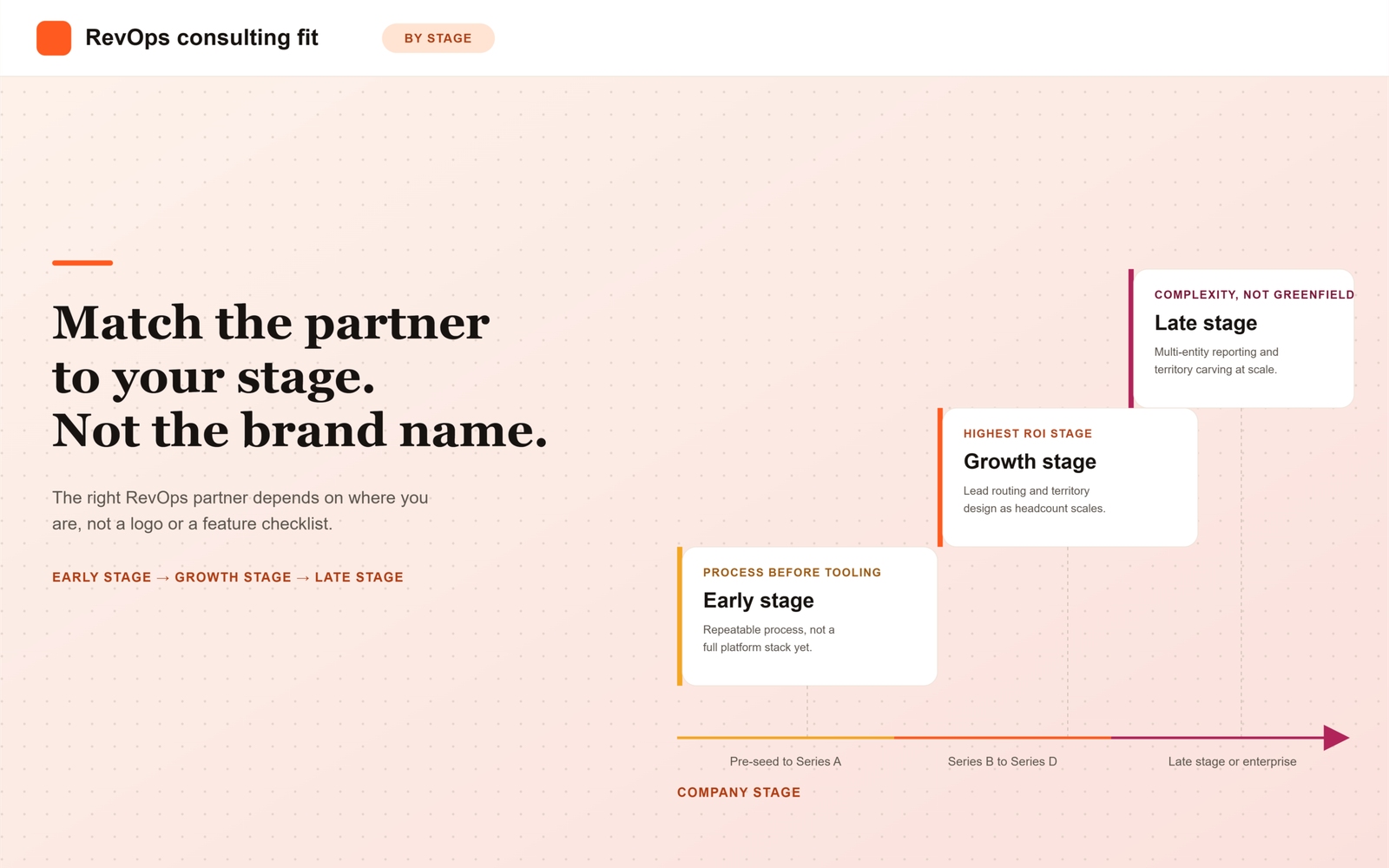
    Most comparisons of RevOps consulting services treat every B2B SaaS company as if it needs the same thing. It doesn’t. What a seed-stage company with five reps needs from a RevOps partner looks almost nothing like what a 300-person, multi-product SaaS company needs. The right way to evaluate consulting services isn’t by brand name or feature checklist, it’s by matching the partner’s model to your company’s actual stage of growth.

    Why Stage Matters More Than Almost Anything Else

    A RevOps consulting engagement that’s perfect for a company doing $2M ARR can be actively wrong for a company doing $20M ARR, and vice versa. Company stage determines:

    • How much process needs to exist before tooling makes sense
    • Whether you need strategic diagnosis or hands-on execution capacity
    • Whether a fractional or project-based model fits better
    • How much of the engagement should focus on people/process versus systems

    What to Look For by Stage

    Early Stage (Pre-Seed to Series A)

    At this stage, most companies don’t need a full RevOps build-out, they need someone to help define a repeatable sales process and basic CRM hygiene before scaling spend on tooling. Look for consultants who explicitly say “you might not need everything yet” rather than upselling a full platform stack. The best early-stage engagements are short, focused, and leave you with lightweight, repeatable processes rather than a heavy system.

    Growth Stage (Series B to Series D)

    This is where dedicated RevOps consulting delivers the most obvious ROI. Pipeline is growing faster than process, sales and marketing are starting to trip over each other, and forecasting needs to hold up for board meetings. Good partners at this stage focus on:

    • Lead routing, scoring, and SLA design between marketing and sales
    • Territory and comp plan structure as headcount scales
    • Forecasting infrastructure that’s accurate enough to bet the business on

    Late Stage / Enterprise SaaS

    At scale, the problem shifts from “build the process” to “manage complexity across multiple products, regions, and go-to-market motions.” Consultants here need experience with multi-entity reporting, complex territory carving, and change management across large, established teams, not just greenfield process design.

    Core Evaluation Criteria That Apply at Every Stage

    Criteria What to Look For
    Stage fit Case studies from companies at a comparable ARR and headcount, not just “SaaS experience”
    Sales-marketing alignment Concrete deliverables around shared lead definitions and closed-loop reporting
    Right-sized scope Willingness to recommend less, not just sell more services
    Execution capability Hands-on CRM/systems expertise, not strategy-only advice
    Exit plan Clear plan for handing off ownership to an internal team eventually

    Fractional vs. Project-Based: Which Fits Your Stage?

    Early-stage and enterprise companies tend to prefer project-based engagements, a defined problem with a start and end date. Growth-stage companies scaling quickly often get more value from fractional RevOps support, where a consultant effectively acts as an interim RevOps leader across several months while the internal function matures.

    Questions That Reveal Whether a Partner Understands Your Stage

    1. What would you NOT recommend we do right now, given where we are?
    2. Can you show me an engagement with a company at a similar ARR and headcount to ours?
    3. How does your approach change for a 20-person sales team versus a 5-person one?
    4. What does success look like in 90 days versus 12 months?

    Frequently Asked Questions

    How much does RevOps consulting cost?

    Pricing typically depends on the engagement model. Project-based engagements are often quoted as a fixed fee for a defined scope, while fractional RevOps support is usually billed monthly, similar to a part-time hire. Expect the price to scale with company stage and the number of systems involved, not just the number of hours.

    What is the difference between fractional and project-based RevOps consulting?

    A project-based engagement solves one defined problem within a set timeline, then ends. Fractional RevOps means the consultant acts as an interim RevOps leader over several months, staying involved as priorities shift. Growth-stage companies often prefer fractional support because their needs keep changing faster than a single project can capture.

    When should a SaaS company hire a RevOps consultant?

    The clearest signal is when process gaps start showing up in the numbers: forecasts that don’t hold up, leads that stall between marketing and sales, or reporting that takes days to reconcile. Waiting until Series B or later is common, but even earlier-stage teams benefit from a short engagement that sets up clean CRM habits before scaling.

    How is RevOps consulting different from hiring an in-house RevOps person?

    An in-house hire owns the function long term and lives inside the company’s day-to-day priorities. A consultant brings pattern recognition from many companies at a similar stage and is often used to build the initial system, then hand it off. Many companies use a consultant first and hire in-house once the role’s scope is clear.

    How long does a typical RevOps consulting engagement last?

    Early-stage and enterprise engagements are often project-based and run four to twelve weeks. Growth-stage fractional engagements commonly run three to nine months, long enough to build lasting infrastructure, but scoped to end once an internal hire can take over.

    What should be included in a RevOps consulting proposal?

    Look for a clear problem statement specific to your stage, defined deliverables rather than vague strategy sessions, a stated timeline, and an explicit exit plan for handing ownership back to your team. A proposal that can’t describe what “done” looks like is a warning sign.

    Match the Partner to the Problem You Actually Have

    The best RevOps consulting relationships aren’t built on the most impressive platform certifications or the biggest brand name, they’re built on a partner who correctly diagnoses what stage you’re at and resists the urge to sell you a bigger engagement than you need. Ask every prospective partner to tell you what they wouldn’t recommend, not just what they would.


  • What Is a Go-to-Market Launch Plan? Checklist

    What Is a Go-to-Market Launch Plan? Checklist

    What Is a Go-to-Market Launch Plan? A Beginner’s Checklist

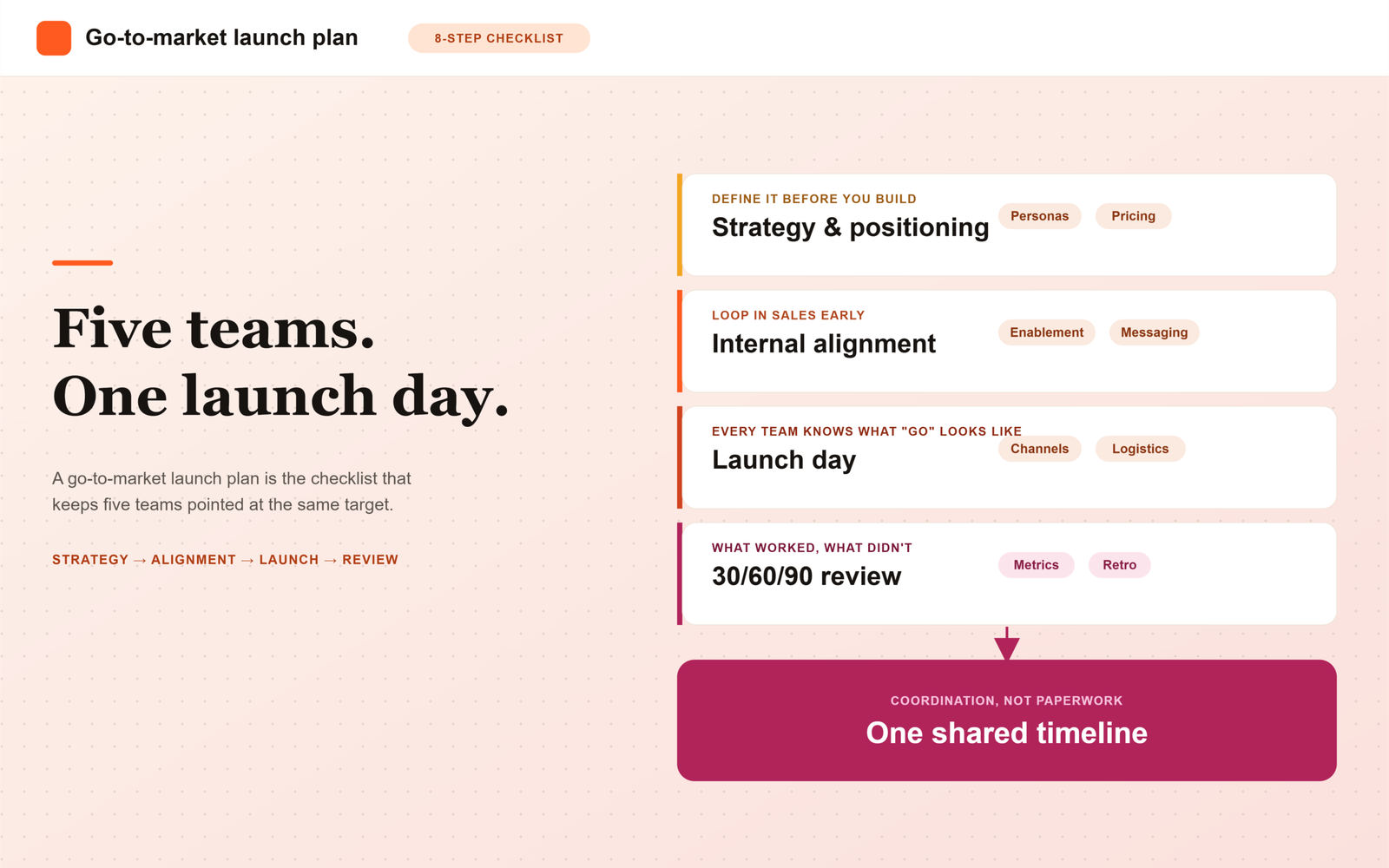
    A go-to-market (GTM) launch plan is the detailed roadmap your team follows to introduce a new product, feature, or market to customers. It covers your target audience, positioning, pricing, channels, sales enablement, and launch-day logistics, aligning every team around one shared timeline and goal.

    If you’ve ever watched a launch go sideways, sales pushing one message while marketing pushes another, support fielding questions nobody prepped them for, you already know why this document exists. A launch plan isn’t paperwork for its own sake. It’s the thing that keeps five different teams pointed at the same target on the same day.

    This post breaks down what actually belongs in a go-to-market launch plan, why skipping it costs you more than it saves, and gives you a checklist you can start filling in today.

    What Is a Go-to-Market Launch Plan?

    A go-to-market strategy is the broader plan for how your company turns a product into revenue. It’s the thinking behind who you’re selling to and why they’d buy. A go-to-market launch plan is narrower: it’s the operational, dated, task-level version of that strategy for one specific launch event.

    One source describes it simply as the planning and preparation for introducing a new product or service to a market, something that puts you in a position to actually reach product-market fit instead of just shipping and hoping. Another way to think about it: a go-to-market strategy is the map, and the launch plan is the turn-by-turn directions with a departure time.

    A solid launch plan usually answers these questions before day one:

    • Who exactly are we launching to?
    • What problem does this solve for them, in their words?
    • How is this priced and packaged?
    • Which channels will carry the message?
    • Is sales actually ready to sell it?
    • What happens in the first 30, 60, and 90 days after launch?

    If you’re still fuzzy on who your buyer even is, it’s worth backing up to define your ideal customer profile before you build the rest of the plan around a guess.

    Why Does a Go-to-Market Launch Plan Matter?

    Here’s the problem with launching without one: every team ends up improvising, and improvised launches tend to look inconsistent from the outside. A go-to-market plan is meant to deliver a cohesive customer experience across sales, marketing, and support, rather than a scattered set of one-off efforts that happen to share a launch date.

    Without a documented plan, teams tend to drift into their own silos: marketing chases one audience, sales chases another, and product keeps shipping features that don’t map to either. That disconnect doesn’t just look messy internally, it burns through budget and confuses the exact customers you’re trying to win over.

    Honestly, most launch failures we see aren’t a product problem. They’re a coordination problem dressed up as a product problem. The features work fine. Nobody agreed on who they were for, or who was supposed to say what to whom, by when.

    How Do You Build a Go-to-Market Launch Plan? (Step-by-Step)

    Most frameworks converge on a similar sequence, even if the exact number of steps varies by source. Here’s a practical version you can adapt regardless of company size.

    1. Define your target market and buyer personas. Get specific about industry, company size, and the roles of the people who’ll actually buy and use the product. Buyer personas are simply a representation of what your ideal buyer looks like, including the roles they hold and the problems they’re trying to solve.
    2. Nail your positioning and messaging. What makes this different, and why should a buyer care right now? This is also where understanding your GTM motion (PLG, sales-led, or a hybrid of the two) shapes how that message actually reaches people.
    3. Set pricing and packaging. Decide this before launch day, not during a sales call. Pricing decisions ripple into everything from messaging to sales scripts.
    4. Choose your channels deliberately. Great launch plans mix channels that work together toward the same goals, dictated by your audience and metrics, rather than trying to be everywhere at once.
    5. Get internal alignment first. The launch process touches nearly every team in the company, so it matters that everyone understands the purpose of the launch and their specific role in it before execution starts.
    6. Brief and enable sales early. Sales teams need to be briefed well ahead of launch day so they aren’t improvising their pitch in front of a prospect.
    7. Plan launch day logistics. Content goes live, campaigns kick off, and every team should know exactly what “go” looks like for their piece of it.
    8. Build in a post-launch review. A plan doesn’t end at launch. Post-launch evaluation is part of the process too, so you can see what worked and adjust the next one.

    Go-to-Market Launch Plan Checklist

    Use this as a working list, not a rigid script. Adapt it to your team’s size and launch type.

    • [ ] Target market and firmographics defined
    • [ ] Buyer personas documented, including roles and pain points
    • [ ] Core positioning statement written and agreed on
    • [ ] Pricing and packaging finalized
    • [ ] Channel mix selected and tied to specific goals
    • [ ] Internal alignment meeting held across product, marketing, sales, and support
    • [ ] Sales enablement materials built and reps trained
    • [ ] Launch day timeline with named owners per task
    • [ ] Post-launch metrics defined (what “success” actually looks like)
    • [ ] 30/60/90-day review scheduled

    One more thing worth knowing: research cited by product marketing teams suggests a typical B2B buying group can include six to ten decision-makers, including influencers and gatekeepers who can slow or block approval. That’s a strong argument for making sure your messaging and sales materials address more than just the person who signed up for the demo.

    Summary

    A go-to-market launch plan is the operational, dated version of your broader GTM strategy, built specifically for one launch event. It answers who you’re launching to, what problem it solves for them, how it’s priced, which channels carry the message, whether sales is actually ready, and what happens in the first 30, 60, and 90 days after go-live.

    Skipping this document doesn’t usually show up as a product failure, it shows up as a coordination failure: sales, marketing, and support each improvising their own version of the story. The eight-step process, target market and personas, positioning, pricing, channels, internal alignment, sales enablement, launch-day logistics, and a post-launch review, gives every team the same shared timeline. Bring sales into the room during positioning, not just before launch day, and remember that a typical B2B buying group has six to ten decision-makers, so the plan needs to speak to more than just the person who booked the demo.

    Frequently Asked Questions

    Is a go-to-market launch plan the same as a go-to-market strategy?

    Not quite. The strategy is the bigger-picture thinking, your target market, positioning, and business case. The launch plan is the execution layer: dates, owners, tasks, and channels for one specific launch.

    Who should own the go-to-market launch plan?

    It varies by company, but product marketing often drives the document while pulling in sales, customer success, and product leadership as contributors. Someone still needs final ownership, otherwise tasks fall through the cracks between teams.

    How far in advance should we start building the plan?

    There’s no single universal number, but sales needs to be briefed well before launch day so reps aren’t caught unprepared, which means the plan itself needs to start taking shape weeks earlier than that.

    What happens if we skip the launch plan and just wing it?

    You can. Plenty of teams do. But without alignment, you tend to get mixed messaging, wasted spend, and a sales team improvising in front of prospects, which is a rough way to find out your pricing page and your sales deck don’t agree with each other.

    Does a launch plan work the same way for a small feature update as it does for a brand-new product?

    No, scale it down. A feature update might only need messaging, a couple of channels, and a quick sales briefing. A brand-new product or market entry usually needs the full checklist, including deeper buyer research and a longer post-launch review window.

  • Best CRM and RevOps Platforms for SaaS in 2026

    Best CRM and RevOps Platforms for SaaS in 2026

    Choosing a CRM used to be a single decision. In 2026, it’s rarely just one platform anymore: most SaaS revenue teams are stitching together a core CRM, a RevOps/operations layer, and one or more AI-driven analytics or forecasting tools. Getting this stack right matters more than ever, because the cost of getting it wrong now compounds across every downstream system it touches.

    This guide breaks down the CRM and RevOps platforms SaaS teams are actually standardizing on in 2026, how the category has shifted, and how to match a platform combination to your company’s growth stage.

    What Changed in the CRM and RevOps Platform Market for 2026

    Three shifts define the current landscape:

    • AI moved from add-on to default. Lead scoring, forecast modeling, and deal-risk flagging are now built into core CRM tiers rather than sold as separate modules.
    • The “RevOps layer” became its own category. Tools like Clari, Gong, and HubSpot’s Operations Hub now sit on top of or alongside the CRM, handling forecasting, conversation intelligence, and data hygiene as dedicated functions.
    • Buyers consolidated vendors. After years of tool sprawl, SaaS RevOps leaders are actively cutting point solutions in favor of platforms that cover more of the revenue workflow natively.

    The Three Layers You’re Actually Choosing Between

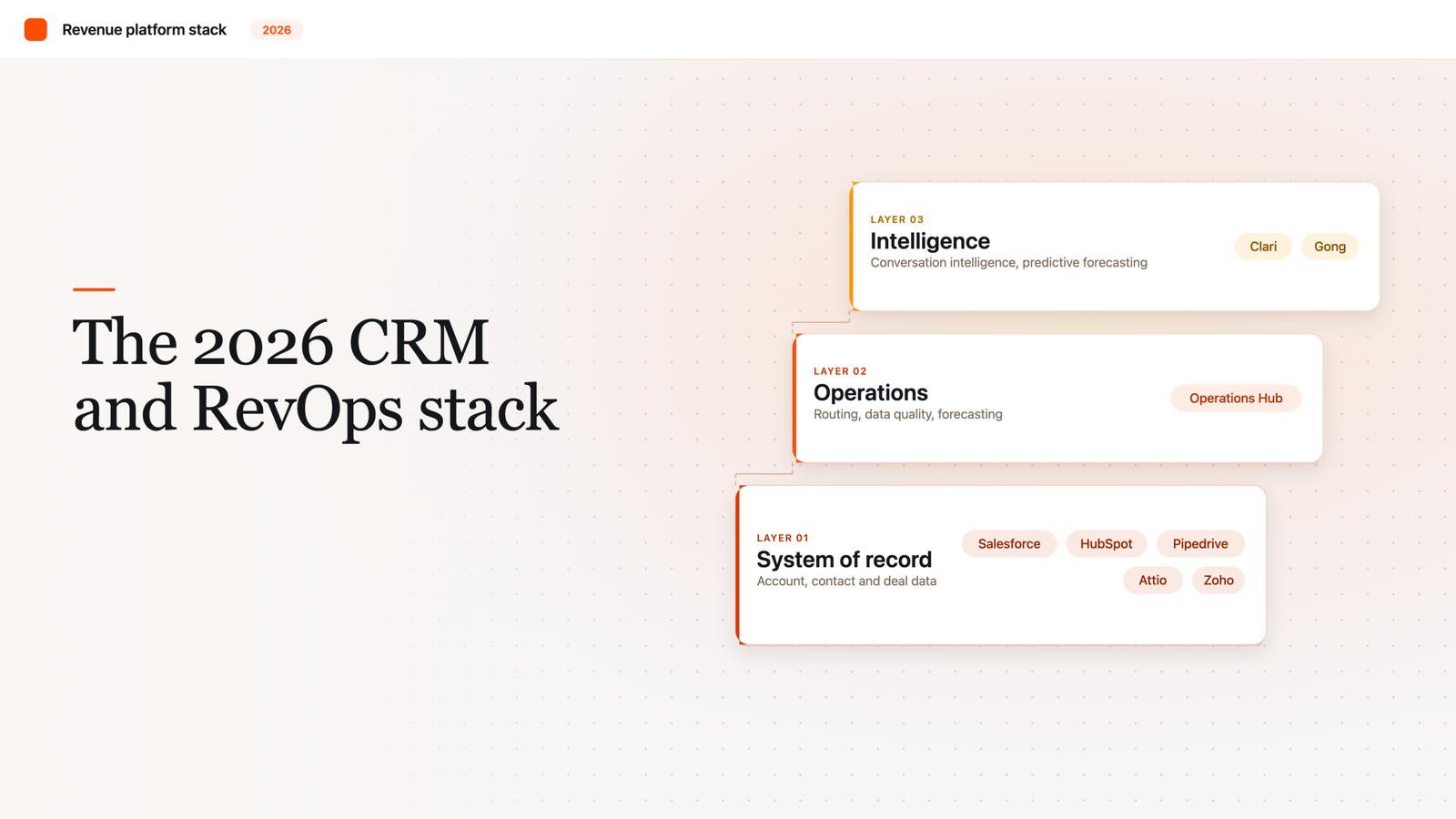
    When people say “CRM platform,” they’re usually describing a stack with three distinct layers:

    1. System of record: the core CRM (Salesforce, HubSpot, Pipedrive, Attio, Zoho) that stores account, contact, and deal data.
    2. Operations layer: tools that sit on top to manage routing, data quality, forecasting, and workflow automation.
    3. Intelligence layer: AI-driven tools for conversation intelligence, signal-based selling, and predictive forecasting.

    Most vendors now compete to own more than one layer, which is why platform comparisons have gotten more complex than a simple feature checklist.

    Platform Comparison at a Glance

    Platform Best For Watch Out For
    Salesforce Complex, multi-product enterprises needing deep customization Implementation cost and admin overhead
    HubSpot Mid-market SaaS wanting CRM + marketing + ops in one suite Costs scale quickly as contact volume grows
    Pipedrive / Attio Lean sales-led teams wanting speed over depth Fewer native RevOps and forecasting features
    Zoho Cost-conscious teams needing broad functionality Less polished UX, smaller partner ecosystem
    Clari / Gong (layered on CRM) Teams that need forecasting and conversation intelligence, not a CRM replacement Additional cost and integration overhead

    How to Match a Platform to Your Growth Stage

    The right stack depends less on brand reputation and more on where your revenue team actually is:

    • Pre-Series A: A lightweight CRM (Pipedrive, Attio, or HubSpot’s free/starter tier) is usually enough. Don’t buy a RevOps layer before you have repeatable process to operationalize.
    • Series A to B, scaling GTM: This is where most teams add an operations layer. Lead routing, forecasting, and reporting typically outgrow spreadsheets and native CRM reporting around this stage.
    • Series C and beyond: Multi-product, multi-region GTM usually justifies Salesforce’s customization depth, paired with dedicated intelligence-layer tools.

    Questions to Ask Before You Commit

    1. Which layer (system of record, operations, or intelligence) is this actually solving for, and do we already own a tool that covers it?
    2. What does data migration and integration actually cost, in time and dollars, not just license price?
    3. Will this platform still fit at 3x our current headcount, or are we buying for today’s team size only?
    4. Who owns admin and configuration internally, and do they have the bandwidth to maintain it?

    The Platform Is Only as Good as the Operating Model Around It

    No CRM or RevOps platform fixes misalignment between sales and marketing on its own. It just gives you the infrastructure to enforce alignment once you’ve defined it. The teams getting the most value from their 2026 stack are the ones who nailed process and definitions first, then chose tooling to support it, rather than the reverse.

    Frequently Asked Questions

    What’s the difference between a CRM and a RevOps platform?

    A CRM is the system of record: it stores account, contact, and deal data. A RevOps platform (or RevOps layer) sits on top of or alongside the CRM to handle lead routing, forecasting, reporting, and data hygiene across sales, marketing, and customer success. Many teams need both, not one instead of the other.

    Do I need a separate RevOps layer if I already have a CRM?

    Not always. Early-stage teams with simple, low-volume pipelines can often rely on native CRM reporting and manual process. A dedicated RevOps layer typically becomes worth the investment once lead volume, headcount, or reporting complexity outgrows what the CRM handles natively, usually around Series A to B.

    Which CRM is best for early-stage SaaS companies?

    Lightweight, fast-to-implement tools like Pipedrive, Attio, or HubSpot’s starter tier are usually the right fit pre-Series A. The priority at this stage is speed and low overhead, not deep customization or a full RevOps layer.

    How much does implementing a RevOps stack typically cost?

    Costs vary widely based on team size, data volume, and how many systems need to integrate, but license price is rarely the biggest cost. Implementation time, data migration, and ongoing admin work usually add up to more than the subscription fee itself, which is why total cost of ownership matters more than sticker price when comparing platforms.

    When should a SaaS company move from HubSpot to Salesforce?

    This shift usually makes sense when a company moves into multi-product or multi-region go-to-market motions that require deeper customization than HubSpot supports, or when contact volume growth makes HubSpot’s pricing model less cost-effective than Salesforce’s structure. It’s rarely worth making the switch before that complexity actually exists.

    What’s the biggest mistake SaaS teams make when choosing a CRM or RevOps stack?

    Buying tooling before defining process. A platform can’t fix misaligned sales and marketing definitions or an undefined lead lifecycle on its own. Teams that get the most value from their stack define their process and shared definitions first, then choose tools to support it, rather than expecting the software to create alignment for them.

  • Best RevOps Consulting Services for India SaaS Teams.

    Best RevOps Consulting Services for India SaaS Teams.

    Indian B2B SaaS companies are scaling faster than ever, but many hit the same wall on the way to $10M+ ARR: sales, marketing, and customer success stop moving in the same direction. Pipeline data lives in one system, campaign data in another, and forecasts become guesswork. This is where revenue operations consulting earns its keep it’s the discipline that aligns people, process, and platforms around a single revenue engine.

    If you’re a RevOps leader evaluating outside help, this guide breaks down what good revenue operations services actually look like, the criteria that separate a strong partner from a mediocre one, and how to shortlist consultants who understand the realities of Indian B2B growth teams selling into global markets.

    Why RevOps Matters More for Indian SaaS Teams Right Now

    Indian SaaS companies operate under a specific set of pressures that make revenue operations consulting especially valuable:

    • Multi-timezone go-to-market motions. Many Indian SaaS teams sell into the US, EMEA, and APAC simultaneously, which means sales and marketing handoffs need to work across time zones without losing momentum.
    • Capital efficiency expectations. Post-2022, Indian SaaS investors have pushed harder on efficient growth metrics CAC payback, net revenue retention, and pipeline conversion all of which depend on clean, aligned revenue data.
    • Rapid tool sprawl. Fast-growing teams often accumulate a patchwork of CRM, marketing automation, and customer success tools before anyone designs how they should talk to each other.
    • Thin RevOps benches. Many Indian SaaS companies are hiring their first dedicated RevOps person around Series A or B, which means there’s rarely internal precedent for how to structure the function.

    A consulting partner that understands these dynamics can shortcut months of trial and error but only if they’re evaluated against the right criteria.

    What Good RevOps Consulting Actually Looks Like

    Not all revenue operations services are built the same. Some consultancies specialize narrowly in CRM administration; others focus on high-level GTM strategy without ever touching your tech stack. For most India-based B2B growth teams, the most valuable partners sit in the middle combining strategic thinking with hands-on systems work.

    1. Sales and Marketing Alignment as a Core Deliverable

    The single biggest sign of a strong RevOps partner is whether sales and marketing alignment is treated as a first-class deliverable, not an afterthought. Look for consultants who:

    • Build a shared definition of a Marketing Qualified Lead (MQL) and Sales Qualified Lead (SQL) that both teams actually agree on.
    • Design lead routing and SLA rules so leads don’t sit untouched between systems.
    • Set up closed-loop reporting so marketing can see which campaigns actually influenced closed-won revenue, not just form fills.
    • Facilitate regular pipeline review cadences that bring sales and marketing leadership into the same room.

    If a consultant can’t describe how they’ll get your CRM and marketing automation platform talking to each other in the first conversation, that’s a red flag.

    2. A Clear, Phased Go-To-Market Strategy Framework

    Strong partners don’t jump straight into system configuration. They start by mapping your go-to-market strategy your ideal customer profile, buying committee, sales motion (PLG, sales-led, or hybrid), and expansion strategy before recommending any process or tooling change. Ask prospective consultants to walk you through:

    • How they diagnose gaps in your current GTM motion.
    • Whether they differentiate their recommendations for new logo acquisition versus expansion and renewal revenue.
    • How they sequence quick wins (things you can fix in 30 days) against longer structural changes (territory design, comp plan redesign, multi-quarter roadmaps).

    3. Deep, Practical CRM and Tech Stack Expertise

    Strategy without execution capability isn’t RevOps it’s just consulting. The best firms bring certified, hands-on expertise in the platforms Indian SaaS teams actually run: Salesforce, HubSpot, Pipedrive, Zoho, and the marketing automation and CS platforms that sit alongside them. Evaluate this by asking for:

    • Specific examples of CRM migrations or re-architectures they’ve led.
    • Their approach to data hygiene and deduplication a chronic problem for fast-growing teams.
    • How they handle integrations between CRM, marketing automation, billing, and customer success tools.

    4. Metrics and Reporting Built for Investor and Board Conversations

    For Indian SaaS companies raising subsequent rounds, RevOps consulting should produce reporting infrastructure that holds up in board meetings pipeline coverage ratios, CAC payback, magic number, NRR, and forecast accuracy. A good partner builds dashboards your CFO and CEO will actually trust, not vanity metrics that look good but don’t inform decisions.

    5. Experience With Cross-Border, Multi-Timezone Teams

    Because so much Indian SaaS revenue comes from outside India, ask any prospective partner how they’ve handled:

    • Territory and comp design across US, EMEA, and India-based sales reps.
    • Marketing attribution when demand generation spans multiple regions and currencies.
    • Handoffs between an India-based SDR team and a US-based closing team, or vice versa.

    Evaluation Criteria: A Practical Scorecard

    When comparing revenue operations consulting firms, score each on the following dimensions before making a decision:

    Criteria What to Look For
    Alignment focus Explicit sales-marketing alignment deliverables, not just CRM cleanup
    Strategic depth Ability to diagnose GTM strategy gaps, not just execute tickets
    Technical fluency Hands-on certifications and migration case studies in your CRM/MAP stack
    Reporting rigor Board-ready dashboards tied to revenue outcomes, not activity metrics
    Cross-border experience Track record with multi-timezone, multi-currency GTM motions
    Engagement model Fixed-scope project vs. ongoing fractional RevOps support — match to your stage
    References Willingness to connect you with similarly-sized Indian SaaS clients

    Fractional vs. Project-Based RevOps Consulting

    Two common engagement models show up across business growth consulting firms serving SaaS:

    • Project-based engagements are best when you have a defined problem a CRM migration, a lead scoring rebuild, or a comp plan redesign with a clear start and end date.
    • Fractional RevOps support works well for earlier-stage companies that need ongoing strategic and operational leadership but aren’t ready to hire a full-time VP of RevOps yet.

    Many B2B growth teams in India start with a project engagement to solve an urgent problem, then transition into fractional support as the relationship proves out and the function matures internally.

    Questions to Ask Before You Sign

    Before committing to a RevOps consulting partner, get clear answers to:

    1. What does the first 30/60/90 days of the engagement actually look like?
    2. Who on their team will be doing the hands-on work is it the person in the sales pitch, or a more junior team member?
    3. Can they show a before/after example of sales and marketing alignment improving pipeline conversion for a comparable client?
    4. How do they measure success, and will they commit to specific outcomes or KPIs?
    5. What happens to documentation, process ownership, and system access when the engagement ends?

    Getting Alignment Right Is the Whole Point

    Revenue operations consulting isn’t about buying another tool or adding another process layer it’s about making sure your sales, marketing, and customer success teams are pulling in the same direction, with data everyone trusts. For Indian SaaS teams competing for global budgets against well-resourced competitors, that alignment is often the difference between a forecast you can bet the business on and one that falls apart every quarter.

    Whether you’re evaluating your first RevOps partner or replacing one that never quite delivered, the criteria above alignment focus, strategic depth, technical fluency, reporting rigor, cross-border experience, and the right engagement model give you a concrete way to compare options instead of choosing on brand name alone.


  • What Is Product-Led Growth (PLG)? A Beginner’s Guide

    What Is Product-Led Growth (PLG)? A Beginner’s Guide

    Product-led growth (PLG) is a go-to-market strategy where your product itself, not a salesperson or an ad campaign, does the work of getting people to try, adopt, and pay for what you sell. Users experience value firsthand, often through a free trial or freemium version, before anyone in sales ever talks to them.

    If you’ve ever signed up for a tool, poked around for ten minutes, and started using it without a single call with a rep, you’ve already lived through PLG. It’s not a buzzword invented to sound fancy. It’s a real shift in how software companies grow, and it’s worth understanding even if you’re not planning to rebuild your GTM (go-to-market, meaning how a company brings a product to customers) motion around it tomorrow.

    What Is Product-Led Growth, Exactly?

    At its core, product-led growth is a business strategy that relies on product usage as the main way to acquire, engage, and retain customers, rather than leaning on a sales team to do the convincing. Instead of a rep walking a prospect through slides and a demo, the prospect just opens the product and figures out the value themselves.

    The term didn’t come out of nowhere. It was originally coined in 2016 by Blake Bartlett at OpenView, a venture capital firm, although the underlying tactics had already been floating around software companies before that. Companies were experimenting with freemium models (a free, limited version of the product) and self-guided product tours to grow while staying profitable, which used to be seen as a tradeoff you couldn’t avoid.

    Here’s the plain version: instead of hiring more salespeople to close more deals, you invest in making the product so good that it sells itself, or at least does most of the early legwork.

    How Is PLG Different From Sales-Led Growth?

    Sales-led growth (SLG) is the model most people picture when they think of enterprise software: a rep reaches out, books a demo, negotiates a contract, and eventually closes a deal. This approach tends to work well for complex products that need customization, hands-on onboarding, or in-depth explanation, which is part of why companies like Salesforce and Oracle still lean heavily on it.

    PLG flips that. Customers can purchase solutions and complete onboarding without ever coming into contact with a salesperson, because the product is built to explain and prove its own value. Companies like Slack, Shopify, and Zoom are frequently pointed to as strong examples of this in action.

    Neither model is objectively “better.” Honestly, most companies that claim to be pure PLG or pure sales-led are oversimplifying. A lot of successful B2B companies end up blending both: a self-serve product that lets small teams get started free, with a sales team that steps in once an account starts looking like a bigger opportunity.

    Why Does PLG Matter for B2B Founders?

    A few reasons founders and revenue leaders keep paying attention to this model:

    It can lower your cost of acquiring customers. PLG typically reduces sales friction and can lead to shorter sales cycles, lower customer acquisition costs, and higher revenue per employee, since the product is doing work that would otherwise require a headcount-heavy sales org.

    It scales without scaling headcount at the same rate. As a company grows, a 1:1 human-to-human support and sales model becomes harder to sustain, and PLG helps by automating onboarding, support, and parts of the sales motion so people can focus on more strategic work.

    The adoption numbers back this up too. According to one industry benchmarks report, almost 60% of surveyed SaaS companies had already implemented a product-led growth motion. And on the cost side, PLG companies report a median CAC (customer acquisition cost) payback period of about 15 months, compared to 29 months for sales-led companies, according to OpenView Partners research.

    That’s not a small gap. If you’re spending money to acquire customers, cutting your payback period nearly in half is the kind of thing that changes your whole financial picture.

    What Does PLG Actually Look Like Day to Day?

    It’s easier to picture with real examples. Companies such as Atlassian, Calendly, and Pinterest have used PLG to drive ongoing growth and customer loyalty, largely by getting users to a meaningful “aha moment” fast, without a sales conversation getting in the way.

    A simple example: someone signs up for a free trial of a project management tool on a Tuesday afternoon, invites two coworkers by Wednesday, and by the following week their whole team is using it daily. Nobody from sales called them. The product convinced them, and then their own usage convinced their teammates.

    How Do You Know If PLG Might Be Right for You?

    Before you decide PLG is (or isn’t) for your company, run through this quick checklist:

    1. Can a new user get real value from your product within minutes, without training? If it takes a two-hour onboarding call just to see the point, PLG will be an uphill climb.
    2. Is your product simple enough to try without heavy customization or implementation work?
    3. Can you offer a free trial or freemium tier without giving away your entire business model?
    4. Do your product, marketing, and support teams talk to each other regularly, or do they operate in silos? PLG needs cross-functional alignment to work.
    5. Are you set up to track in-product usage data, not just website visits and form fills?

    Pro tip: don’t try to flip a switch from fully sales-led to fully product-led overnight. Start by adding a free trial or limited free tier to one product line, watch how people actually use it, and build your sales process around what the data tells you, not the other way around.

    What Is a PQL, and Why Does It Come Up in PLG Conversations?

    Once you’re running a PLG motion, you’ll start hearing the term PQL, or product qualified lead. A product qualified lead is a user whose in-product behavior signals they’re ready to become a paying customer, as opposed to someone who just downloaded a whitepaper or filled out a form.

    FAQ

    Is product-led growth only for SaaS companies?
    Most of the well-known examples are SaaS, since software makes it easy to offer free trials and track usage data. But the underlying idea (let the product prove its value before you ask for money) can apply more broadly, it’s just harder to pull off outside software.

    Does PLG mean I don’t need a sales team?
    No. PLG is not a substitute for human support and sales, it’s a complement to it. Most companies running PLG still have a sales team, they just focus that team on the accounts and moments where a human conversation actually adds value.

    What’s the biggest mistake companies make when trying PLG?
    Treating it as a marketing tactic instead of a company-wide strategy. If your product, support, and sales teams aren’t aligned on what a good user experience looks like, a free trial alone won’t save you.

    How long does it take to see results from a PLG motion?
    There’s no universal timeline, and honestly anyone who gives you an exact number is guessing. It depends on how fast users reach real value in your product and how quickly your team can turn usage data into a working PQL definition.

    Can a company be both sales-led and product-led?
    Yes, and many successful B2B companies are. A self-serve free tier paired with a sales team for larger accounts is a common and practical setup.


  • What Is a RevOps Tech Stack? Core Tools Explained

    What Is a RevOps Tech Stack? Core Tools Explained

    A RevOps tech stack is the set of connected software tools that let your sales, marketing, and customer success teams share the same data and work off the same playbook. At minimum, it includes a CRM, marketing automation, sales enablement, and reporting tools, all wired together so information moves automatically instead of living in separate spreadsheets.

    If you’ve ever had a deal stall because sales didn’t know a prospect had already talked to support, you’ve felt what happens without one. Tools that don’t talk to each other create blind spots, and blind spots cost you revenue.

    Let’s get into what actually makes up a RevOps tech stack, why it matters, and how to start building or fixing yours.

    What Is RevOps, Quickly?

    Before we talk tools, a quick definition. Revenue operations (RevOps) is a business function that aligns sales, marketing, and customer success teams around shared data, processes, and goals so the whole revenue engine works as one system instead of three disconnected departments.

    RevOps isn’t a piece of software. It’s a way of running the business. The tech stack is just the infrastructure that makes that alignment possible day to day.

    What Is a RevOps Tech Stack?

    A RevOps tech stack is the collection of software tools and technologies that let revenue teams (sales, marketing, and customer success) work together instead of in silos. The goal isn’t to buy more software. It’s to make sure the software you already have shares data cleanly, so nobody’s working off stale or conflicting numbers.

    Most stacks lean on native integrations (built-in connections between two tools) and custom workflow automation to keep everything synced. Think of it less as a shopping list and more as plumbing: every pipe needs to connect, or the water backs up somewhere.

    Why Does a RevOps Tech Stack Matter?

    Here’s the problem most teams run into: tools that don’t sync create broken handoffs. When systems don’t talk, deals slip through the cracks between marketing, sales, and customer success. That leads directly to forecasting gaps, because disconnected data means unreliable pipeline projections and missed revenue targets.

    There’s also a hidden cost. Manual workarounds and duplicate records quietly cost you deals you should have won. Nobody notices this on a dashboard. It just shows up as a slower quarter.

    On the flip side, a well-connected stack turns raw activity data into decisions you can act on, instead of just numbers you report on. Gartner had projected that by 2025, 75% of the highest-growth companies globally would be running on some form of RevOps model, which tells you this isn’t a niche practice anymore. It’s becoming the default for companies that plan to scale.

    What Are the Core Tool Categories in a RevOps Stack?

    You don’t need every category from day one. But here’s what shows up in most functioning stacks, from foundation to nice-to-have.

    1. CRM (Customer Relationship Management)

    Your CRM is the central hub where customer and prospect data lives: contact info, deal stages, past conversations, purchase history. Salesforce and HubSpot are the two most common choices. Everything else in your stack should ultimately feed data into, or pull data from, this system.

    2. Marketing Automation

    These tools handle attracting, nurturing, and converting leads while keeping marketing and sales working from the same lead definitions. Without this connected to your CRM, marketing generates leads sales never sees clearly, or worse, leads get followed up twice by two different reps.

    3. Sales Enablement

    This covers everything that helps reps sell more effectively: sales content management, onboarding and training materials, automated outreach sequences, and battlecards for handling objections. It’s the layer between “we have leads” and “we closed the deal.”

    4. Revenue Intelligence and Forecasting

    These tools analyze deal activity, call data, and pipeline trends to flag risk and predict what will actually close. This is a newer category, but it’s quickly becoming a must-have alongside CRM and lead routing tools.

    5. CPQ (Configure, Price, Quote) and Billing

    CPQ software streamlines quoting and approvals, which matters most once your pricing or packaging gets complicated. Billing and revenue recognition tools then automate invoicing and subscription management so finance and go-to-market teams work from the same numbers. Don’t rush into CPQ before your pricing model is settled, it’ll just lock in confusion.

    6. Customer Success Platform

    This tracks health scores, usage data, and renewal risk after the deal closes. RevOps stacks increasingly stretch across the full customer lifecycle now, not just the sales funnel, covering everything from first anonymous website visit through renewal and expansion.

    7. Analytics and Reporting

    One of the core jobs of RevOps is giving leadership a single, trustworthy view of revenue performance. That requires a centralized reporting layer that pulls data across every tool in the stack instead of forcing someone to stitch together three exports in a spreadsheet every Friday.

    8. Integration and Data Quality Tools

    Middleware tools like Workato or Zapier handle the connections between systems that don’t integrate natively. This is the unglamorous layer, but it’s often the difference between a stack that works and one that just looks good in a slide deck. Data quality determines whether your stack delivers real insight or just amplifies bad data faster.

    How Do You Actually Build a RevOps Stack?

    You don’t build this in one sprint, and honestly, most teams shouldn’t try. Here’s a practical order of operations:

    1. Audit what you already have. Most B2B teams already own a CRM and probably more tools than they realize. Map what exists before buying anything new.
    2. Define your core metrics first. Pick a small number of KPIs, like customer acquisition cost, sales cycle length, or customer lifetime value, before you evaluate a single new tool.
    3. Fix the CRM before adding layers. If your CRM data is messy or your sales process isn’t reflected accurately in it, no new tool will fix that. Automation on top of a broken process just breaks things faster.
    4. Add tools by outcome, not by category checklist. Only add a layer (CPQ, revenue intelligence, CS platform) when it solves a specific, named problem you can point to.
    5. Build for integration, not isolation. Favor tools with strong native integrations so you’re not stuck building brittle custom connections for everything.
    6. Review and cut regularly. Audit your tech spend on a schedule and eliminate redundant or underused tools, especially ones with overlapping functionality.

    Pro tip: before you buy a single new tool, write down the exact workflow that’s broken today (“leads sit in marketing’s tool for 3 days before sales sees them”) and work backward from that. Buying tools to solve a vague feeling of disorganization almost never works.

    Honestly, most “RevOps tech stack” problems we see aren’t a tooling gap at all, they’re a process and ownership gap that a new tool gets blamed for. Adding software on top of an undefined sales process just automates the confusion faster.

    Quick Checklist: Is Your Stack RevOps-Ready?

    • CRM is the single source of truth, not one of three
    • Marketing and sales use the same lead definitions and stages
    • Deal, usage, and support data are visible to all three teams
    • You can build a full-funnel report without exporting to a spreadsheet
    • Every tool in the stack has a clear owner
    • You’ve audited tool spend in the last two quarters

    If you’re missing three or more of these, that’s a sign your stack is growing faster than your operations discipline.

    FAQ

    Do I need a dedicated RevOps tool, or can I use my existing CRM?
    Most B2B teams already have the core pieces (a CRM, some marketing tool, maybe a reporting dashboard). The real work usually isn’t buying new software, it’s configuring and connecting what you’ve already got.

    How many tools should be in a RevOps stack?
    There’s no fixed number. The right size depends on your revenue complexity: a small B2B team might run fine on a CRM plus one or two connected tools, while an enterprise org juggling multiple pricing tiers will need CPQ, contract management, and revenue intelligence layered in too.

    What’s the difference between a RevOps stack and a sales stack?
    A sales stack only covers tools sales reps use to close deals. A RevOps stack spans marketing, sales, and customer success, plus the integration and reporting layer that connects all three.

    Is HubSpot or Salesforce better for a RevOps tech stack?
    Both serve as a strong CRM foundation. HubSpot tends to appeal to teams that want built-in automation and reporting without heavy engineering, while Salesforce is often chosen for its depth of customization on complex, enterprise-level requirements.

    How much should a RevOps tech stack cost?
    There’s no universal benchmark, since it scales with headcount and deal complexity. What matters more than the total spend is whether you’re tracking ROI against clear KPIs like CAC, sales cycle length, or customer lifetime value after every new tool addition.

    Where to Go From Here

    A RevOps tech stack isn’t about owning the most tools. It’s about making sure the tools you have actually talk to each other and reflect how revenue really flows through your business. Get the foundation (a clean CRM and clear process) right before you stack anything else on top.


  • What Is CRM Data Enrichment? A Plain-English Guide

    What Is CRM Data Enrichment? A Plain-English Guide

    What Is CRM Data Enrichment and Why It Matters for Sales Teams

    Ever pulled up a lead in your CRM (customer relationship management system, the database where you track contacts, companies, and deals) and found… almost nothing? No job title, no company size, an email that bounces. Your rep ends up doing detective work on LinkedIn before they even write a cold email.

    CRM data enrichment is the process of automatically adding verified details, like job titles, company size, industry, and working contact info, to the records already sitting in your CRM. Instead of reps manually googling prospects, enrichment tools pull that missing information in from outside data sources and fill the gaps for you.

    That’s the short version. Here’s what it actually looks like in practice, why your CRM needs it more than you’d think, and how to get started without overcomplicating it.

    What Is CRM Data Enrichment, Exactly?

    At its core, CRM data enrichment connects your CRM to outside data sources through APIs (application programming interfaces, which is just a technical way for two systems to share information automatically) so new details can flow into your existing records without anyone typing them in by hand.

    Say a lead fills out a form on your website with just their name and work email. On its own, that record tells you almost nothing about whether they’re worth chasing. An enrichment tool can take that email, match it against outside data, and fill in the person’s job title, seniority, company size, industry, and sometimes even signals about what they’re actively researching.

    It’s worth separating enrichment from a couple of terms people use interchangeably. Data cleansing removes errors and duplicates from records you already have. Data enrichment adds brand-new fields you didn’t have before, like firmographic details (facts about a company, such as headcount or revenue) or technographic details (what software a company already uses). Both matter, but they solve different problems.

    Why Does Your CRM Data Fall Apart So Fast?

    Honestly, this is the part most teams underestimate. You don’t have a data entry problem so much as a decay problem, and decay never stops.

    People change jobs. Companies get acquired. Phone numbers get reassigned. None of that requires anyone on your team to make a mistake, your data just gets less accurate the longer it sits untouched.

    According to Salesforce’s State of Sales research, 91% of CRM data is incomplete, and that number reflects a structural reality: even well-maintained databases accumulate gaps faster than manual upkeep can fix them. On top of that, research cited by HubSpot puts B2B data decay at roughly 22.5% a year, meaning close to a quarter of your contact database can go stale in twelve months without anyone touching it.

    The financial side isn’t small either. Research cited by ZoomInfo found that sales reps waste around 27% of their time dealing with bad data, and separate research found that 44% of companies lose more than 10% of their annual revenue to data decay. That’s not a rounding error on a spreadsheet. That’s reps chasing dead leads instead of live ones.

    How Does CRM Data Enrichment Actually Work?

    There are two broad ways teams handle it, and most growing companies start with one and graduate to the other.

    Manual enrichment means someone on your team searches LinkedIn for a missing job title or checks a company website for headcount, then types it into the CRM by hand. It works fine at a tiny scale. It falls apart the moment you have more than a handful of leads coming in per week.

    Automated enrichment connects your CRM to third-party data providers through integrations or APIs, so missing fields get filled in the moment a record is created or updated, often within seconds. This is what most people mean when they talk about “CRM data enrichment” as a category of tool.

    Enrichment itself isn’t one-size-fits-all. A few common types show up again and again:

    • Contact enrichment: fills in job title, seniority, direct phone, and verified email so reps know who they’re actually talking to.
    • Firmographic enrichment: adds company size, industry, revenue range, and location so you can tell if a lead fits your ideal customer profile (ICP, meaning the type of company most likely to buy from you and succeed as a customer).
    • Intent data enrichment: surfaces signals that a company is actively researching a solution like yours right now, so reps know which accounts to call first instead of guessing.

    Why Does This Matter for Sales Teams Specifically?

    A rep with a full, accurate profile can qualify a lead in seconds instead of minutes. A rep working off three fields and a guess can’t personalize outreach, can’t prioritize, and honestly can’t forecast their pipeline with any confidence either, because forecasts are only as good as the data feeding them.

    This is where I’d push back on how most teams frame the problem. It’s rarely “our reps aren’t researching enough.” It’s that you’re asking humans to manually do a job that’s genuinely better suited to automation, and then blaming pipeline numbers when the research doesn’t happen consistently.

    Pro tip: before you buy any enrichment tool, sit down and list your must-have fields versus your nice-to-haves. Job title, company size, and industry are usually must-haves for sales qualification. Social profiles and interests are nice-to-haves. Knowing the difference keeps you from paying for enrichment you’ll never actually use.

    A Simple Checklist to Get Started

    1. Define your goal. Are you trying to qualify leads faster, personalize outreach, or improve forecast accuracy? Pick one primary goal first.
    2. List your must-have fields. Job title, company size, and industry are common starting points for most B2B sales teams.
    3. Audit what you already have. Pull a sample of records and see how many are missing your must-have fields or contain data that looks outdated.
    4. Choose manual or automated enrichment. Manual works for small volumes; automated tools make sense once lead volume grows past what a person can keep up with.
    5. Schedule recurring audits. Enrichment isn’t a one-time fix. Set a cadence, monthly or quarterly, to catch new gaps before they pile up.

    FAQ: CRM Data Enrichment

    Is CRM data enrichment the same as data cleansing?
    No. Cleansing removes errors, duplicates, and outdated entries from data you already have. Enrichment adds new information you didn’t have before, like a missing job title or company size.

    How often does CRM data actually need enriching?
    Given that B2B data decays at roughly 22.5% a year according to HubSpot-cited research, most teams are better off enriching continuously or at least monthly rather than waiting for an annual cleanup.

    Do small sales teams need an enrichment tool, or can they enrich manually?
    At low lead volume, manual research (checking LinkedIn or a company site) can work fine. Once your team is handling more than a few dozen new leads a week, manual enrichment usually can’t keep pace.

    What’s the difference between enrichment and enhancement?
    Enrichment adds entirely new fields from external sources. Enhancement improves what you already have, standardizing formats or adding context to existing fields, without necessarily pulling in new data points.

    Does enrichment help with sales forecasting?
    Yes, indirectly. Forecasts are built on pipeline data, and if that data is incomplete or outdated, the forecast built on top of it will be too.