Category: CRM

  • Best CRM Tools for Product Led Growth in 2026

    Most CRM comparisons for product-led growth teams still get evaluated on price, seat count, and how many integrations appear on a marketplace page. Those criteria miss the questions that actually determine whether a CRM works for a PLG motion: can it see activation data natively, does it support a clean handoff from self-serve to sales-assist without losing context, and does it track expansion the way a PLG account actually grows, through seat additions and feature adoption, not just a manually updated deal stage.

    This guide compares six CRM tools worth evaluating for product-led growth teams heading into 2026, specifically through activation visibility, sales handoff support, and expansion workflow fit.

    Why Standard CRM Evaluation Criteria Don’t Work for PLG

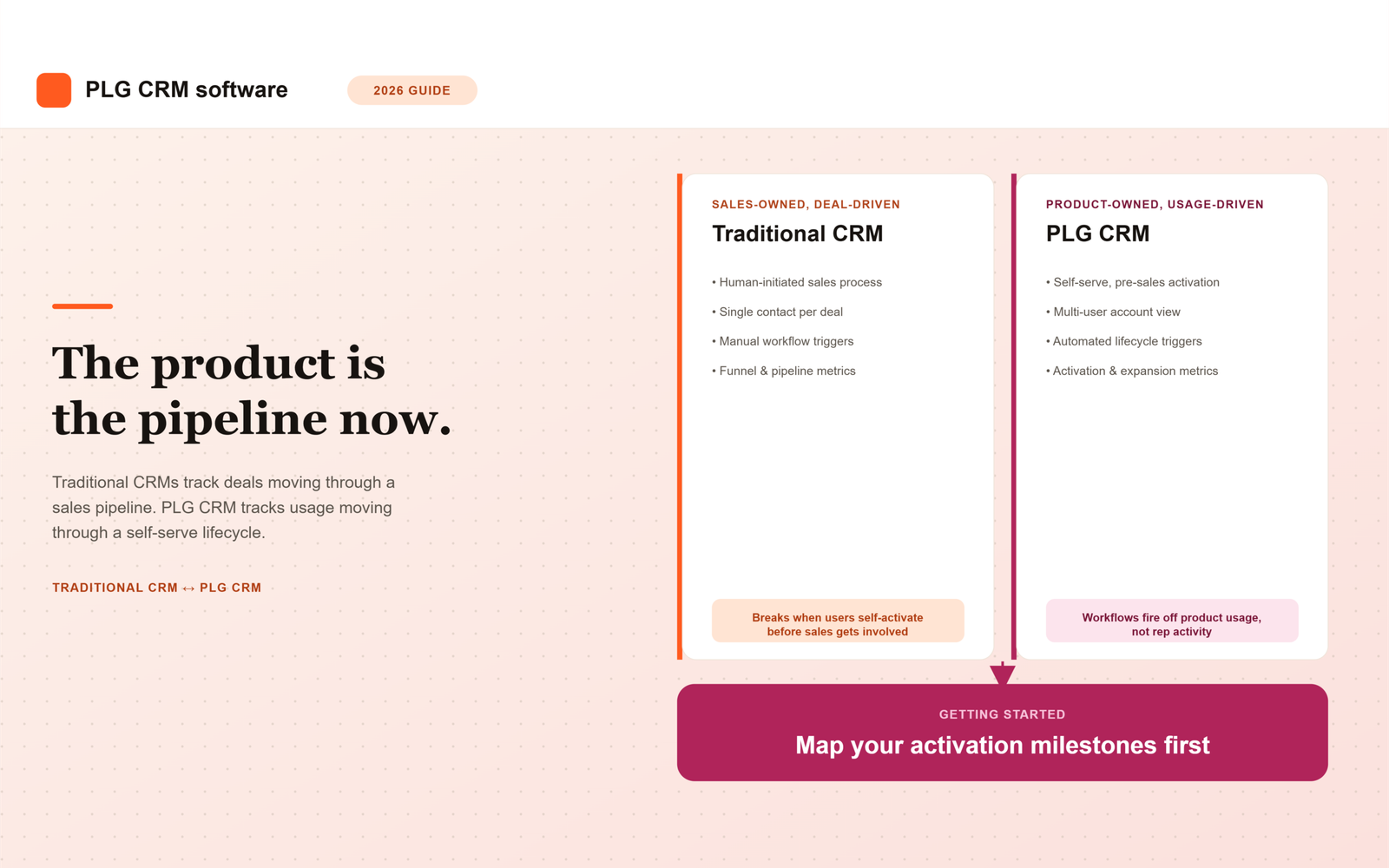
    • Traditional CRMs assume a human-initiated sale. In PLG, the user often self-activates before any sales contact happens, so a CRM built around rep-logged activity has nothing to work with until much later in the relationship.
    • Deal stages don’t map to activation stages. A PLG account can be signed up, active, and expanding without ever touching a traditional pipeline, which makes deal-stage reporting nearly meaningless for the accounts that matter most.
    • PLG accounts have many users, not one contact. A single-contact-per-deal data model can’t represent an account where twenty users sit at different points in the activation journey.
    • Expansion is usage-driven, not rep-driven. A seat addition or feature adoption event should trigger a workflow automatically, not wait for a rep to notice and manually log it.

    Tool Comparison: CRM Software for Product-Led Growth

    Tool Activation Visibility Sales Handoff Support Expansion Workflow Fit Best For
    Endgame Native, purpose-built for usage-based signals Strong, built specifically for self-serve to sales-assist Native, triggers off product events PLG-first companies wanting purpose-built tooling over a stitched stack
    Correlated Native, strong account-level signal scoring Moderate, works as a signal layer feeding an existing CRM Strong, surfaces expansion-ready accounts automatically Teams wanting a usage-signal layer on top of a CRM they already run
    Pocus Native, focused on surfacing warm accounts to reps Strong, designed to hand signals directly to sales workflow Moderate, depends on the connected CRM for deal tracking Sales teams needing PLG signals surfaced inside their existing tools
    HubSpot (Breeze) Requires integration with a product analytics tool Moderate, configurable workflows once usage data is connected Moderate, tracked via deal and contact properties Mid-market teams wanting CRM, marketing, and PLG signals in one platform
    Salesforce (Agentforce) Requires custom build to ingest usage data Strong once configured, built for complex multi-stakeholder handoffs Strong for large accounts, but needs engineering investment to set up Larger PLG companies with an enterprise upsell motion and engineering resources
    Attio Requires integration; flexible data model helps represent usage data once connected Moderate, customizable but less purpose-built than PLG-native tools Moderate, depends on how the account model is configured Product-led or hybrid GTM teams wanting a lightweight, highly customizable CRM

    Endgame: Built Specifically for the PLG Motion

    Endgame treats product usage as a first-class data object rather than something bolted on afterward, which makes activation visibility and account health scoring genuinely native rather than something your team has to configure from scratch. Its strongest advantage is the self-serve to sales-assist handoff, a rep picking up an account inherits full usage history automatically. The tradeoff is that it’s purpose-built for PLG specifically, so companies running a significant enterprise or sales-led motion alongside PLG may still need a traditional CRM working in parallel.

    Correlated: A Signal Layer for Teams Keeping Their Existing CRM

    Correlated doesn’t try to replace your CRM, it sits alongside it and translates raw product usage into account-level signals that feed into whatever system your reps already work from. This fits teams that have already standardized on HubSpot or Salesforce and don’t want to migrate, but still need the usage-based scoring those platforms don’t provide natively. The expansion workflow fit is strong specifically because it’s designed to flag expansion-ready accounts automatically, rather than waiting for a rep to notice.

    Pocus: Getting Signals Directly in Front of Reps

    Pocus focuses specifically on surfacing warm, usage-qualified accounts to reps at the moment they’re ready for outreach, which makes it strong on activation visibility and handoff support. Its expansion workflow fit depends more heavily on the CRM it’s connected to for actual deal and forecasting mechanics, so it works best as a companion tool rather than a standalone system of record.

    HubSpot: The All-in-One Option for Mid-Market PLG Teams

    HubSpot’s native AI, Breeze, plus its marketing and CRM tooling in one platform makes it an efficient starting point for mid-market PLG companies that don’t want to run three separate vendors. Activation visibility isn’t native, it requires connecting a product analytics tool, but once that connection exists, HubSpot’s workflow automation can act on the data reasonably well. It tends to be the sensible default for teams without heavy engineering resources to build a custom stitched stack.

    Salesforce: Depth for Complex, Enterprise-Bound PLG Motions

    Salesforce’s Agentforce and broader configurability give it real strength in handling complex, multi-stakeholder handoffs, which matters once PLG accounts start growing into genuine enterprise upsell opportunities. The catch is that activation visibility requires custom integration work, Salesforce doesn’t treat usage data as native the way Endgame or Correlated do, so this option makes the most sense for companies with engineering capacity to build that connection properly.

    Attio: Flexibility for Hybrid GTM Teams

    Attio’s highly customizable data model makes it easier than most traditional CRMs to represent multi-user PLG accounts once usage data is connected, without forcing a rigid single-contact-per-deal structure. It’s a lighter-weight option than Salesforce and often faster to configure than HubSpot for teams with unconventional data needs, though its smaller ecosystem means less out-of-the-box support for PLG-specific workflows compared to purpose-built tools like Endgame.

    How to Choose Between These Options

    Start by identifying which of the three criteria is actually broken today, not which tool has the most impressive demo. If reps can’t see activation data at all, prioritize activation visibility first, that’s usually Endgame, Correlated, or Pocus depending on whether you want a standalone system or a signal layer on an existing CRM. If activation visibility already exists but handoffs lose context when accounts move to sales-assist, prioritize handoff quality specifically, and test it against a real account during any vendor demo, not a curated one.

    Companies running a hybrid PLG-plus-enterprise motion often end up combining a PLG-native tool for activation and expansion signals with a traditional CRM like Salesforce or HubSpot for the actual sales and forecasting mechanics, rather than expecting one platform to do both equally well.

    Common Mistakes When Choosing a PLG CRM

    • Evaluating tools on feature lists instead of testing activation visibility, handoff quality, and expansion tracking against real account data
    • Assuming a traditional CRM’s “AI features” cover usage-based scoring natively, when most require a separate integration to work at all
    • Choosing a PLG-native tool as a full CRM replacement when what’s actually needed is a signal layer alongside an existing system
    • Skipping the step of mapping actual activation milestones before evaluating any platform against them

    Summary

    CRM tools for product-led growth split into two real categories: purpose-built PLG platforms like Endgame, Correlated, and Pocus that treat usage data as native, and traditional CRMs like HubSpot, Salesforce, and Attio that require connecting a product analytics tool before activation visibility works at all. The three criteria that actually determine fit, activation visibility, sales handoff quality, and expansion workflow fit, matter more than price or seat count when comparing options.

    Endgame offers the deepest native fit for PLG-first companies, Correlated and Pocus work well as a signal layer for teams keeping their existing CRM, and HubSpot, Salesforce, or Attio suit teams needing broader CRM functionality alongside PLG signals, particularly once a hybrid PLG-plus-enterprise motion develops. Many companies end up combining a PLG-native tool with a traditional CRM rather than expecting one platform to handle both activation tracking and complex enterprise sales equally well.

    FAQ

    What’s the best CRM for a company that’s purely PLG with no sales team yet?

    Endgame or Correlated tend to fit best at this stage, since both treat activation and usage data as native rather than requiring a separate integration project. A traditional CRM like HubSpot or Salesforce is usually more than a purely self-serve company needs before a sales-assist motion actually develops.

    Can we add PLG capability to HubSpot or Salesforce instead of switching platforms?

    Yes, both can support PLG workflows once connected to a product analytics tool, though neither treats usage data as native the way purpose-built PLG platforms do. This tends to work well for teams already standardized on one of these CRMs that don’t want to run a separate system for PLG signals.

    Should we replace our CRM entirely with a PLG-native tool?

    Not necessarily. Tools like Correlated and Pocus are often used as a signal layer alongside an existing CRM rather than a full replacement, which lets teams keep their sales and forecasting mechanics in a familiar system while adding the usage-based visibility that system lacks natively.

    How do we test whether a CRM’s sales handoff actually preserves context?

    Ask the vendor to demonstrate the handoff on a real account with a mix of active and dormant users, not a curated demo account. A rep picking up the account should immediately see its full activation timeline and usage trends, not start from a blank contact record.

    What should a hybrid PLG-plus-enterprise company do differently?

    Many hybrid companies combine a PLG-native tool for activation and expansion signals with a traditional CRM like Salesforce for the actual enterprise sales and forecasting workflow, rather than trying to force one platform to handle both equally well.
  • Best CRM and RevOps Platforms for Australian SaaS

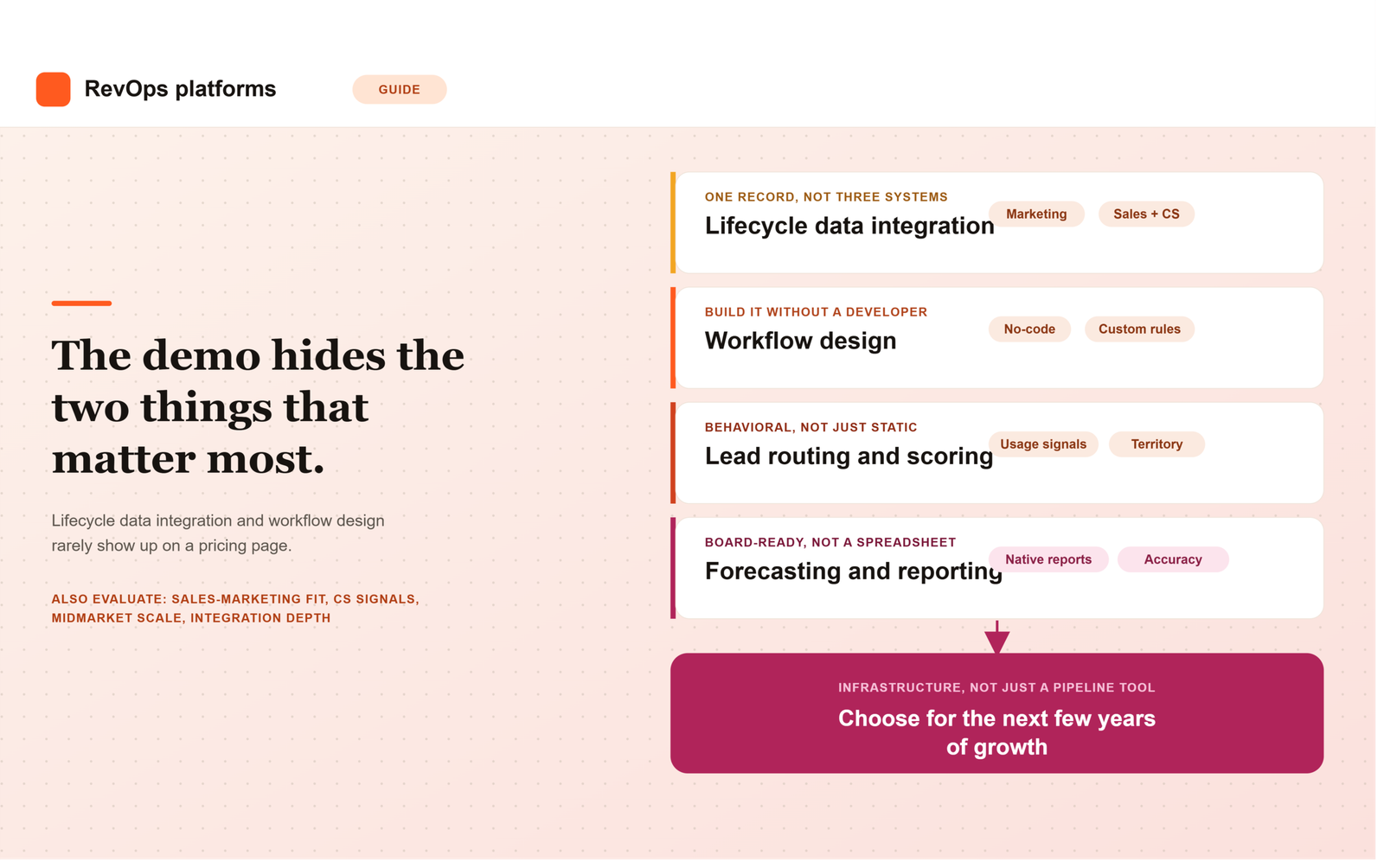
    Choosing between B2B SaaS CRM and RevOps platforms is rarely a pure feature comparison, and that’s especially true for Australian SaaS companies running complex, multi-stakeholder sales cycles into the US, EMEA, and APAC simultaneously. A platform that works well for a domestic-only company, or even a US-based one, can quietly underperform once you factor in time zone gaps, currency exposure, and the reality that most Australian SaaS teams need international revenue to hit venture-scale outcomes.

    This guide compares the CRM software worth evaluating and the revenue operations services available to run it, specifically through the lens of what changes for Australian SaaS companies rather than a generic global comparison.

    Why Platform Selection Looks Different for Australian SaaS Companies

    • Small home market, early international expansion. Most Australian SaaS companies need US or UK revenue to reach venture-scale outcomes, which means the CRM has to support multi-currency, multi-region reporting from a much earlier stage than a comparable US company would need.
    • Time zone overlap that barely exists. Sydney and Melbourne business hours overlap awkwardly with both US and EMEA hours, which puts real weight on whether a platform supports time zone-aware lead routing and SLA automation rather than assuming a single business-hours window.
    • Complex, multi-stakeholder sales cycles. Longer, more considered B2B SaaS deals involving security review, procurement, and multiple decision-makers need a CRM built for opportunity-stage complexity, not just a simple pipeline kanban board.
    • Smaller local RevOps talent pool. Australia’s RevOps talent market is thinner than the US or UK, which is a major reason Australian SaaS companies lean on RevOps consulting partners rather than building out a large in-house function early.

    None of these four factors show up in a standard vendor comparison chart, which is exactly why Australian teams that copy a US peer’s stack decision often discover the gap only after the contract is signed.

    CRM Software Comparison for Australian SaaS Teams

    Platform Best Fit Complex Sales Cycle Support Considerations for Australian Teams
    Salesforce Larger, multi-product B2B SaaS companies with enterprise sales motions Strong; built for multi-stakeholder opportunity management and custom approval flows Higher implementation cost; usually needs a certified partner familiar with ANZ-to-global expansion
    HubSpot Mid-market teams wanting CRM, marketing, and RevOps tooling in one platform Moderate to strong depending on tier; deal stages and playbooks configurable for longer cycles Costs scale with contact volume; model total cost against AUD budgets, not list price
    Zoho Cost-conscious teams wanting broad functionality without enterprise pricing Moderate; workable for complex cycles with more manual configuration Good value, but less polished for very large, multi-region enterprise GTM
    Pipedrive Lean, early-stage, sales-led teams Limited; built for simpler, faster-moving deals rather than long enterprise cycles Native RevOps and forecasting depth thins out quickly as the team and deal complexity scale
    Attio Product-led and hybrid GTM teams wanting a flexible, modern CRM Moderate; highly customizable data model suits evolving sales processes Smaller partner and implementation ecosystem in Australia compared to Salesforce or HubSpot

    The right platform among these B2B SaaS sales tools depends less on company size and more on how complex your actual sales cycle is. A company running a straightforward, single-stakeholder motion rarely needs Salesforce’s configuration depth, while a company managing security reviews, procurement, and multiple buying-committee members will hit real limits on Pipedrive fairly quickly.

    RevOps Service Options: Who Actually Runs the Platform

    Buying CRM software solves only half the problem. Someone still has to design the pipeline stages, build lead routing that accounts for the US-APAC time zone gap, and keep reporting clean as the company scales, and for most Australian SaaS companies that capacity doesn’t exist internally at the size the software is bought.

    Option Best For Tradeoff
    In-house RevOps hire Companies with enough scale to justify a dedicated full-time role Slower to build institutional expertise; a single hire can become a bottleneck
    RevOps consulting services Companies needing defined, project-based work, like a CRM re-architecture ahead of a US launch Engagement ends once the project is complete; needs internal ownership afterward
    Fractional RevOps leadership Growth-stage companies whose international motion is live but still evolving Higher ongoing cost than a single project, but avoids hiring a full-time role too early

    Many Australian SaaS companies start with project-based RevOps consulting, typically a CRM re-architecture or lead-routing overhaul timed to a US or UK expansion push, before moving to fractional support once the international motion stabilizes. Given the smaller local talent pool, fractional revenue operations services are often more cost-effective than building a large in-house function too early.

    What to Prioritize When Comparing Platforms and Partners

    1. Multi-Currency and Multi-Region Reporting

    If you’re billing in AUD, USD, and potentially GBP, confirm the CRM can roll this up cleanly for board reporting without manual spreadsheet reconciliation every cycle. Ask vendors to walk through what a single revenue dashboard looks like across three currencies, not just whether “multi-currency” appears on a feature list.

    2. Time Zone-Aware Lead Routing

    A lead generated during Sydney business hours shouldn’t sit unworked for ten-plus hours before a US-based rep sees it, and vice versa. Confirm the platform, or the RevOps partner building on top of it, can design SLA and routing rules that actually account for this gap rather than assuming a single global business-hours window.

    3. Support for Genuinely Complex Sales Cycles

    Confirm the CRM can represent multi-stakeholder deals accurately, with support for multiple contacts per opportunity, custom approval stages, and forecasting that doesn’t assume every deal moves through the pipeline at the same pace. This matters more as average deal size and buying-committee size grow.

    4. Local Implementation and Partner Support

    Platforms and RevOps consulting partners with genuine ANZ experience, not just a certification badge, generally mean faster onboarding and fewer surprises during implementation. Ask any prospective partner how many Australian SaaS clients they’ve helped expand internationally, and ask for specific examples rather than a general claim of “global experience.”

    Common Mistakes Australian SaaS Teams Make

    • Choosing a CRM based on what a US-based peer uses, without checking pricing scalability against AUD budgets
    • Underestimating implementation time when a vendor’s support team operates entirely outside Australia-friendly hours
    • Buying enterprise-grade CRM software before the sales process and data hygiene underneath it are solid enough to justify the platform’s complexity
    • Hiring a full-time RevOps person before the company’s GTM motion is complex enough to keep that role fully utilized

    Match the Platform and Partner to Your Actual Sales Complexity

    There’s no single best answer among B2B SaaS CRM and RevOps platforms for Australian companies, only the combination that fits your current sales cycle complexity, international footprint, and internal RevOps capacity. A company with a straightforward motion and a lean team is usually better served by HubSpot or Zoho paired with project-based RevOps consulting. A company running genuinely complex, multi-region enterprise deals is more likely to need Salesforce alongside either an in-house hire or fractional RevOps leadership, depending on how quickly the international motion is still evolving.

    Summary

    Australian SaaS companies face platform decisions shaped by four factors most global comparisons ignore: a small home market forcing early international expansion, time zones that barely overlap with the US or EMEA, genuinely complex multi-stakeholder sales cycles, and a smaller local RevOps talent pool. Among CRM software, Salesforce fits larger, complex enterprise motions, HubSpot suits mid-market teams wanting an all-in-one platform, Zoho offers strong value for cost-conscious teams, Pipedrive fits lean early-stage motions, and Attio suits product-led or hybrid GTM approaches.

    Buying the software is only half the decision. Revenue operations services, whether project-based consulting, fractional leadership, or an eventual in-house hire, determine whether the platform actually gets configured for AUD reporting, time zone-aware routing, and complex deal tracking. Weight multi-currency reporting, time zone-aware automation, complex sales cycle support, and genuine local implementation experience as heavily as the core feature set when comparing options.

    FAQ

    Which CRM is best for an Australian SaaS company with a complex sales cycle?

    Salesforce generally offers the deepest support for multi-stakeholder, multi-region enterprise sales cycles, though it comes with higher implementation cost. HubSpot is a strong middle ground for mid-market teams wanting CRM, marketing, and RevOps tooling in one platform without Salesforce’s full configuration overhead.

    Do we need a RevOps consultant, or can our sales team run the CRM themselves?

    It depends on sales cycle complexity and international footprint. A simple, domestic-only sales motion may not need dedicated RevOps support early on, but once you’re managing multi-currency reporting and time zone-aware lead routing across US, EMEA, and APAC, RevOps consulting services or a fractional leader typically pay for themselves in avoided forecasting errors and missed leads.

    Should we use a project-based RevOps engagement or fractional support?

    Project-based engagements suit a defined, time-boxed problem, like rebuilding lead routing ahead of a US launch. Fractional RevOps leadership fits better once your international motion is live but still evolving and needs an ongoing owner rather than a one-time fix.

    How does AUD pricing exposure affect choosing a USD-priced CRM?

    Most major CRM platforms price in USD, which means currency fluctuation directly affects your real per-seat cost in a way it doesn’t for a US-based buyer. Model total cost at your projected headcount using a realistic AUD-to-USD range rather than the exchange rate on the day you sign the contract.

    Why does time zone-aware lead routing matter so much for Australian SaaS teams?

    Sydney and Melbourne business hours overlap only briefly with US hours and awkwardly with EMEA hours, so a lead generated outside that narrow window can sit unworked for most of a business day without deliberate routing rules. This creates real handoff and SLA problems between marketing, SDRs, and closing reps that a generic, single-timezone routing setup won’t catch.

    What should we ask a RevOps consulting partner before hiring them?

    Ask specifically how many Australian SaaS clients they’ve helped expand into the US or UK, and ask for a real example rather than a general claim of global experience. Also ask what they would explicitly not recommend given your current stage, since a partner focused on right-sizing the engagement is generally more trustworthy than one scoping the largest possible project.

  • Best AI Tools for SaaS Onboarding and Renewals

    Most conversations about AI tools for B2B SaaS focus on the front end of the funnel, lead scoring, forecasting, conversation intelligence. Less attention goes to what happens after a deal closes, even though onboarding and renewals are where a huge share of B2B SaaS revenue growth actually gets protected or lost. A customer who never activates properly churns quietly months later, and a renewal that nobody flagged as at-risk shows up as a surprise on the forecast the same week finance is asking why the number dropped.

    For revenue operations leaders running these customer workflows out of India, evaluating AI tools for onboarding and renewals also means checking a few things a generic comparison won’t cover, pricing exposure on INR budgets, support availability across the time zones your customers sit in, and how cleanly the tool plugs into a CRM stack that may already include India-built platforms like Zoho or Freshworks. This guide compares the tools worth evaluating for both workflows and the criteria that matter specifically for an India-based RevOps team.

    Why Onboarding and Renewal AI Tools Matter for RevOps

    Onboarding and renewals sit downstream of the CRM but upstream of net revenue retention, which makes them a natural RevOps concern even though they’re often owned operationally by Customer Success. AI workflow automation in these two areas typically does one of three things: it standardizes what a good onboarding actually looks like instead of leaving it to individual CSM habit, it surfaces renewal risk earlier than a manual health-score spreadsheet ever could, and it frees up CSM time from status updates and manual tracking so more of it goes toward actually managing the relationship.

    None of that shows up cleanly in a pipeline report, which is exactly why these tools get evaluated less rigorously than sales-facing ones, even though the revenue impact of a broken onboarding or a missed renewal signal can be just as large as a lost deal.

    Tool Comparison: Onboarding and Renewal AI Platforms

    Tool Primary Workflow Best-Fit Team Size Stack Integration India-Specific Consideration
    Rocketlane Customer onboarding and implementation project management Mid-market Salesforce, HubSpot, Slack Founded by an India-based team; strong regional support and awareness of INR-budget buyers
    Arrows (by HubSpot) Onboarding plans native to the CRM SMB to mid-market Native, built for HubSpot specifically Simplest option for teams already standardized on HubSpot; no separate vendor relationship to manage
    GuideCx Implementation and onboarding project management Mid-market to enterprise Salesforce, HubSpot, and major CRMs US-based support hours; confirm SLA response times against IST before committing
    Userpilot In-product, self-serve onboarding for PLG motions SMB to mid-market Product-side, connects to analytics tools and CRMs via integration Usage-based pricing tied to monthly active users; model cost carefully as PLG usage scales
    Vitally Customer health scoring and renewal risk detection Mid-market CRM plus product analytics integration Configurable health scoring works well for teams wanting to define their own India-specific usage signals
    ChurnZero Renewal and churn prevention automation Mid-market to enterprise Native CRM integrations, in-app messaging Strong automated playbooks; confirm onboarding support timezone before signing
    Catalyst Customer success and renewal workflow automation Mid-market to enterprise CRM, billing, and product data integration Data unification across billing and CRM matters if you already run a mixed India-plus-global stack
    Totango Enterprise-scale customer success and renewal management Enterprise Deep CRM and data warehouse integration Implementation complexity and cost tend to only make sense once customer volume is high

    Onboarding Tools: What to Actually Evaluate

    1. Does It Standardize the Process, Not Just Track It?

    A tool like Rocketlane or GuideCx should enforce a repeatable onboarding template across customers, not just give a CSM a place to log status updates manually. Ask vendors to show a live onboarding plan for a real customer, not a demo template, and check whether milestones actually trigger automated nudges when they’re at risk of slipping.

    2. In-Product vs. Human-Led Onboarding Fit

    Tools like Userpilot are built for self-serve, product-led onboarding, where the goal is guiding a user to activation without a human ever getting involved. That’s a fundamentally different problem from Rocketlane or GuideCx, which manage a human-led, multi-stakeholder implementation project. Confirm which category actually matches your onboarding motion before comparing pricing, since the two aren’t interchangeable.

    3. Visibility Back Into the CRM

    An onboarding tool that operates in isolation from your CRM creates the same reporting gap that plagues disconnected marketing and sales systems. Confirm onboarding status and completion data flows back into whatever CRM your RevOps team already reports from, whether that’s HubSpot, Salesforce, Zoho, or Freshworks, so a stalled onboarding shows up as a visible risk signal rather than something only the CSM team can see.

    Renewal Tools: What to Actually Evaluate

    1. Configurable Health Scoring, Not a Fixed Model

    Vitally, ChurnZero, and Catalyst all offer health scoring, but the value depends entirely on whether you can define the specific usage signals that predict renewal or churn for your product, rather than accepting a generic model built for a different kind of SaaS business. Ask each vendor how flexible the scoring configuration actually is on a real account, not a curated demo.

    2. Signal-to-Action Speed

    A churn-risk signal is only useful if it reaches a CSM’s queue quickly enough to act on it before the renewal conversation is already happening. Ask vendors specifically how fast a usage drop or engagement decline becomes a visible alert, and whether that alert can trigger an automated playbook rather than sitting in a dashboard nobody checks daily.

    3. Renewal Forecasting That Feeds RevOps Reporting

    The best renewal tools don’t just help a CSM manage individual accounts, they roll up into a renewal forecast RevOps can actually use for board reporting. Confirm the tool can export or natively feed renewal probability data into whatever forecasting system your revenue operations team already relies on, rather than creating a second, disconnected forecast that competes with the CRM’s.

    What Changes for Indian B2B SaaS Teams Specifically

    • USD pricing on INR budgets. Most of these tools price in USD, so per-seat or usage-based costs move with currency fluctuation in a way that matters more for India-based finance teams than for a US buyer evaluating the same platform.
    • Support hours across time zones. Several of these vendors run support primarily in US hours. Confirm actual response-time SLAs against IST before assuming “24/7 support” means what you think it means.
    • Integration with an existing India-built CRM. If your core CRM is Zoho or Freshworks rather than Salesforce or HubSpot, confirm the onboarding or renewal tool’s integration is genuinely native rather than a manual export-import workaround.
    • Data hosting and compliance. If your customers or your own compliance obligations require clarity on where customer data is processed, get this in writing from the vendor rather than assuming.

    Common Mistakes When Choosing These Tools

    • Buying a renewal health-scoring tool before defining what actually predicts churn for your specific product
    • Choosing an onboarding tool built for human-led implementation when your actual motion is self-serve product-led onboarding, or vice versa
    • Assuming a US case study translates directly to a team managing customers across US, EMEA, and APAC time zones from India
    • Letting onboarding and renewal data live in a separate system that never feeds back into core RevOps reporting

    Start With the Workflow That’s Actually Broken

    The same principle that applies to sales AI tools applies here: start by identifying whether onboarding or renewals is the specific broken workflow, not by shopping for “an AI tool for customer success.” If new customers are activating slowly and inconsistently, that points toward an onboarding tool like Rocketlane, Arrows, or Userpilot depending on your motion. If renewals are being caught reactively instead of flagged early, that points toward a health-scoring and renewal automation tool like Vitally, ChurnZero, or Catalyst. Buying either category before diagnosing which workflow is actually failing tends to produce an expensive tool that never gets fully adopted.

    Summary

    Onboarding and renewals are where B2B SaaS revenue growth quietly gets protected or lost, and both deserve the same rigorous AI tool evaluation that sales-facing workflows already get. Onboarding tools split into two categories, human-led implementation platforms like Rocketlane, Arrows, and GuideCx, and self-serve, in-product tools like Userpilot for PLG motions, and picking the wrong category matters more than comparing price. Renewal tools like Vitally, ChurnZero, Catalyst, and Totango live or die on configurable health scoring, fast signal-to-action speed, and whether renewal forecasts actually feed back into RevOps reporting rather than sitting in a separate CS-only dashboard.

    For Indian B2B SaaS teams specifically, weight USD pricing exposure against INR budgets, actual support hours relative to IST, integration depth with whatever CRM you already run, whether that’s Salesforce, HubSpot, Zoho, or Freshworks, and data hosting clarity as heavily as the core feature set. Start by diagnosing which workflow, onboarding or renewals, is actually broken before evaluating any tool against it.

    FAQ

    What’s the difference between an onboarding tool and a renewal tool?

    Onboarding tools like Rocketlane or Arrows manage the process of getting a new customer to first value, whether through a human-led implementation project or self-serve in-product guidance. Renewal tools like Vitally or ChurnZero focus on ongoing health scoring and churn-risk detection for existing customers approaching a renewal date. Some platforms overlap, but most teams end up using a distinct tool for each workflow.

    Should we pick a tool built for human-led onboarding or self-serve onboarding?

    It depends entirely on your actual onboarding motion. If a CSM manages a multi-stakeholder implementation project, tools like Rocketlane or GuideCx fit better. If customers largely activate the product themselves without human involvement, a self-serve, in-product tool like Userpilot is the better fit. Buying the wrong category typically means the tool goes unused regardless of its feature list.

    How important is CRM integration for onboarding and renewal tools?

    Very important for revenue operations visibility. If onboarding status or renewal health scores don’t flow back into the CRM your RevOps team reports from, whether that’s Salesforce, HubSpot, Zoho, or Freshworks, those signals stay siloed with the Customer Success team and never inform the broader revenue forecast or risk reporting.

    What should Indian SaaS teams check before signing with a US-based vendor for these tools?

    Confirm actual support response times against IST rather than accepting a generic “24/7” claim, model total cost against currency fluctuation since most of these tools price in USD, and ask directly where customer data is processed if data residency or compliance is a concern for your customers.

    Can one platform handle both onboarding and renewals?

    Some enterprise-focused platforms like Totango and Catalyst offer capability across both workflows, but most mid-market teams end up choosing a specialized tool for each, since a platform built primarily for renewal health scoring rarely matches the depth of a dedicated onboarding project management tool, and vice versa.

    How do we know if renewal health scoring is actually working?

    The clearest signal is whether at-risk accounts get flagged before the renewal conversation starts, rather than being discovered reactively when a customer emails to cancel or expresses hesitation during the renewal call. If your team is still being surprised by churn regularly after implementing a health-scoring tool, the scoring model likely needs to be reconfigured against your own historical churn data rather than left on its default settings.

  • Best CRM and RevOps Partners in India for SaaS

    Most “best CRM for SaaS” comparisons stop at the platform decision, HubSpot versus Salesforce versus Zoho, and leave out a question that matters just as much for Indian B2B SaaS teams: who’s actually going to configure, run, and improve that platform once it’s live? For a lot of teams, especially HubSpot users scaling past their first few reps, the real bottleneck isn’t the CRM itself, it’s whether they have the internal capacity or the right partner to get real value out of it.

    This guide covers both halves of that decision: the CRM platforms worth considering for Indian B2B SaaS teams, and the RevOps consulting options available when internal capacity isn’t enough to run the platform well on its own.

    Why This Is a Two-Part Decision, Not Just a CRM Choice

    A CRM is infrastructure, not a finished process. Buying Salesforce doesn’t give you a working lead-routing system any more than buying a gym membership gives you a fitness routine. Someone still has to design the pipeline stages, configure the automation, and keep the data clean as the team grows, and for most Indian SaaS teams under a few hundred employees, that someone is either a single stretched-thin ops hire or nobody at all.

    That’s the gap RevOps consulting partners exist to fill. Some buyers need this from day one, particularly HubSpot users who chose the platform for its ease of setup and then discovered that ease of setup doesn’t automatically mean the workflows are actually right for their specific sales motion.

    CRM Platforms for Indian B2B SaaS Teams

    The right platform depends on GTM complexity and budget more than company size alone.

    Platform Best Fit Partner Ecosystem in India
    HubSpot Mid-market teams wanting CRM, marketing, and ops in one platform Large certified Solutions Partner network, including India-based agencies
    Salesforce Larger, complex, multi-product or enterprise sales motions Deep partner ecosystem, but implementation partners tend to be higher cost
    Zoho Cost-conscious teams wanting strong local support India-headquartered, extensive domestic partner and support network
    Freshsales / Freshworks Teams wanting India-built pricing and regional support Strong domestic support, smaller third-party partner ecosystem
    Pipedrive Lean, early-stage, sales-led teams Smaller partner network; less relevant once RevOps needs grow

    HubSpot deserves particular attention here because of its scale in the Indian market and its large certified partner network, which makes it the platform most likely to have a genuine growth-support conversation attached to it, not just a licensing decision.

    RevOps Consulting Partners: What They Actually Do Beyond the Platform

    A good RevOps partner doesn’t just configure the CRM you already bought. They design lead routing and scoring rules, build the reporting your leadership team actually trusts, fix the sales-marketing handoff gaps that show up as forecasting confusion, and set up the forecasting infrastructure that holds up in a board meeting. Some also take on fractional RevOps leadership, effectively acting as an interim ops function while an internal hire matures into the role.

    What separates a strong partner from a weak one usually isn’t platform certification, it’s whether they diagnose your actual stage and problem before recommending a scope of work, rather than defaulting to the biggest engagement they can sell.

    HubSpot Users Specifically: When You Need a Growth Partner

    HubSpot’s own partner program ranks Solutions Partners across tiers based on client volume and demonstrated outcomes, roughly from Community and Silver up through Gold, Platinum, Diamond, and Elite. A higher tier generally signals more implementation experience, but tier alone doesn’t tell you whether a partner understands your specific sales motion or your stage of growth, which matters more than the badge on their website.

    The signal that a HubSpot user actually needs a growth partner, rather than just more HubSpot training, is usually one of these: reports that leadership stops trusting because sales and marketing numbers never match, lead routing that still runs on manual Slack messages months after go-live, or a forecasting process that lives in a spreadsheet parallel to the CRM because nobody trusts what HubSpot shows. None of these get fixed by watching another product tutorial, they get fixed by someone redesigning the underlying process.

    It’s also worth distinguishing a HubSpot-certified implementation partner from an independent RevOps consultant who happens to work inside HubSpot. The former is usually strongest at platform configuration specifically. The latter tends to bring a broader lens, comp plans, forecasting methodology, org design, that isn’t tied to any one platform’s feature set.

    What to Look for in a RevOps Partner

    • Stage fit. Case studies from companies at a comparable headcount and ARR, not just general SaaS experience.
    • Willingness to recommend less. A partner who tells you what you don’t need yet is more trustworthy than one who scopes the biggest possible engagement.
    • Execution capability, not just strategy. Confirm they can actually build the workflows and automation, not just advise on them in a slide deck.
    • An exit plan. A clear path for handing ownership back to an internal hire once your RevOps function matures.

    Platform-Native Support vs. Independent RevOps Consultants

    Both options have a real place depending on what’s actually broken.

    Option Best For Limitation
    HubSpot-certified Solutions Partner Deep platform configuration, migrations, HubSpot-specific automation Recommendations often stay within what HubSpot itself can do
    Independent RevOps consultant Cross-functional process design, forecasting, comp, org structure May need to bring in a certified partner for deep platform build work
    Fractional RevOps leader Growth-stage teams needing an interim function, not just a project Higher ongoing cost than a one-time implementation project

    Common Mistakes When Choosing a CRM or RevOps Partner in India

    • Picking a platform based on what a US-based peer uses, without checking pricing scalability against INR budgets
    • Hiring a certified implementation partner to solve a problem that’s actually a process design gap, not a configuration gap
    • Assuming platform tier or partner badge is a substitute for asking about stage-specific case studies
    • Signing an open-ended consulting engagement with no defined exit plan for bringing the function in-house

    Match the Partner to Your Stage and Platform

    There’s no single “best” CRM or RevOps partner for Indian B2B SaaS teams, only the combination that fits your current stage, budget, and how much internal capacity you already have to run the platform yourself. A team with a stretched-thin ops hire and a messy HubSpot instance usually needs a certified implementation partner first. A team whose CRM is technically fine but whose forecasting and handoffs are broken usually needs an independent RevOps consultant instead.

    Summary

    Choosing CRM and RevOps support for an Indian B2B SaaS team is really two decisions layered together: which platform fits your GTM complexity and budget, and whether you need a partner to actually run it well. HubSpot, Zoho, and Freshworks tend to fit cost-conscious or mid-complexity teams with strong local support, while Salesforce fits larger, more complex enterprise motions at higher implementation cost.

    On the partner side, a HubSpot-certified Solutions Partner is strongest for deep platform configuration, while an independent RevOps consultant or fractional leader brings a broader lens across forecasting, comp, and org design that isn’t tied to one platform. The signals that you need a partner at all, mismatched reports, manual lead routing months after go-live, a forecast nobody trusts, matter more than any certification badge, and any partner worth hiring should be able to show stage-specific case studies and a clear plan for eventually handing ownership back to your own team.

    FAQ

    Do we need a RevOps consultant if we already have a certified HubSpot implementation partner?

    It depends on what’s broken. A certified implementation partner is usually strongest at platform configuration specifically. If the underlying issue is forecasting methodology, comp design, or cross-functional process rather than HubSpot setup itself, an independent RevOps consultant often brings a broader lens the implementation partner isn’t scoped to cover.

    Does HubSpot’s partner tier matter when choosing an implementation partner?

    A higher tier generally signals more implementation volume and demonstrated client outcomes, but it doesn’t guarantee the partner understands your specific sales motion or stage. Ask for case studies from companies at a comparable headcount and ARR rather than relying on the tier badge alone.

    Is Zoho or Freshworks a better fit than HubSpot for a cost-conscious Indian SaaS team?

    Both are India-built platforms with pricing and support already tuned to Indian budgets, which makes them attractive for cost-conscious teams. HubSpot tends to win out when a team specifically wants CRM, marketing, and ops in one platform with access to a large certified partner ecosystem for future growth support.

    What’s the difference between a fractional RevOps leader and a project-based consultant?

    A project-based consultant solves a defined problem within a set timeline, then the engagement ends. A fractional RevOps leader acts as an interim ops function over several months, staying involved as priorities shift, which tends to suit growth-stage teams whose needs are still changing faster than a single project can capture.

    What questions reveal whether a RevOps partner actually understands our stage?

    Ask what they would specifically not recommend given where your company is right now, and ask for an example engagement with a company at a similar headcount and ARR to yours. A partner who can only describe what they’d sell you, not what they’d hold back, is usually optimizing for a bigger engagement rather than the right one.

    Should we sign an open-ended RevOps consulting engagement or a fixed-scope project?

    Early-stage and platform-migration work tends to fit a fixed-scope project with a defined start and end date. Growth-stage teams with evolving needs often get more value from an ongoing fractional arrangement, but either way, the engagement should include a clear plan for eventually handing ownership back to an internal hire rather than running indefinitely with no exit point.

  • What to Know About RevOps CRM Data Integrations

    Most RevOps CRM evaluations focus on dashboards, workflow builders, and reporting templates, the parts of the product a vendor can show off in a thirty-minute demo. The part that actually determines whether that dashboard can be trusted, how customer lifecycle data actually gets unified across marketing, sales, and customer success in the first place, rarely gets the same scrutiny.

    That’s a mistake, because integration depth is usually the difference between a platform that reflects reality and one that just looks like it does. This guide walks through the key considerations B2B SaaS revenue operations leaders should evaluate before committing to a platform, specifically around how it handles the data flowing in from your existing stack.

    Why Integration Depth Matters More Than Feature Lists

    A CRM’s reporting is only as accurate as the data underneath it, and that data usually originates in three or four other systems, marketing automation, product analytics, billing, support, before it ever reaches the CRM. If the connection between those systems and the CRM is shallow, delayed, or fragile, every report built on top of it inherits that weakness, no matter how polished the dashboard looks.

    This is why two platforms with nearly identical feature lists can produce very different results in practice. The one with deeper, more resilient integrations will simply reflect what’s actually happening with customers more accurately, and that accuracy compounds over time as more decisions get made based on it.

    Key Considerations for RevOps CRM Data Integrations

    1. Native Integration Depth vs. Third-Party Connectors

    A native integration, built and maintained by the CRM vendor itself, tends to be more reliable than a third-party connector pulled from an app marketplace, since the vendor has direct incentive to keep it working as both systems evolve. Ask specifically whether an integration is native or third-party, and if it’s third-party, who’s responsible for fixing it when it breaks. “Supports the integration” can mean either, and the difference only becomes obvious once something goes wrong.

    2. Real-Time Sync vs. Batch Sync

    Some integrations sync data continuously, while others batch updates on a delay, hourly, nightly, or even less frequently. For a signal like a usage spike that predicts expansion, a day-old data point can mean the difference between a proactive outreach and a missed window entirely. Ask vendors for a specific latency number, in minutes or hours, rather than accepting a vague claim of real-time sync.

    3. Bi-Directional Sync and Field-Mapping Conflicts

    Many integrations only push data one direction, into the CRM, without pulling updates back out to the source system. If a rep updates a field inside the CRM, does that change flow back to the originating tool, or do the two systems quietly drift out of sync? Ask specifically how the platform resolves a conflict when the same field gets updated in two systems before the next sync runs.

    4. Cross-System Identity Resolution

    A single customer often exists as slightly different records across marketing, sales, billing, and support, different email formats, different company name spellings, sometimes different contact identifiers entirely. A strong integration layer resolves these into one unified identity rather than leaving your team to manually reconcile duplicate records. Ask vendors to demonstrate this directly on a messy, real-world example, not a clean demo dataset built to avoid the problem.

    5. System of Record Clarity

    When the same field, say, a customer’s plan tier, exists in both the billing system and the CRM, which one wins if they disagree? Without a clear answer, teams end up with silent data drift that nobody notices until a report looks obviously wrong. Confirm the platform lets you designate a system of record per data type, rather than defaulting to whichever system happened to sync most recently.

    6. Resilience to Upstream API and Schema Changes

    Every connected system, your product analytics tool, your billing platform, occasionally changes its API or data schema. A fragile integration breaks silently when that happens, and nobody notices until a dashboard shows suspiciously flat numbers weeks later. Ask how the vendor detects and alerts on integration failures, and whether that alert reaches your team automatically or requires someone to notice the anomaly manually.

    7. Data Governance and Access Control Across Integrated Systems

    Once data from multiple systems lives inside one CRM, access control becomes more complicated, not less. A rep who shouldn’t see certain financial or support data in the source system shouldn’t automatically see it once it’s unified into a customer record. Confirm the platform supports field-level or object-level permissions that respect the original system’s access rules, rather than flattening everything into one broadly visible record.

    How to Evaluate Vendors on These Criteria

    Rather than asking generic questions about “integration support,” build a scorecard using these seven considerations and score each vendor based on a live demonstration using data structures similar to your own, not a curated demo environment. Where a vendor can’t answer a specific question concretely, for example, exact sync latency or how field conflicts get resolved, treat that gap as useful information about how reliable the integration will be once real usage begins.

    Summary

    A RevOps CRM’s reporting is only as trustworthy as the integrations feeding it, which is why integration depth deserves as much evaluation scrutiny as dashboards or workflow builders. The seven considerations that matter most are native integration depth versus third-party connectors, real-time versus batch sync speed, bi-directional sync with clear field-conflict resolution, cross-system identity resolution for unifying customer records, clear system-of-record rules when data disagrees, resilience to upstream API changes, and governance that respects source-system access controls once data is unified.

    The most reliable way to evaluate any vendor against these criteria is a live demonstration using data that resembles your own, messy edge cases included, rather than a polished demo environment built to avoid revealing the gaps. A vendor that can’t answer these questions specifically is telling you the integration will need rework after the contract is signed, not before.

    FAQ

    What’s the difference between a native integration and a third-party connector?

    A native integration is built and maintained directly by the CRM vendor, while a third-party connector is typically built by an independent developer or app marketplace partner. Native integrations tend to be more reliable over time since the vendor has direct incentive to keep them working as both connected systems evolve.

    How important is real-time sync versus batch sync?

    It depends on how time-sensitive the signal is. A usage spike that predicts expansion revenue loses much of its value if it takes a day to reach the CRM, while less urgent data, like historical support ticket counts, can often tolerate a batch delay without meaningfully affecting decisions.

    What happens when the same field gets updated in two connected systems?

    This depends entirely on how the platform handles bi-directional sync conflicts, which varies significantly between vendors. Some platforms let you designate a system of record per field so conflicts resolve predictably, while others simply apply whichever update synced most recently, which can silently overwrite the correct value.

    Why does cross-system identity resolution matter for RevOps?

    Without it, the same customer can appear as multiple disconnected records across marketing, sales, billing, and support, which fragments account health scoring and makes reporting unreliable. Strong identity resolution unifies these into one account view instead of leaving your team to manually reconcile duplicates.

    How do we know if an integration will break silently?

    Ask the vendor directly how integration failures are detected and whether alerts reach your team automatically, or whether someone has to notice an anomaly in the data manually. A platform without proactive failure alerting can leave broken data flowing unnoticed for weeks.

    Should access permissions change once data is unified into one CRM record?

    No, ideally the original system’s access rules should carry over. If a rep couldn’t see certain billing or support data in the source system, unifying that data into a CRM record shouldn’t suddenly make it visible to them. Confirm the platform supports field-level or object-level permissions rather than flattening everything into one broadly accessible record.

  • Best CRM and RevOps Platforms for Indian SaaS Teams

    Choosing a CRM and RevOps platform is never purely a feature comparison, it’s a decision shaped by who you’re selling to, where your team sits, and what compliance and pricing realities you operate under. For Indian SaaS teams selling primarily into the US, EMEA, and APAC while managing teams based in India, those constraints look different than they do for a domestic-only company. This guide looks at platform selection specifically through that lens.

    Most CRM comparison content is written from a US-centric vantage point, assuming USD pricing, US business hours, and US-based support are simply the default. For an India-headquartered SaaS company, none of those assumptions hold automatically, and treating them as if they do tends to produce a platform decision that looks fine on a feature checklist and causes friction for the next several years.

    What’s Different About Platform Selection for Indian SaaS Teams

    • USD pricing on INR budgets. Most major CRM and RevOps platforms price in USD, which means currency fluctuation and per-seat cost scrutiny matter more for India-based finance teams than for US-based buyers.
    • Selling across time zones from a single hub. Unlike distributed teams, many Indian SaaS companies run GTM out of one or two India-based offices while selling into US and EMEA hours, which puts more weight on async workflow support and mobile access.
    • Blended local and global stack needs. Many Indian SaaS companies also need domestic invoicing, GST-compliant billing, and India-specific payment gateway integrations alongside a global CRM, which not every platform handles cleanly out of the box.
    • Talent and support access. Platform vendors with strong partner and implementation support in India, versus purely remote or US-based support, meaningfully affect onboarding speed and total cost.

    None of these four factors show up clearly in a standard vendor comparison chart, which is exactly why they get missed. A platform can score well on every core CRM feature and still create real friction the moment your finance team tries to reconcile a USD-denominated invoice against an INR budget, or your support ticket sits unanswered overnight because the vendor’s team works exclusively in US hours.

    Platform Categories to Evaluate

    The table below reflects general fit patterns, not a ranking, since the right platform depends heavily on company stage, GTM complexity, and how many regions you’re actively selling into.

    Platform Fit for Indian SaaS Teams Considerations
    HubSpot Strong for mid-market teams wanting CRM + marketing + ops in one platform, with a large partner ecosystem in India Costs scale with contact volume; budget carefully against INR-denominated plans
    Salesforce Best for larger, complex India-based SaaS companies with multi-product or enterprise sales motions Higher implementation cost; often needs a certified India-based partner
    Zoho India-headquartered, strong value for cost-conscious teams, good local support Less polished for highly complex, multi-region enterprise GTM
    Freshsales / Freshworks India-built CRM with strong regional support and pricing tuned closer to Indian SaaS budgets Smaller ecosystem of third-party integrations than Salesforce/HubSpot
    Pipedrive Lightweight option for lean, sales-led early-stage teams Limited native RevOps/forecasting depth as team scales

    Zoho and Freshworks carry a specific advantage worth calling out directly: both are India-built products, which tends to translate into pricing that’s already sensitive to INR budgets and support teams that operate in Indian time zones by default, rather than as an add-on. That doesn’t automatically make either the right choice, but it does remove two of the four friction points on this list without any extra evaluation work.

    What to Prioritize When Comparing Platforms

    1. Multi-Currency and Multi-Region Reporting

    If revenue is closing in USD, GBP, and INR across different regions, confirm the platform can roll this up cleanly for board reporting without manual spreadsheet reconciliation. Ask vendors directly to walk through how a single revenue dashboard would look with deals closing in three currencies simultaneously, rather than accepting a general claim that “multi-currency is supported.”

    2. Time Zone-Aware Automation

    Lead routing and SLA automation should account for the reality that your India-based team may be handling leads generated during US or EMEA business hours, and vice versa. A lead generated at 9pm US Eastern time needs a routing rule that doesn’t just assume the India-based rep is already awake and available, or the response-time SLA becomes meaningless in practice even if it looks fine on paper.

    3. Local Implementation and Support Access

    Platforms with certified implementation partners or support teams based in India generally mean faster onboarding and lower ongoing dependency on offshore support tickets. This matters most in the first ninety days after signing, when small configuration questions come up frequently and a multi-hour response delay compounds into weeks of lost momentum.

    4. Integration With India-Specific Tools

    Check native or easy integration with tools commonly used by Indian SaaS finance and ops teams, GST-compliant billing systems, local payment gateways, and India-based communication tools. A platform that handles this well out of the box saves a meaningful amount of custom integration work that would otherwise fall to an already-stretched internal ops team.

    Common Mistakes Indian SaaS Teams Make When Choosing a Platform

    • Choosing a platform based on what US-based peers use, without checking pricing scalability against INR budgets
    • Underestimating implementation time when the vendor’s support team operates entirely outside India-friendly hours
    • Ignoring multi-currency reporting until it becomes a painful, manual board-reporting exercise

    The first mistake is the most common, and the most understandable. It’s natural to default to whatever a well-known US competitor or peer company uses, on the assumption that if it works for them, it’ll work equally well here. The problem is that a US-based company evaluating the same platform never has to think about INR-to-USD conversion on a per-seat basis, or whether support tickets get answered before the next business day starts in Bangalore, so their experience with the platform simply isn’t a reliable proxy for yours.

    Choose the Platform That Matches Your Actual GTM Geography

    For Indian SaaS teams, the “best” CRM and RevOps platform isn’t necessarily the one with the most brand recognition, it’s the one that handles your specific mix of currencies, time zones, and regional support needs without requiring constant manual workarounds. Weight local implementation support and multi-currency reporting as heavily as core CRM features when making the final call.

    A useful exercise before finalizing a shortlist is to map out your actual revenue geography, what percentage of bookings close in USD versus INR versus GBP, and where your reps and support staff are physically located relative to your buyers. That map, more than any vendor’s feature list, should be doing most of the work in narrowing down which of these platforms genuinely fits.

    Summary

    Indian SaaS teams selling into the US, EMEA, and APAC face four constraints that don’t show up in a typical CRM comparison: USD pricing measured against INR budgets, time zone gaps between an India-based team and global buyers, the need for GST-compliant billing and local payment gateway integrations alongside a global CRM, and the value of vendor support actually operating in Indian time zones rather than purely remote support.

    Zoho and Freshsales, both India-built, tend to remove two of those four friction points by default, while HubSpot and Salesforce offer stronger fit for larger or more complex GTM motions at the cost of higher implementation overhead. When comparing platforms, weight multi-currency reporting, time zone-aware automation, local implementation support, and India-specific tool integrations as heavily as core CRM features, and map your actual revenue geography before assuming a platform that works well for a US-based peer will work the same way for you.

    FAQ

    Is Zoho or Freshworks better for an Indian SaaS company than Salesforce or HubSpot?

    It depends on GTM complexity. Zoho and Freshsales, both built in India, tend to offer pricing and support already tuned to Indian budgets and time zones, which suits cost-conscious or mid-complexity teams well. Salesforce and HubSpot generally fit better once a company has a more complex, multi-product, or enterprise-heavy sales motion that needs deeper customization than Zoho or Freshworks currently offer.

    How does INR budgeting affect choosing a USD-priced CRM?

    Most major CRM platforms price in USD, which means currency fluctuation directly affects per-seat cost predictability for an India-based finance team in a way it simply doesn’t for a US buyer. It’s worth modeling total cost at your expected headcount using a realistic USD-to-INR range, rather than the exchange rate on the day you signed the contract.

    What’s the biggest platform selection mistake Indian SaaS teams make?

    Choosing a platform mainly because a well-known US-based peer uses it, without checking whether the pricing scales sensibly against INR budgets or whether support is realistically available in India-friendly hours. A platform that works well for a US-based company isn’t automatically a reliable signal for an India-headquartered one facing different currency and time zone constraints.

    Do we need local implementation partners, or can we manage with remote support?

    It depends on how much configuration complexity you expect and how quickly you need to move. Local implementation partners or India-based support teams tend to mean faster onboarding and fewer multi-hour delays on small configuration questions, which matters most in the first few months after signing when those questions come up frequently.

    How important is multi-currency reporting if we only sell in USD today?

    It’s worth checking even if you’re USD-only today, since many Indian SaaS companies expand into additional currencies as they grow into EMEA or serve domestic Indian customers alongside global ones. Confirming this capability upfront avoids discovering, months later, that your board reporting requires a manual spreadsheet reconciliation every quarter.

    Should platform choice differ based on whether we sell into the US, EMEA, or APAC?

    Yes, to a degree. Selling primarily into US hours from an India-based team creates a different time zone gap than selling into EMEA or APAC, which affects how important time zone-aware lead routing and SLA automation are for your specific mix. Mapping out where your leads are actually generated relative to where your team sits should inform this more than a generic platform comparison would.

  • What Revenue Leaders Should Look for in a PLG CRM

    When a revenue leader evaluates a PLG CRM, the demo almost always looks impressive, usage dashboards, health scores, activation funnels. The harder question is which of those capabilities will actually hold up once your team is relying on the system daily to prioritize accounts and forecast expansion revenue. This is a practical buying checklist for revenue leaders, CROs, VPs of Revenue, Heads of RevOps, evaluating a PLG CRM, focused on what actually matters after the demo is over.

    Most vendor demos are built to be impressive in an hour. They rarely reveal how the tool behaves once it’s loaded with your actual, messy usage data and your team is checking it every day under real pressure to hit a number. This checklist is meant to help you evaluate against that longer bar instead of the polish of the pitch.

    Start With Your Activation Definition, Not the Vendor’s

    Every PLG CRM vendor will show you their default activation and health-scoring model. Before evaluating any tool, revenue leaders should already have a clear, internally agreed definition of what activation and expansion-readiness actually look like for their specific product. A tool that can’t be configured to your definition and instead forces you into its generic model will produce scores nobody trusts.

    This step is easy to skip because it feels like homework that slows down the buying process. In practice, skipping it just moves the problem later: you end up buying a tool, discovering its default scoring doesn’t match how your product actually predicts expansion, and then spending months trying to reconfigure a system nobody agreed on the definitions for in the first place.

    What to Actually Evaluate

    Once your own activation definition is settled, these five capabilities determine whether a vendor can actually deliver on it.

    1. Configurability of Health and Activation Scoring

    Can you define your own activation milestones and weight them according to what your data actually shows predicts expansion or churn, or are you stuck with a fixed, generic scoring model? A vendor that can’t answer this concretely, and instead points to a slide of default health tiers, is telling you the scoring will need to be replaced with something custom later anyway.

    2. Account-Level Rollup Across Multiple Users

    PLG accounts frequently have many individual users at different stages. Confirm the tool aggregates this into a single, trustworthy account view rather than leaving reps to manually piece together user-level data. Ask to see this rollup on a real account with a mix of active and dormant users, not a curated demo account built to look clean.

    3. Signal-to-Action Speed

    A usage signal that takes days to reach a rep’s queue is far less useful than one that triggers an alert or workflow in near real time. Ask vendors directly how fast a usage event actually becomes an actionable alert, and push past a vague answer like “fast” to get an actual number in minutes or hours.

    4. Sales-Assist Handoff Quality

    As accounts qualify for human-assisted expansion or enterprise upsell, does the tool preserve full lifecycle context for the rep taking over, or does the handoff lose critical history? A rep should inherit an account’s activation timeline and usage trends automatically, not start the relationship by asking the customer to re-explain how they’ve been using the product.

    5. Forecasting Built for Expansion Revenue, Not Just New Business

    Many CRMs still forecast primarily around new-logo pipeline. For PLG companies, expansion and net revenue retention are often the bigger revenue lever, so confirm the tool’s forecasting model actually accounts for this rather than treating expansion as an afterthought bolted onto a traditional pipeline report.

    Red Flags to Watch For

    These signals tend to surface during the evaluation itself, if you know to look for them, rather than waiting until after the contract is signed.

    • A fixed, non-configurable health scoring model presented as one-size-fits-all
    • Usage data that syncs into the CRM on a delay of a day or more
    • No clear way to see a rolled-up account view across multiple individual users
    • Weak or bolted-on forecasting for expansion revenue specifically
    • Reference customers who can’t show real, specific before-and-after metrics

    Any single item here is worth a direct follow-up question rather than an automatic disqualification. Two or more together, especially a rigid scoring model paired with reference customers who can’t cite specific results, usually points to a tool that will underperform its demo once real data and real pressure are applied to it.

    Evaluation Checklist

    Use this table as a working scorecard across vendors, scoring each cell based on a direct, specific answer rather than marketing language.

    Criteria Question to Ask
    Configurability Can we define our own activation milestones and scoring weights?
    Data latency How quickly does a usage event become a visible signal in the CRM?
    Account rollup Does the tool show a unified account view across all users?
    Handoff quality What context transfers when an account moves to sales-assist?
    Expansion forecasting Does forecasting explicitly model expansion and renewal, not just new logos?

    Involve the Team That Will Actually Use It

    Revenue leaders sometimes evaluate PLG CRM tools in isolation from the reps and CS managers who’ll use them daily. Before finalizing a decision, have frontline sales and customer success staff run the tool against real accounts, not a sanitized demo environment, their feedback on how trustworthy the health scores feel in practice is often more predictive of long-term adoption than anything in a sales pitch.

    This step also surfaces problems a leadership-level demo tends to miss entirely. A rep working ten accounts a week will notice within a single session whether a health score consistently matches what they already know about an account, or whether it feels disconnected from reality often enough that they’ll quietly stop trusting it.

    The Real Test Is Six Months In, Not the Demo

    The PLG CRM tools that deliver lasting value are the ones revenue leaders can still trust after six months of real usage, when scores are configured to actual data, signals are fast enough to act on, and the forecasting model reflects how the business actually makes money. Evaluate against that bar, not the polish of the initial demo.

    A useful practice is to write down, before the contract is signed, what you’d expect to see six months in if the tool is working: reps trusting the health scores without double-checking them manually, expansion opportunities getting flagged before the customer asks, and a forecast that holds up against what actually closes. Revisit that list at the six-month mark rather than assuming the initial rollout excitement is the same thing as long-term success.

    Summary

    A PLG CRM demo is designed to impress in an hour, which is exactly why it’s the wrong bar to evaluate against. Revenue leaders should start with their own definition of activation and expansion-readiness, then test any vendor against five specific capabilities: configurable scoring, account-level rollup across multiple users, fast signal-to-action speed, a clean sales-assist handoff, and forecasting that actually models expansion revenue, not just new logos.

    Watch for red flags like rigid scoring models, laggy usage data, and reference customers who can’t cite specific results, and involve the reps and CS managers who’ll use the tool daily before finalizing a decision. The real measure of a good PLG CRM is whether your team still trusts it six months in, not how polished it looked in the first demo.

    Frequently Asked Questions

    What’s the biggest mistake revenue leaders make when evaluating a PLG CRM?

    Evaluating the tool against the vendor’s default activation and scoring model instead of an internally agreed definition of what activation and expansion-readiness actually mean for their own product. Without that definition set first, any scoring the tool produces will be difficult for the team to trust.

    How configurable should activation scoring be before we commit to a vendor?

    It should be fully configurable to your own activation milestones and weighted according to what your own data shows predicts expansion or churn. A fixed, generic scoring model that can’t be adjusted is a strong signal the tool will need to be reworked or replaced once real usage begins.

    Why does data latency matter so much for PLG CRM signals?

    A usage signal that takes a day or more to reach a rep is much less actionable than one that surfaces in near real time, since the moment a customer shows expansion or churn risk is often the best moment to act on it. Ask vendors for a specific latency number in minutes or hours rather than accepting a general claim of being “fast.”

    Should reps and CS managers be involved in the buying decision?

    Yes. Frontline reps and CS managers working real accounts every day are often better positioned than leadership to notice whether a health score matches reality or feels disconnected from what they already know about an account. Their feedback tends to predict long-term adoption more reliably than anything shown in a sales pitch.

    How does expansion-revenue forecasting differ from typical CRM forecasting?

    Typical CRM forecasting is built primarily around new-logo pipeline moving through deal stages. Expansion-revenue forecasting, which matters more for PLG companies where net revenue retention is often the bigger lever, needs to model renewal and expansion likelihood based on usage signals, not just new opportunities moving through a traditional pipeline.

  • Best CRM Tools for PLG Customer Lifecycle Teams

    Product-led growth companies have a customer lifecycle problem that traditional CRMs weren’t built for: users sign up and activate long before a salesperson ever talks to them, and by the time a human touches the account, most of the meaningful lifecycle data already lives in the product, not the CRM. Choosing the right CRM tools for a PLG customer lifecycle team means picking systems built around usage data and activation signals, not just contact records and deal stages.

    Why Standard CRMs Struggle With PLG Lifecycle Data

    Traditional CRMs are built around a linear sales funnel: lead, opportunity, close. PLG lifecycle teams need something closer to a living map of account health across free trial, activation, expansion, and renewal, most of it driven by product usage events rather than sales activity. That mismatch shows up in the same three gaps across nearly every standard CRM.

    • No native way to ingest product usage or event data as a first-class object
    • Poor support for tracking multiple users within one account at different activation stages
    • Weak signal-based alerting for expansion or churn risk based on in-product behavior

    None of these gaps look dramatic in isolation, which is exactly why they persist so long. A team can patch around one with a spreadsheet or a Slack channel. Once there are enough self-serve accounts to matter, though, that patchwork becomes someone’s full-time job, and the CRM stops being the system of record it was supposed to be.

    What to Look for in CRM Tools for PLG Lifecycle Management

    1. Native or Easy Product Usage Integration

    The CRM needs to ingest usage data from your product analytics tool, such as Amplitude, Mixpanel, or PostHog, or a CDP like Segment, without heavy custom engineering, so account health reflects actual behavior, not just CRM activity. If every integration requires a developer sprint, the data will always lag behind what’s actually happening in the product.

    2. Account-Level Views Across Multiple Users

    PLG accounts often have dozens of individual users at different activation stages. Look for tools that roll this up into a single account health view rather than forcing reps to piece it together contact by contact. A rep should be able to see at a glance which users are active, which are stalled, and whether the account as a whole is trending toward expansion or churn.

    3. Lifecycle-Stage Automation, Not Just Deal-Stage Automation

    Good PLG CRM tooling triggers workflows off product events, a user hitting an activation milestone, a team inviting new seats, usage dropping below a threshold, not just off manually updated deal stages. This is the difference between a system that reacts to what a rep remembers to log and one that reacts to what the customer is actually doing.

    4. Sales-Assist Handoff Support

    Most mature PLG motions add a sales-assist layer for expansion or enterprise upsell. The CRM needs to support a clean handoff from self-serve to human-assisted selling without losing lifecycle context. A rep picking up an account should inherit its full usage history, not start from a blank contact record and a vague note about why the account suddenly matters.

    Tool Categories to Evaluate

    Most PLG lifecycle stacks combine several of these categories rather than relying on a single tool to do everything.

    Category Role in PLG Lifecycle Examples
    Core CRM System of record for accounts, users, and deals HubSpot, Salesforce, Attio
    Product analytics Tracks usage events and activation milestones Amplitude, Mixpanel, PostHog
    Customer data platform Unifies product and CRM data into one account view Segment, RudderStack
    PLG-native growth tools Purpose-built for usage-based signals and expansion triggers Endgame, Correlated, Pocus

    A common pattern is a core CRM for the system of record, a product analytics tool for event tracking, and either a CDP or a PLG-native growth tool sitting between them to translate usage signals into account health and routing decisions.

    Signs Your Current CRM Isn’t Built for PLG Lifecycle Work

    These patterns tend to show up gradually, which is part of why they’re easy to miss until they’re already costing real deals.

    • Sales and customer success teams manually re-explain account context to each other because the CRM doesn’t hold it
    • Expansion opportunities get identified reactively, a customer emails asking for more seats, rather than proactively, usage data flags the account first
    • Reps rely on spreadsheets or Slack threads to track activation status because the CRM can’t represent it well

    If more than one of these sounds familiar, the issue usually isn’t a training gap or a data hygiene problem. It’s the CRM itself not being built to represent how a self-serve product actually generates lifecycle signals.

    How to Evaluate a Tool Before Committing

    1. Ask for a live demo using your actual product usage event structure, not a generic sales demo.
    2. Check whether account health scoring is configurable to your specific activation milestones, or a fixed generic model.
    3. Confirm how the tool handles multi-user, multi-role accounts, a common PLG blind spot in older CRM platforms.
    4. Ask current customers running a similar-sized PLG motion how long implementation actually took.

    The first step matters more than it looks. A vendor demo built around a generic SaaS trial rarely surfaces the gaps that show up once your actual event data, with all its inconsistencies and edge cases, gets loaded into the system.

    The Right Tool Reflects How Your Customers Actually Grow

    For PLG companies, the CRM shouldn’t just be a sales tool retrofitted with product data bolted on, it needs to reflect how your customers actually move through activation, expansion, and renewal in the product itself. Prioritize usage-data integration and account-level lifecycle views over traditional deal-pipeline features when comparing options.

    Summary

    Traditional CRMs are built for a linear sales funnel, while PLG lifecycle teams need a living view of account health across trial, activation, expansion, and renewal, driven mostly by product usage rather than sales activity. The tools worth evaluating should integrate usage data natively, roll multi-user accounts into one health view, trigger workflows off product events instead of deal stages, and support a clean handoff to sales-assist without losing lifecycle context.

    Most real stacks combine a core CRM, a product analytics tool, and either a CDP or a PLG-native growth platform to connect the two. Before committing to any option, test it against your own usage event structure rather than a generic demo, and talk to customers running a similarly sized PLG motion about how long implementation actually took.

    Frequently Asked Questions

    What’s the difference between a CRM built for PLG and a traditional sales CRM?

    A traditional sales CRM is built around leads, opportunities, and deal stages driven by rep activity. A PLG-oriented CRM is built around account health across the full lifecycle, trial, activation, expansion, and renewal, driven primarily by product usage signals rather than manually logged sales activity.

    Do we need a separate product analytics tool if our CRM claims to support PLG?

    Usually, yes. Most CRMs that claim PLG support still rely on a dedicated product analytics tool like Amplitude, Mixpanel, or PostHog to actually capture granular usage events. The CRM’s job is typically to ingest and act on that data, not to replace the analytics layer entirely.

    How do we know our current CRM isn’t working for our PLG motion?

    Common signs include teams manually re-explaining account context to each other, expansion opportunities getting caught reactively instead of being flagged by usage data first, and reps tracking activation status in spreadsheets because the CRM can’t represent it. If more than one of these is happening regularly, the CRM itself is likely the bottleneck.

    What should a PLG CRM demo actually show us?

    Ask the vendor to run the demo using your actual product usage event structure rather than a generic sales scenario, and confirm whether account health scoring can be configured to your specific activation milestones rather than relying on a fixed, generic model that may not match how your product actually works.

    Is HubSpot or Salesforce good enough for a PLG lifecycle team, or do we need a specialized tool?

    It depends on how deeply usage data needs to be reflected in account health and automation. Core CRMs like HubSpot and Salesforce can work well as the system of record, but many PLG teams pair them with a CDP or a PLG-native growth tool like Endgame, Correlated, or Pocus to handle the usage-based scoring and lifecycle triggers the core CRM wasn’t built to do natively.

    How long does it typically take to implement a PLG-native CRM?

    Implementation time varies significantly based on how clean your existing usage event data is and how many systems need to connect. Rather than relying on a vendor’s stated timeline, ask current customers running a similarly sized PLG motion how long their implementation actually took, since that tends to be a more reliable estimate than the sales pitch.

  • The Complete Guide to PLG CRM Software in 2026

    The Complete Guide to PLG CRM Software in 2026

    PLG CRM Software

    Product-led growth changed how SaaS companies acquire customers, but for years, the CRM software supporting those companies didn’t change with it. PLG CRM software is the category that’s emerged to close that gap: systems built around usage-driven signals and self-serve customer journeys, rather than the traditional linear sales pipeline. This guide covers what PLG CRM software actually is, why it matters, and how the category has developed heading into 2026.

    What Is PLG CRM Software?

    PLG CRM software is a category of tools, sometimes a purpose-built platform, sometimes a configuration of a traditional CRM plus supporting tools, designed to track and act on customer behavior across the entire self-serve lifecycle: signup, activation, expansion, and renewal, largely driven by in-product usage rather than sales activity.

    Unlike a traditional CRM, which is built around deals moving through a sales-owned pipeline, PLG CRM software treats the product itself as the primary source of lifecycle data, with sales and customer success acting on signals the product generates rather than driving the process from the start. A user signing up, exploring a feature, inviting a colleague, or hitting a usage limit all become data points the system can act on automatically, long before a rep ever gets involved.

    This distinction matters because the underlying assumption behind most CRMs, that a human initiates and drives the sale, simply doesn’t hold for a self-serve product. The account already exists, is already being used, and may already be showing signs of expanding or churning before anyone at the company has spoken to a single user.

    Why Traditional CRMs Fall Short for PLG Companies

    Most traditional CRMs were designed decades before product-led growth became a standard motion, and the gaps that creates tend to show up in the same four places.

    • They assume a human-initiated sales process, when in PLG the user often self-activates before any sales contact happens
    • They’re built around single primary contacts per deal, not the multi-user, multi-role accounts typical of PLG products
    • They lack native support for triggering workflows off product usage events rather than manually logged sales activity
    • Reporting defaults to funnel and pipeline metrics rather than activation and expansion metrics that actually matter for PLG growth

    None of these gaps are fatal on their own, but they compound. A team can work around any single one with a manual process or a spreadsheet. Once a company has enough self-serve accounts to matter, though, those manual workarounds turn into the full-time job of someone stitching data together that the CRM should have surfaced natively.

    Core Capabilities of PLG CRM Software

    1. Usage-Based Account Health Scoring

    Rather than scoring leads on firmographic data alone, PLG CRM systems weigh product usage patterns, feature adoption, login frequency, seat expansion, to determine account health and expansion readiness. A company with 500 employees that logs in once a month is a worse expansion candidate than a 50-person company where three teams use the product daily, and a good PLG CRM should reflect that in the score rather than defaulting to company size.

    2. Multi-User Account Views

    Because PLG accounts often have many individual users at different points in the activation journey, the software needs to represent the account as a whole, not just individual contact records. One user might be a power user driving expansion, while three others haven’t logged in since their invite. A single contact record can’t capture that spread, but an account-level view built for multi-user products can.

    3. Automated Lifecycle Triggers

    Workflows fire based on product behavior, a user hitting an activation milestone, usage dropping below a churn-risk threshold, a team adding new seats, rather than requiring manual updates from a rep. This is where PLG CRM software earns its keep operationally: a sales or customer success rep doesn’t need to remember to check in on an account, the system surfaces the account the moment its behavior changes.

    4. Self-Serve to Sales-Assist Handoff

    As PLG motions mature, most add a sales-assist layer for larger accounts or enterprise upsell. Good PLG CRM software supports a clean handoff at the right moment, without losing the lifecycle context built up during the self-serve journey. A rep picking up an account should see its full usage history and activation milestones, not just a name and an email address with no context for why the account is suddenly worth a phone call.

    How the Category Has Evolved Heading Into 2026

    Early PLG companies stitched together product analytics tools, Amplitude or Mixpanel, a CDP like Segment, and a traditional CRM to approximate this functionality. That stitched approach worked, but it required significant engineering investment to keep the pipes between systems running and in sync.

    By 2026, purpose-built PLG CRM and growth platforms, such as Endgame, Correlated, and Pocus, have matured enough that many companies are replacing parts of that stitched-together stack with more integrated, purpose-built tooling. At the same time, traditional CRM vendors have added usage-data ingestion and lifecycle automation of their own to compete, narrowing the gap between the two categories in some cases while widening it in others, depending on how deeply each vendor actually built the capability versus bolted it on.

    Build vs. Buy: How to Decide

    The right approach depends less on company size and more on how much engineering capacity is available to maintain the system once it’s built.

    Approach Best For Trade-off
    Stitched stack (CRM + analytics + CDP) Teams with strong data/engineering resources wanting full customization Higher maintenance burden, more integration risk
    Purpose-built PLG CRM platform Teams wanting faster time-to-value without heavy engineering investment Less customization than a fully bespoke stack
    Traditional CRM with PLG add-ons Teams already standardized on a major CRM wanting incremental PLG capability May not fully solve multi-user, usage-native lifecycle needs

    Teams that already have a data engineering function tend to lean toward the stitched stack, since they can build exactly what they need and already have the capacity to maintain it. Teams without that capacity are usually better served by a purpose-built platform, even with less customization, simply because the alternative is a fragile stack nobody has time to keep working.

    Getting Started: A Practical First Step

    Rather than starting with a platform search, start by mapping your actual activation milestones, the specific in-product events that reliably predict a user or account will convert, expand, or churn. This step matters more than it sounds like it should, because most teams skip it and go straight to evaluating vendors on feature lists.

    Any PLG CRM software you evaluate should be judged first on how easily it can track and act on those specific milestones, not on its feature list in the abstract. A platform with an impressive list of integrations is useless if it can’t surface the one signal, say, a team inviting five new users in a week, that your data already shows predicts expansion.

    Summary

    PLG CRM software exists because traditional CRMs were built around a human-initiated sales process that doesn’t match how self-serve products actually get adopted, used, and expanded. The core capabilities that matter are usage-based account health scoring, multi-user account views, automated lifecycle triggers, and a clean handoff to sales-assist once an account is ready for it.

    Heading into 2026, companies are choosing between a stitched analytics-plus-CRM stack, a purpose-built PLG platform, or a traditional CRM with PLG add-ons, with the right choice depending mostly on available engineering capacity rather than company size alone. Whichever direction a team takes, the starting point should be the same: map your specific activation milestones first, then evaluate any platform against how well it tracks and acts on those exact signals, not against a generic feature list.

    Frequently Asked Questions

    What’s the main difference between PLG CRM software and a traditional CRM?

    A traditional CRM is built around deals moving through a sales-owned pipeline, driven by rep activity. PLG CRM software treats the product itself as the primary source of lifecycle data, tracking usage-driven signals like activation, feature adoption, and seat expansion, with sales and customer success acting on those signals rather than initiating the process.

    Do we need to replace our existing CRM to support PLG?

    Not necessarily. Some companies add PLG capability to their existing CRM through add-ons or integrations, particularly if they’re already standardized on a major platform. This tends to work best for incremental needs, but it may not fully solve the multi-user, usage-native lifecycle gaps that a purpose-built PLG CRM or a custom stitched stack can address more directly.

    What are activation milestones and why should we map them first?

    Activation milestones are the specific in-product events that reliably predict whether a user or account will convert, expand, or churn, such as inviting a teammate or completing a key setup step. Mapping these first matters because any CRM platform is only as useful as its ability to track and act on the exact signals that predict outcomes for your product, not a generic list of features.

    Should we build a stitched PLG stack or buy a purpose-built platform?

    It depends mainly on available engineering capacity. Teams with strong data and engineering resources can build a fully customized stitched stack using analytics tools, a CDP, and a CRM, but that comes with a higher maintenance burden. Teams without that capacity typically get faster time-to-value from a purpose-built PLG CRM platform, even with somewhat less customization.

    How does account health scoring work in PLG CRM software?

    Instead of scoring based on firmographic data like company size alone, PLG CRM systems weigh actual product usage patterns, including feature adoption, login frequency, and seat expansion, to determine how healthy an account is and how ready it may be for expansion. A smaller account with high daily engagement can score higher than a larger account that logs in rarely.

    When should a self-serve account get a sales-assist layer?

    There’s no single universal trigger, but common signals include an account approaching usage limits, multiple teams within the same company adopting the product, or a company requesting features like centralized billing or custom contracts that self-serve typically can’t support. Good PLG CRM software should surface these signals automatically, along with the account’s full usage history, so the handoff doesn’t lose the context built up during the self-serve journey.

  • What to Look for in a B2B SaaS RevOps Platform

    What to Look for in a B2B SaaS RevOps Platform

    Most comparisons of B2B SaaS CRM and revenue operations platforms focus on the wrong layer. They compare pricing tiers, seat counts, and feature checklists, while the thing that actually determines whether a platform works long term rarely shows up on a pricing page: how well it unifies customer lifecycle data, and how flexibly it lets your team design the workflows that run on top of that data.

    A platform can look impressive in a demo and still fail in production if marketing, sales, and customer success data live in three loosely connected systems, or if every process change requires a support ticket to the vendor. This guide breaks down the core capabilities B2B SaaS revenue operations leaders should actually evaluate, with particular attention to lifecycle data integration and workflow design, the two areas where most revenue operations software quietly falls short.

    1. Unified Customer Lifecycle Data Integration

    Customer lifecycle data integration is the foundation everything else depends on. A B2B SaaS customer generates data across marketing engagement, sales activity, product usage, and support interactions, and a platform that treats these as separate silos forces your team to reconcile them manually every time leadership asks a cross-functional question.

    When evaluating a SaaS CRM on this dimension, ask whether marketing engagement data, sales activity, and product usage signals live natively in the same record, or whether they require a separate integration layer to connect. Ask specifically how the platform handles a lead that becomes a customer, then later shows churn risk based on product usage. If tracing that single customer’s full history requires exporting data from three systems, the integration is shallower than the vendor’s pitch suggests.

    2. Flexible Workflow Design, Not Just Pre-Built Templates

    Workflow design is where a genuine revenue operations platform separates itself from a CRM with automation bolted on. Most platforms ship with template workflows for common processes like lead routing or renewal reminders, which work fine until your business has a rule those templates never anticipated.

    Strong RevOps workflow management means your team can build, test, and modify multi-step workflows without needing a developer or a vendor consulting engagement for every change. Ask to see the workflow builder directly during evaluation, not just a slide describing it. Have someone from your own team attempt to build a workflow that mirrors a real process you run today, and see how many steps it actually takes.

    3. Native Lead Routing and Scoring

    Lead routing and scoring sound like basic features, and most platforms claim to support both. The real question is whether the logic lives natively inside the platform or depends on a third-party add-on that has to be separately licensed and maintained.

    Native scoring should weigh behavioral signals such as product usage and engagement, not just static firmographic fields like company size or job title. Ask vendors to walk through exactly how a lead moves from marketing to a specific sales rep, and what happens when routing rules need to change because your territory model changed. If that change requires reconfiguring a separate app rather than adjusting a setting inside the core platform, the routing capability is thinner than it initially appears.

    4. Sales and Marketing Automation That Actually Shares Data

    Sales and marketing automation frequently exist as two separate products stitched together through an integration, which means definitions drift apart over time. Marketing’s idea of a qualified lead and sales’ idea of a qualified opportunity can end up describing two different things, even though both teams are looking at what they assume is the same data.

    A platform built for B2B SaaS revenue operations should let both teams work from shared definitions and shared reporting, not parallel dashboards that require manual reconciliation. Ask the vendor to show a single report tracing a lead from its first marketing touch through to closed revenue, built entirely inside their platform. If that report requires exporting data to a spreadsheet, the alignment gap you’re trying to solve will likely persist regardless of which platform you choose.

    5. Customer Success and Retention Signals Built Into the Same System

    Retention and expansion depend on customer success signals that many CRM platforms treat as an afterthought, even though recurring revenue businesses depend on them as much as new pipeline. Product usage, support ticket volume, and renewal timing all need to feed into the same system that sales and marketing already use.

    When evaluating a platform, ask specifically how it surfaces an account that’s showing early churn risk, and whether that signal reaches the account owner automatically or requires a customer success manager to notice it manually inside a separate tool. A platform that treats retention data as a bolt-on report rather than a native part of the customer record will always lag behind the accounts it should be flagging.

    6. Forecasting and Revenue Reporting That Holds Up in a Board Meeting

    Forecasting accuracy depends directly on how clean the underlying lifecycle data is, which is why this capability sits so close to data integration on this list. A platform with weak native reporting pushes the real forecasting work onto a RevOps team that then has to rebuild the analysis manually in a spreadsheet every cycle.

    Test this directly during evaluation by asking the vendor to reproduce a report your team currently builds by hand, using only their platform’s native reporting tools. If it takes several workarounds or an export to get there, that gap resurfaces every single reporting cycle after the contract is signed.

    7. Scalability for Midmarket B2B SaaS Teams Specifically

    Midmarket B2B SaaS teams sit in a specific gap: too complex for a bare-bones starter CRM, but without the budget or headcount for a heavy enterprise implementation. A platform aimed at this segment needs to scale with headcount and data volume without forcing a disruptive migration within a couple of years.

    Ask vendors directly what breaks first as usage scales, record limits, workflow complexity caps, or reporting performance, and at what size their typical customers outgrow the tier you’re evaluating. Vendors are rarely eager to volunteer this information unprompted, since it points toward a more expensive tier sooner than their sales team would prefer.

    8. Integration Depth With Your Existing Stack

    Most B2B SaaS teams already run a marketing automation tool, a billing system, and a product analytics platform before they ever evaluate a new CRM. How cleanly a platform connects to that existing stack matters more than how many integrations appear on its marketplace page.

    A native, well-maintained integration and a fragile third-party connector can look identical on a features list. The difference only becomes visible once something breaks during a sync, so ask specifically how the integration handles conflicting field updates and what happens when a connected system changes its API.

    How to Score These Capabilities When Evaluating Vendors

    Rather than treating this list as a generic checklist, build a simple scorecard with these eight capabilities as rows and your shortlisted platforms as columns. Score each cell based on a direct answer or a live demonstration, not marketing copy. Where a vendor cannot answer a specific question concretely, for example, exactly how lifecycle data connects across marketing, sales, and customer success, treat that gap itself as useful information about how the relationship will go after the contract is signed.

    The Platform Is Infrastructure, Not Just a Pipeline Tool

    The teams that choose well treat a B2B SaaS CRM and revenue operations platform as infrastructure for the next several years of growth, not just a tool for tracking today’s pipeline. Customer lifecycle data integration and flexible workflow design are the two capabilities most likely to be underestimated during a demo, and the two most likely to cause real pain eighteen months after signing if they were.

    Frequently Asked Questions

    What is customer lifecycle data integration in a RevOps platform?

    It means marketing engagement, sales activity, product usage, and customer success signals all live in the same customer record rather than in separate, loosely connected systems. Strong integration lets your team trace one customer’s full history, from first touch through renewal, without exporting data from multiple tools.

    Do midmarket B2B SaaS teams need a different platform than enterprise teams?

    Often, yes. Midmarket teams need a system that scales for the next few years without a disruptive re-platform, but typically lack the dedicated admin headcount enterprise teams have. The right platform for this stage balances scalability with a workflow builder your existing team can maintain without a certified specialist.

    What’s the difference between a SaaS CRM and a full revenue operations platform?

    A SaaS CRM typically centers on tracking deals and contacts. A revenue operations platform goes further, natively connecting marketing, sales, and customer success data and supporting the workflow automation that runs across all three, rather than treating pipeline tracking as the only core function.

    How important is workflow design compared to out-of-the-box features?

    It matters more over time than it does during a demo. Pre-built templates cover common processes, but every company eventually has a rule those templates don’t anticipate. A platform with flexible workflow design lets your team adapt without a developer or a vendor consulting engagement for every change.

    Should sales and marketing automation live in the same platform?

    Ideally, yes, or at minimum share the same underlying data and definitions. When sales and marketing automation exist as separate products stitched together, lead definitions tend to drift apart, and reporting stops matching between teams even though both are supposedly looking at the same pipeline.

    What should we ask vendors specifically about lifecycle data integration?

    Ask them to trace one customer’s full history, from first marketing touch through a product usage signal that indicates churn risk, entirely inside their platform. If that requires exporting data to a spreadsheet or switching between separate tools, the integration is shallower than it may have appeared during the initial pitch.