Author: Shantanu Sharma

  • RevOps Maturity Model: A Beginner’s Framework

    What Is RevOps Maturity? A Beginner’s Framework for Assessing Your Stage

    If you’ve ever sat in a pipeline review where sales, marketing, and customer success each showed up with a different number for the same deal, you’ve already met the problem RevOps maturity tries to solve. Revenue operations (RevOps) is the function that aligns those teams around shared processes, data, and tools so revenue growth becomes predictable instead of accidental. But not every company practicing RevOps is doing it at the same level, and that’s where a maturity model comes in.

    A RevOps maturity model is a framework that shows how far along a company is in unifying its sales, marketing, and customer success operations, usually ranked across stages from siloed and reactive to fully integrated and predictive. It helps you diagnose gaps in process, data, technology, and team alignment, then prioritize what to fix next.

    Most teams overestimate where they actually stand. That gap between what you think your RevOps looks like and what’s actually happening day to day is worth taking seriously, because it’s usually where forecasts go wrong.

    What Is RevOps Maturity, Exactly?

    RevOps maturity is a way of measuring how consistently your revenue teams execute, not just whether you’ve hired a RevOps person or bought a CRM. If you’re new to the broader concept, our guide on what RevOps is covers the basics of the function itself. This post focuses specifically on how to tell which stage your organization is in.

    Gartner, one of the most cited sources on this topic, frames RevOps maturity in three stages. The developing stage involves end-to-end revenue processes that are defined, but functional platforms and cross-functional alignment are still catching up. The intermediate stage brings well-defined processes with moderate data sharing, though it may offer either broad cross-functional support or sophisticated customer understanding, not usually both yet. The advanced stage is where revenue processes map to the full customer buying journey, backed by centralized data and broad cross-functional support.

    Other vendors break this same arc into four or five stages with different names (Ad Hoc, Emerging, Defined, Optimized, Predictive is one common version), but they’re describing the same underlying progression: from disconnected teams guessing at numbers to a revenue engine that runs on shared, trustworthy data.

    Why Does RevOps Maturity Actually Matter?

    Honestly, most companies don’t fail at RevOps because they lack tools. They fail because they buy tools before fixing the process and data problems underneath them, and then wonder why the new platform didn’t move the needle.

    The numbers back this up at scale. Accenture’s global research found that more than 80% of businesses sit in a developing or evolving phase of RevOps maturity, and only 6% of software and technology companies have reached a scaling or systemized level. That’s a big gap between where most companies think they are and where the leaders actually are.

    The payoff for closing that gap is real. According to Gartner data cited by Outreach, companies with advanced RevOps maturity are twice as likely to exceed their revenue goals and 2.3 times more likely to exceed profit goals compared to less mature organizations. Most revenue organizations currently sit in the stage 2 to stage 3 range, so there’s real room to move.

    What Are the Stages of RevOps Maturity?

    Strip away the branding differences between vendors and you’ll find the same basic arc repeats:

    • Siloed / Ad Hoc. Teams operate independently, processes are manual, and customer engagement is mostly reactive. There’s no shared goal, and cross-functional communication happens by accident, not by design.
    • Defined. Core processes like lead qualification and handoffs get documented for the first time, even if execution is still inconsistent.
    • Managed / Intermediate. Data starts flowing between marketing, sales, and customer success systems. Shared dashboards and enforced handoff rules show up here.
    • Advanced. Predictive models start informing decisions like territory planning and pipeline forecasting, and the revenue engine runs on leading indicators, not just lagging ones.
    • Optimized / Predictive. Revenue processes map to the full customer journey, supported by sophisticated data centralization and broad cross-functional support.

    A quick gut check: if your team can tell you what happened last quarter but can’t reliably tell you what to do differently next quarter, you’re probably somewhere in stage 2 or 3, not stage 4 or 5. That’s normal.

    How Do You Assess Your Own RevOps Maturity Stage?

    One widely used approach scores maturity across four dimensions on a 1-to-5 scale, then averages the results, measured against your typical week, not your best week: process standardization, data unification, technology integration, and cross-functional alignment.

    Here’s a simple version you can run yourself:

    • Score process standardization. Are lead qualification criteria, pipeline stage definitions, and handoff rules documented and actually followed, regardless of which rep or manager is involved?
    • Score data unification. Does every revenue function read from a single source of truth, or does each team keep its own version of the numbers?
    • Score technology integration. Are your CRM, marketing automation, and customer success tools actually talking to each other, or are they disconnected point solutions?
    • Score cross-functional alignment. Do sales, marketing, and customer success share goals and dashboards, or does each team optimize for its own metrics?

    Average the four scores and find your weakest link. That’s where your next investment should go, not wherever feels most urgent this week.

    Pro tip: don’t let your weakest dimension drag down decisions you’re making in a stronger one. A company scoring high on technology but low on process will get disappointing results from any new tool, because the platform inherits the mess underneath it.

    It’s also worth remembering that maturity isn’t purely about headcount or revenue size. RevOps maturity tracks more closely with the complexity of your go-to-market motion than with your annual revenue number. A smaller company with a complicated multi-product, multi-segment motion can genuinely need more RevOps maturity than a larger company with a simple, single-product sale.

    And more maturity isn’t automatically better. Overinvesting in advanced capabilities you don’t need yet wastes resources just as much as underinvesting does. Right-size your RevOps investment to your current stage and actual situation, not to whatever the fanciest vendor pitch describes.

    If you’re still sorting out how RevOps fits alongside your general business operations function, our post on RevOps vs. Business Operations breaks down where the two overlap and where they diverge, which matters a lot once you start assigning ownership for each maturity dimension.

    Summary

    RevOps maturity measures how consistently your revenue teams actually execute, not whether you’ve hired a RevOps person or bought a CRM. Most frameworks describe the same arc regardless of how many stages they use: siloed teams guessing at numbers, then documented processes, then shared data and dashboards, then predictive decision-making, then a fully integrated engine running on the complete customer journey. Most companies sit in the developing or evolving range, and that gap matters, since advanced maturity correlates with being significantly more likely to exceed both revenue and profit goals.

    To find your own stage, score four dimensions, process standardization, data unification, technology integration, and cross-functional alignment, on a 1-to-5 scale, then invest in whichever one scores lowest rather than whatever feels most urgent this week. Maturity tracks with the complexity of your go-to-market motion more than with revenue size, and higher isn’t automatically better: the goal is right-sizing your RevOps investment to where you actually stand, not chasing a label from a vendor pitch.

    FAQ

    How many stages are in a RevOps maturity model?

    It depends on the source. Gartner uses three stages (developing, intermediate, advanced), while several other vendors use four or five stages with names like Ad Hoc, Defined, Managed, Advanced, and Optimized. The number of stages matters less than understanding which dimension (process, data, technology, or alignment) is holding you back.

    Is a higher maturity stage always the goal?

    Not necessarily. Further along the model isn’t automatically better for your business. The goal is right-sizing your RevOps investment to your company’s actual stage and situation, not chasing a label.

    Do small companies need to worry about RevOps maturity?

    Yes, if your go-to-market motion is complex. Maturity is tied more to the complexity of your GTM motion than to your revenue size, so a smaller company selling multiple products across several segments can need more maturity than a bigger company with a simpler sale.

    What’s the single biggest mistake companies make with RevOps maturity?

    Buying advanced tools before the underlying process and data foundation is solid. A team without documented processes usually doesn’t get much value from a fancy forecasting platform, because the tool just makes bad data move faster.

    Where do most companies currently sit on the maturity curve?

    Most revenue organizations sit in the stage 2 to stage 3 range, meaning processes are somewhat documented but data and cross-functional alignment still lag behind. If that sounds like your team, you’re in good company, not behind schedule.
  • What Is Weighted Pipeline? A Beginner’s Guide

    What Is Weighted Pipeline? A Beginner’s Guide

    If you’ve ever watched a sales leader announce a huge pipeline number, then watched the quarter close way under target, you’ve seen the problem weighted pipeline is built to fix. Raw pipeline totals lie to you. They treat a deal that just had a first call the same as one that’s ready to sign, and that’s a recipe for false confidence.

    A weighted pipeline is a forecasting method that multiplies each open deal’s value by its probability of closing, then adds up those adjusted numbers. Instead of counting every deal at full value, it shows you what you’ll likely actually collect, based on how far along each opportunity really is.

    What Is a Weighted Pipeline, Exactly?

    Let’s back up and define a few terms first, since none of this makes sense without them. A sales pipeline is the list of open deals, called opportunities, that your reps are working, usually organized by stage, like “discovery,” “proposal sent,” or “contract negotiation.” A weighted pipeline takes that same list and adjusts it for reality.

    Instead of assuming every deal will close, it assigns each one a probability based on where it sits in your sales process, then multiplies that probability by the deal’s dollar value. Add up all those adjusted values and you get your weighted pipeline total.

    The core idea is that deals further along in the pipeline are more likely to close than deals that just started, so they should count for more in your forecast. A weighted sales pipeline recognizes that not every opportunity results in a sale, and assigns a value to each one based on its position in the sales process.

    How Is Weighted Pipeline Different from Unweighted Pipeline?

    An unweighted pipeline, sometimes just called “total pipeline,” adds up every open deal at its full value, no matter what stage it’s in. A brand-new $200K lead counts exactly the same as a $200K deal that’s about to sign.

    That’s obviously not how real sales works. An unweighted pipeline treats every deal as equally likely to close, whether you just made contact or they’re ready to sign, and that can lead to inflated revenue forecasts if the big deals don’t come through.

    Unweighted pipeline still has its uses. It’s fine for capacity planning or lead-gen targets, where you just want to know volume. But when it comes to forecasting actual revenue, weighted pipeline is the more honest number, because it adjusts for close probability instead of assuming everything lands.

    If you’re still fuzzy on how pipeline and funnel relate to each other, our post on sales pipeline vs. sales funnel breaks down that distinction in plain terms.

    How Do You Calculate Weighted Pipeline Value?

    The formula itself is simple, even if getting the inputs right takes some work. The standard formula is Weighted Pipeline = Deal Amount multiplied by Stage Probability, summed across every open deal.

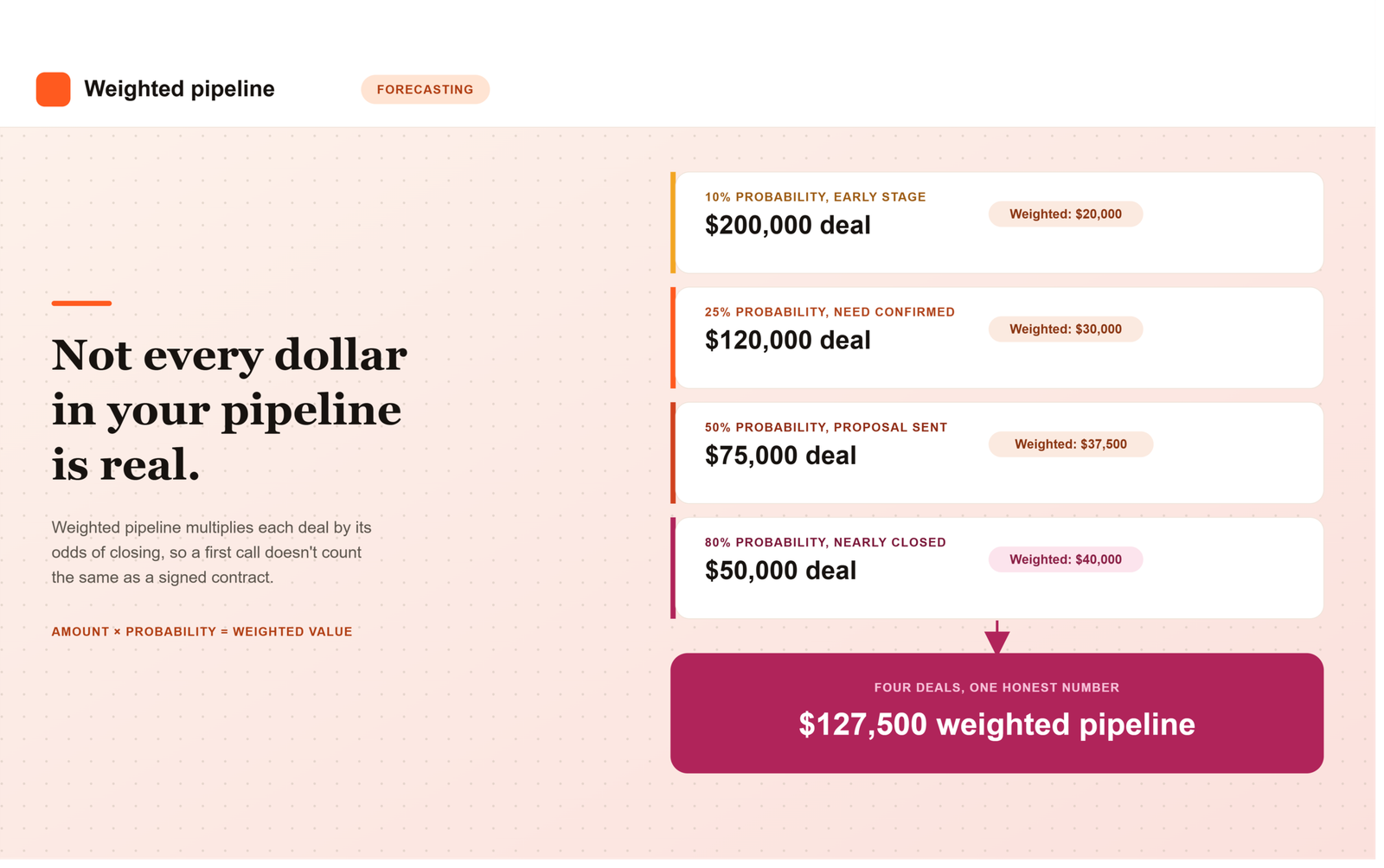
    Here’s a worked example using four hypothetical deals at different stages: a $200K deal at 10% probability, a $120K deal at 25%, a $75K deal at 50%, and a $50K deal at 80%. Multiplying each deal by its stage probability and adding the results gives you a weighted pipeline of $127,500, which becomes a reasonable estimate of near-term new bookings.

    Here’s how to actually build this for your own team:

    1. Map your sales stages. Write out every stage a deal moves through, from first contact to closed-won.
    2. Assign a close probability to each stage, ideally based on your own historical conversion data rather than a guess.
    3. Multiply each open deal’s value by its stage’s probability to get that deal’s weighted value.
    4. Add up every weighted value across all open opportunities. That total is your weighted pipeline.
    5. Recalibrate regularly. A common recommendation is to compare your weighted forecast against what actually closed each quarter, then adjust your stage probabilities based on the gap.

    Pro tip: don’t hand-wave your stage probabilities. If you’re just guessing “discovery is 20 percent, proposal is 50 percent,” you’re not building a forecast, you’re building a nicer-looking version of a guess. Pull actual historical win rates by stage from your CRM. Even a simple lookback at the last four to six quarters of closed deals gives you a far more honest starting point than a probability borrowed from a template or a competitor’s blog post.

    Common Mistakes That Wreck a Weighted Forecast

    Weighted pipeline only works if the inputs behind it are trustworthy, and a few recurring mistakes quietly break that trust. The most common is letting stage probabilities go stale. A company sets them once during CRM setup and never revisits them, even as the sales motion, product, and market shift underneath those original assumptions.

    Another common issue is reps manually overriding probabilities on individual deals based on gut feel rather than actual stage movement. When that happens enough times across a team, the weighted total stops reflecting the sales process and starts reflecting whatever mood the pipeline review was in that week. A third mistake is applying the same probability curve across very different deal types, treating a small self-serve upgrade the same as a large multi-stakeholder enterprise deal, when the two rarely behave the same way as they move through a pipeline.

    Weighted Pipeline vs. Other Forecasting Approaches

    Weighted pipeline is one forecasting method among several, and most sales organizations end up using it alongside, not instead of, other approaches. A rep’s manual forecast category, commit, best case, pipeline, reflects human judgment about a specific deal. Historical trending looks at how deals of a similar size and type have converted in the past regardless of current stage. Weighted pipeline sits between the two: more systematic than a gut-feel forecast, more current than a purely historical trend line.

    More mature revenue operations software increasingly blends all three, layering rep judgment and historical win-rate data on top of stage-based weighting to produce a forecast that’s harder to game and easier to defend in a board meeting. If you’re evaluating a platform partly for its forecasting capability, our guide on what to look for in a B2B SaaS RevOps platform covers what native forecasting and reporting should actually look like before you sign a contract.

    Why Weighted Pipeline Matters Beyond the Sales Team

    Weighted pipeline isn’t just a sales reporting exercise. Finance uses it to model cash flow and hiring plans. Customer success and implementation teams use it to anticipate onboarding volume a quarter or two out. Marketing uses it to judge whether current pipeline generation is actually on pace to hit the number, rather than just counting raw leads.

    This is also where RevOps earns its keep. Someone has to own the stage probabilities, make sure they’re based on real historical data rather than assumption, and recalibrate them as the business changes. Get that ownership wrong, and every team downstream ends up planning against a number that looks precise but was never actually accurate to begin with.

    The Bottom Line

    Weighted pipeline exists because raw pipeline totals oversell certainty that doesn’t exist yet. By multiplying each deal’s value against a realistic probability of closing, it gives leadership a number that’s less exciting than the full pipeline total, but considerably more likely to actually show up in the bank account. The formula is simple. Getting the probabilities right, and keeping them honest over time, is the real work.

    Frequently Asked Questions

    What’s a good starting point for stage probabilities if we don’t have historical data yet?

    If you’re too new to have reliable historical win rates, start with a conservative curve, something like 10 percent for early discovery, 25 to 30 percent once a deal has a confirmed need, 50 percent at proposal, and 75 to 80 percent once verbal commitment is given. Treat these as placeholders and replace them with real data as soon as you have a few closed quarters to look back on.

    How often should we update our stage probabilities?

    Most teams review stage probabilities quarterly, comparing what the weighted forecast predicted against what actually closed. If a stage consistently over- or under-predicts close rates by a meaningful margin, adjust the probability rather than waiting for an annual planning cycle to fix it.

    Should every deal type use the same probability curve?

    Not necessarily. A small self-serve upgrade and a large multi-stakeholder enterprise deal often behave very differently as they move through a pipeline, so applying one universal curve to both can distort the forecast. Many teams build separate probability curves by deal size or segment once they have enough volume to support it.

    Can reps manually override a deal’s weighted probability?

    Some CRMs allow it, but it’s worth limiting how often this happens. If reps regularly override probabilities based on gut feel rather than actual stage progression, the weighted total stops reflecting your sales process and starts reflecting individual optimism or caution instead, which defeats the purpose of weighting in the first place.

    Is weighted pipeline the same thing as a sales forecast?

    They’re related but not identical. Weighted pipeline is one input into a forecast, a systematic, stage-based estimate. A full sales forecast often also incorporates rep judgment categories like commit and best case, along with historical trending, to produce a final number leadership actually commits to externally.

    Why does weighted pipeline matter to teams outside of sales?

    Finance uses it for cash flow and hiring plans, customer success uses it to anticipate onboarding volume, and marketing uses it to judge whether pipeline generation is actually on pace. Because so many teams plan against this number, getting the underlying probabilities right is a shared responsibility, not just a sales metric.

  • What Is a HubSpot Workflow? A Beginner’s Guide

    What Is a HubSpot Workflow? A Beginner’s Guide

    A HubSpot workflow is an automated set of actions that runs on its own when a specific trigger happens, like a form submission, a property change, or a scheduled date. Instead of a person manually sending an email or updating a record, HubSpot does it for you based on rules you set once.

    If you’re setting up HubSpot for the first time, “workflow” is one of those words that gets thrown around constantly in onboarding calls and YouTube tutorials. Nobody stops to explain it in plain terms. So let’s fix that.

    What is a HubSpot workflow, exactly?

    At the simplest level, a workflow is an “if this happens, then do that” instruction you build inside HubSpot. It’s an automated sequence of actions that you can trigger based on specific criteria, such as contact properties, behaviors, or lifecycle stages.

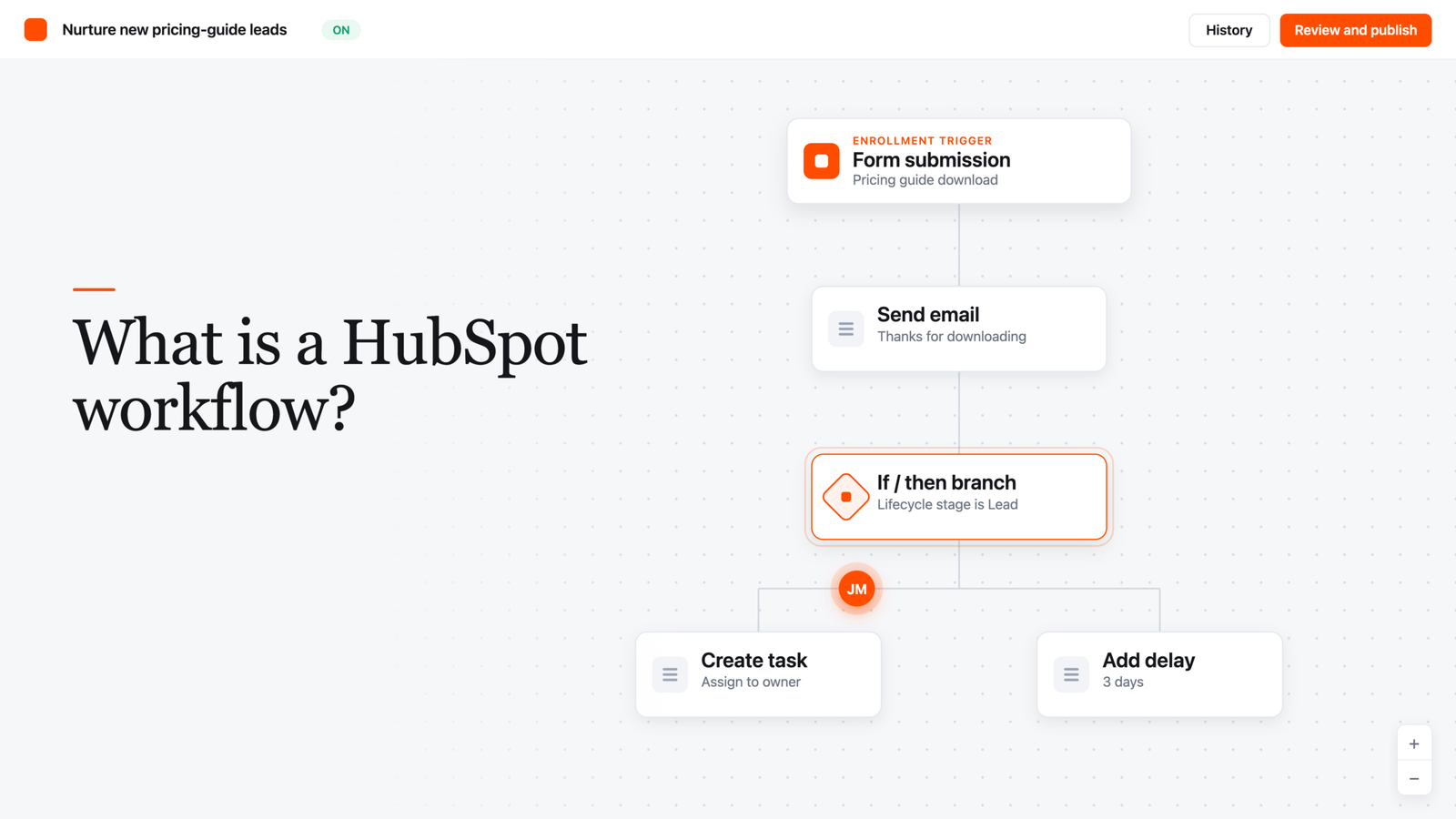
    Say a prospect fills out a form to download a pricing guide. A workflow can automatically send them a thank-you email, create a follow-up task for a sales rep, and drop them into a nurture sequence, all without anyone touching a keyboard.

    That’s the whole point. You set the logic up once, and HubSpot repeats it every single time the trigger condition is met, whether that’s once a day or a thousand times a day.

    How does a HubSpot workflow actually work?

    Every workflow has two core pieces: a trigger (HubSpot calls this an “enrollment trigger”) and a set of actions.

    The enrollment trigger decides which records get pulled into the workflow and when. There are a few different trigger types you’ll run into:

    • Event-based triggers: fire when something happens, like a form submission or a page view.
    • Filter-based (list) triggers: fire when a record matches certain criteria, like “lifecycle stage is Customer.”
    • Schedule-based triggers: run on a set frequency, such as an annual birthday email based on a contact’s birthday property.
    • Webhook triggers: enroll a record when HubSpot receives a signal from an outside tool (this one requires Data Hub Professional or Enterprise).

    Once a record (a contact, company, deal, or ticket) is enrolled, the workflow moves it through a series of actions. Those actions can send an email, update a CRM property, create a task, assign an owner, add a delay, or branch the record down a different path depending on how it answers a yes/no condition.

    Here’s the part beginners miss: workflows aren’t just for contacts. HubSpot lets you build workflows around companies, deals, tickets, quotes, and a handful of other object types, so the same logic applies whether you’re nurturing a lead or routing a support ticket to the right rep.

    Why does this matter for a growing GTM team?

    Honestly, most teams don’t get burned by a lack of workflows, they get burned by workflows nobody understands or maintains. But used well, workflows solve a real problem: manual follow-up doesn’t scale.

    When your lead volume is small, a rep can eyeball every new form fill and respond by hand. Once you’re getting dozens of leads a day across multiple channels, that falls apart fast. Workflows let you automate the qualification and distribution of leads, so high-priority prospects get attention immediately instead of sitting in an inbox.

    They’re also how HubSpot keeps CRM data from turning into a mess as you scale. A workflow can automatically update a lifecycle stage, log an activity, or flag a record for cleanup the moment a condition is met, instead of relying on someone to remember to do it.

    Workflows vs. sequences: what’s the difference?

    This trips up a lot of new HubSpot users, so it’s worth a quick clarification. Sequences are built for one-to-one sales outreach: a rep enrolls a specific contact into a series of personalized emails and task reminders, and it’s designed to preserve a human touch.

    Workflows are the fully automated version that runs across marketing, sales, and service at scale, updating properties, assigning tasks, routing tickets, and handling branching logic without a rep manually enrolling each record. If a sequence is a rep working a list by hand with some automation assist, a workflow is the machine running in the background regardless of who’s watching it.

    What HubSpot plan do you need for workflows?

    This is where a lot of people get tripped up during setup, and it’s worth checking before you build your first one. The full workflow builder, with branching logic and multi-step automation, is a Professional and Enterprise tier feature. Starter subscriptions only include simple, single-step automations in specific tools like forms, not the full drag-and-drop workflow editor.

    If you’re still figuring out which HubSpot tier your team actually needs, it’s worth reading through HubSpot Free vs. Starter vs. Professional: Which Tier Do You Actually Need? before you commit to a plan based on workflow access alone.

    A simple checklist before you build your first workflow

    Pro tip: don’t open the workflow builder until you can answer these questions on paper. A workflow built without a clear trigger and end state is how you end up with duplicate emails and confused prospects.

    1. What specific event or condition should start this workflow? (Form fill, property change, date, list membership.)
    2. Which record type does it apply to? (Contact, company, deal, ticket.)
    3. What should happen, step by step, once a record enrolls?
    4. Should records be allowed to re-enroll, or only run through once?
    5. What condition should remove a record from the workflow early?
    6. Who on your team needs to be notified if something breaks?

    Getting these six answers down before you touch the builder will save you from the classic beginner mistake: building a workflow that technically runs, but does the wrong thing to the wrong people.

    FAQ

    Is a HubSpot workflow the same as an automation?
    Pretty much, yes. “Workflow” is just HubSpot’s specific name for its automation tool. Other platforms might call the same concept a “flow” or an “automation recipe,” but the underlying idea (trigger plus actions) is the same.

    Can I use workflows on HubSpot’s free plan?
    No. The full workflow builder requires Marketing Hub, Sales Hub, Service Hub, or Operations Hub Professional or Enterprise. Free and Starter accounts get simple, single-action automations in specific tools, not the visual multi-step builder.

    Do workflows only send emails?
    No, and this is a common misconception. While email automation is the most visible use case, workflows can also update CRM records, create internal tasks, notify team members, route support tickets, and connect to external systems through webhooks and integrations.

    What happens if a contact meets a workflow’s trigger twice?
    It depends on your re-enrollment setting. You can configure whether a record re-enrolls each time it meets the trigger criteria again, or only runs through the workflow once, ever.

    Do I need coding skills to build a workflow?
    No. Workflows are built through a visual, drag-and-drop editor that lets you set up branching “if this, then that” logic without writing code. HubSpot has also added an AI assistant that can suggest triggers and actions based on a plain-language prompt.

  • HubSpot Free vs. Starter vs. Professional: Which Tier?

    HubSpot Free vs. Starter vs. Professional: Which Tier?

    HubSpot Free vs. Starter vs. Professional: Which Tier Do You Actually Need?

    If you’ve spent any time on HubSpot’s pricing page, you know the feeling. Three tiers, a handful of “Hubs,” per-seat math, and a nagging suspicion that you’re either about to overpay or about to get stuck two months in.

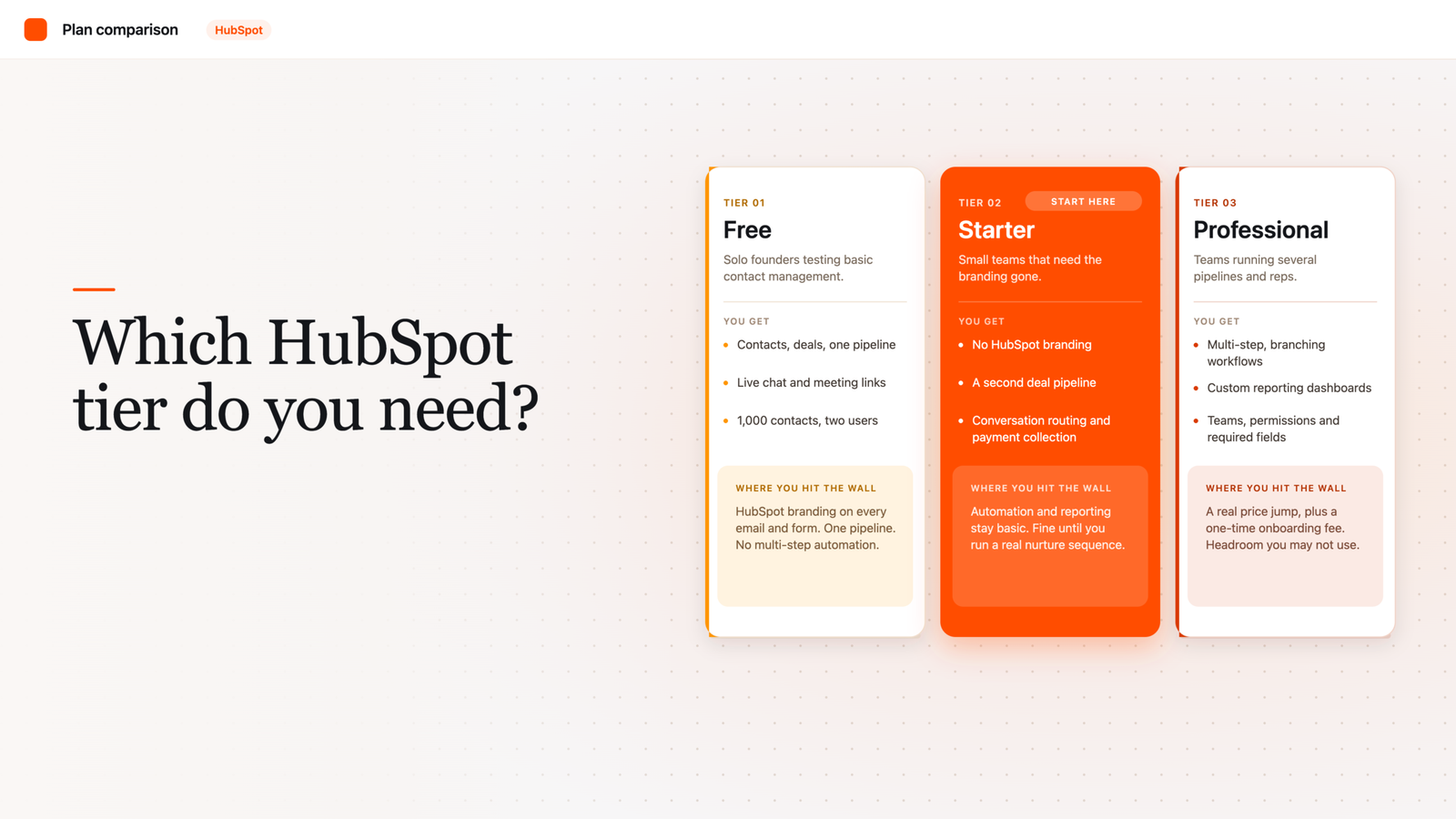
    HubSpot Free works for solo founders testing basic contact management. Starter (around $20/seat/month) fits small teams that need automation basics and no branding. Professional ($100+/seat or $890/month for Marketing Hub) suits teams that need multi-step automation, custom reporting, and multiple pipelines.

    That’s the short version. But the real answer depends on where your team actually gets stuck day to day, not on some abstract “company size” bracket. Let’s walk through what each tier really includes, so you’re not guessing.

    What’s actually different between the three tiers?

    A “tier” in HubSpot just means a package of features tied to a price point. You can mix tiers across different Hubs (Marketing, Sales, Service, Content, Operations), which is part of why the pricing page feels confusing.

    At a high level: Free gets you in the door with core CRM functionality. HubSpot’s free CRM includes up to two users and 1,000 contacts, with no limits on how long you can use it and no expiration date. Starter removes HubSpot’s branding from your emails and forms and adds early automation. Professional is where real workflow automation, custom reporting, and team management features live.

    What do you actually get with HubSpot Free?

    Free is a genuinely usable CRM (a system for tracking your contacts, companies, and deals in one place), not just a stripped-down demo. You get contact and deal records, basic pipeline tracking, live chat, and meeting scheduling at no cost.

    But it has real ceilings. You’re capped at two users and 1,000 contacts. You only get one deal pipeline (the stages a deal moves through, like “Prospect” to “Closed Won”), so if you run more than one sales process, say new business versus renewals, you’re already boxed in. There’s also no multi-step workflow automation on Free; you can trigger a single follow-up email off a form fill, but you can’t build a branching sequence.

    Every outward-facing piece of Free, your emails, forms, chat widget, and meeting links, carries HubSpot’s branding. For a two-person team testing the waters, that’s a non-issue. For a team fielding client questions about “what CRM are you using,” it starts to feel unprofessional.

    What does Starter add?

    Starter is priced around $20 per seat per month and is really the first “real” paid tier. It removes HubSpot’s branding and unlocks a second deal pipeline, so you can finally separate two different sales motions.

    On the sales side specifically, Starter adds conversation routing (automatically directing incoming chats or emails to the right rep), built-in payment collection, unlimited email notifications, and a set amount of calling minutes per account each month. It also introduces custom properties and task queues, small but meaningful upgrades if your team has outgrown default fields.

    Honestly, Starter is the tier most early-stage teams should be evaluating first, not Free and not Professional. It’s cheap enough to try without a real budget conversation, and it removes the two limitations (branding and single pipeline) that trip people up fastest.

    What does Professional unlock?

    This is where the price jump gets real. Sales Hub Professional runs about $100 per seat per month, while Marketing Hub Professional starts closer to $890 per month. Professional tiers also typically carry a one-time onboarding fee, roughly $1,500 for Professional plans, separate from your monthly subscription.

    What do you actually get for that? Multiple deal pipelines with more flexibility, required fields (so reps can’t skip critical data entry), Teams (for organizing larger sales orgs with permissions), advanced views, and significantly more calling minutes per rep each month. Professional also connects to Salesforce if you’re running a hybrid stack, and it’s the tier where custom reporting and true multi-step automation live.

    Here’s the honest take: most teams don’t actually need Professional because of one flashy feature. They need it because Starter’s automation and reporting genuinely can’t support a sales or marketing motion with more than a couple of pipelines and reps. If that’s not you yet, you’re paying for headroom you won’t use for a year.

    A quick self-check: which tier do you need?

    Run through these questions before you commit to a plan:

    1. How many people need CRM access today? More than two, and Free is already off the table.
    2. Do you run more than one sales or marketing process? If yes, you need at least Starter’s second pipeline.
    3. Does your team need multi-step automation (like a five-email nurture sequence triggered by behavior, not just one follow-up)? That’s a Professional-level need.
    4. Do you need custom reporting dashboards for leadership, not just default views? Professional territory.
    5. Is branding on your customer-facing emails and forms a dealbreaker? If yes, skip Free entirely.
    6. Can you absorb a one-time onboarding fee on top of monthly seats? If not, stay on Starter until you can.

    Pro tip: don’t buy Professional across every Hub at once just because you need it in one. Most teams only need Professional-level automation in Sales or Marketing, not both, at least in year one. Buying it everywhere just because the bundle looks tidy is how budgets balloon.

    FAQ

    Is HubSpot’s free CRM actually free forever, or is it a trial?
    It’s genuinely free forever, no expiration date and no credit card required for the core CRM. The catch is the two-user and 1,000-contact caps, not a hidden time limit.

    Can I mix tiers across different HubSpot Hubs?
    Yes. You could run Sales Hub Professional while staying on Marketing Hub Starter, and plenty of teams do exactly that to control cost.

    Does upgrading from Starter to Professional include onboarding help?
    Professional plans typically carry a one-time onboarding fee separate from your monthly subscription. That fee covers setup support, but it’s mandatory in most cases, not optional white-glove service.

    What’s the single biggest reason teams outgrow Starter?
    Automation. Starter gives you light, single-step automation, but the moment you need branching workflows based on contact behavior, you’re looking at Professional.

    Should a two-person startup ever start on Professional?
    Rarely. If you’re testing a motion, not scaling one, Free or Starter almost always makes more sense until your process is proven.