Author: Kartik Mishra

  • Best CRM Tools for Product Led Growth in 2026

    Most CRM comparisons for product-led growth teams still get evaluated on price, seat count, and how many integrations appear on a marketplace page. Those criteria miss the questions that actually determine whether a CRM works for a PLG motion: can it see activation data natively, does it support a clean handoff from self-serve to sales-assist without losing context, and does it track expansion the way a PLG account actually grows, through seat additions and feature adoption, not just a manually updated deal stage.

    This guide compares six CRM tools worth evaluating for product-led growth teams heading into 2026, specifically through activation visibility, sales handoff support, and expansion workflow fit.

    Why Standard CRM Evaluation Criteria Don’t Work for PLG

    • Traditional CRMs assume a human-initiated sale. In PLG, the user often self-activates before any sales contact happens, so a CRM built around rep-logged activity has nothing to work with until much later in the relationship.
    • Deal stages don’t map to activation stages. A PLG account can be signed up, active, and expanding without ever touching a traditional pipeline, which makes deal-stage reporting nearly meaningless for the accounts that matter most.
    • PLG accounts have many users, not one contact. A single-contact-per-deal data model can’t represent an account where twenty users sit at different points in the activation journey.
    • Expansion is usage-driven, not rep-driven. A seat addition or feature adoption event should trigger a workflow automatically, not wait for a rep to notice and manually log it.

    Tool Comparison: CRM Software for Product-Led Growth

    Tool Activation Visibility Sales Handoff Support Expansion Workflow Fit Best For
    Endgame Native, purpose-built for usage-based signals Strong, built specifically for self-serve to sales-assist Native, triggers off product events PLG-first companies wanting purpose-built tooling over a stitched stack
    Correlated Native, strong account-level signal scoring Moderate, works as a signal layer feeding an existing CRM Strong, surfaces expansion-ready accounts automatically Teams wanting a usage-signal layer on top of a CRM they already run
    Pocus Native, focused on surfacing warm accounts to reps Strong, designed to hand signals directly to sales workflow Moderate, depends on the connected CRM for deal tracking Sales teams needing PLG signals surfaced inside their existing tools
    HubSpot (Breeze) Requires integration with a product analytics tool Moderate, configurable workflows once usage data is connected Moderate, tracked via deal and contact properties Mid-market teams wanting CRM, marketing, and PLG signals in one platform
    Salesforce (Agentforce) Requires custom build to ingest usage data Strong once configured, built for complex multi-stakeholder handoffs Strong for large accounts, but needs engineering investment to set up Larger PLG companies with an enterprise upsell motion and engineering resources
    Attio Requires integration; flexible data model helps represent usage data once connected Moderate, customizable but less purpose-built than PLG-native tools Moderate, depends on how the account model is configured Product-led or hybrid GTM teams wanting a lightweight, highly customizable CRM

    Endgame: Built Specifically for the PLG Motion

    Endgame treats product usage as a first-class data object rather than something bolted on afterward, which makes activation visibility and account health scoring genuinely native rather than something your team has to configure from scratch. Its strongest advantage is the self-serve to sales-assist handoff, a rep picking up an account inherits full usage history automatically. The tradeoff is that it’s purpose-built for PLG specifically, so companies running a significant enterprise or sales-led motion alongside PLG may still need a traditional CRM working in parallel.

    Correlated: A Signal Layer for Teams Keeping Their Existing CRM

    Correlated doesn’t try to replace your CRM, it sits alongside it and translates raw product usage into account-level signals that feed into whatever system your reps already work from. This fits teams that have already standardized on HubSpot or Salesforce and don’t want to migrate, but still need the usage-based scoring those platforms don’t provide natively. The expansion workflow fit is strong specifically because it’s designed to flag expansion-ready accounts automatically, rather than waiting for a rep to notice.

    Pocus: Getting Signals Directly in Front of Reps

    Pocus focuses specifically on surfacing warm, usage-qualified accounts to reps at the moment they’re ready for outreach, which makes it strong on activation visibility and handoff support. Its expansion workflow fit depends more heavily on the CRM it’s connected to for actual deal and forecasting mechanics, so it works best as a companion tool rather than a standalone system of record.

    HubSpot: The All-in-One Option for Mid-Market PLG Teams

    HubSpot’s native AI, Breeze, plus its marketing and CRM tooling in one platform makes it an efficient starting point for mid-market PLG companies that don’t want to run three separate vendors. Activation visibility isn’t native, it requires connecting a product analytics tool, but once that connection exists, HubSpot’s workflow automation can act on the data reasonably well. It tends to be the sensible default for teams without heavy engineering resources to build a custom stitched stack.

    Salesforce: Depth for Complex, Enterprise-Bound PLG Motions

    Salesforce’s Agentforce and broader configurability give it real strength in handling complex, multi-stakeholder handoffs, which matters once PLG accounts start growing into genuine enterprise upsell opportunities. The catch is that activation visibility requires custom integration work, Salesforce doesn’t treat usage data as native the way Endgame or Correlated do, so this option makes the most sense for companies with engineering capacity to build that connection properly.

    Attio: Flexibility for Hybrid GTM Teams

    Attio’s highly customizable data model makes it easier than most traditional CRMs to represent multi-user PLG accounts once usage data is connected, without forcing a rigid single-contact-per-deal structure. It’s a lighter-weight option than Salesforce and often faster to configure than HubSpot for teams with unconventional data needs, though its smaller ecosystem means less out-of-the-box support for PLG-specific workflows compared to purpose-built tools like Endgame.

    How to Choose Between These Options

    Start by identifying which of the three criteria is actually broken today, not which tool has the most impressive demo. If reps can’t see activation data at all, prioritize activation visibility first, that’s usually Endgame, Correlated, or Pocus depending on whether you want a standalone system or a signal layer on an existing CRM. If activation visibility already exists but handoffs lose context when accounts move to sales-assist, prioritize handoff quality specifically, and test it against a real account during any vendor demo, not a curated one.

    Companies running a hybrid PLG-plus-enterprise motion often end up combining a PLG-native tool for activation and expansion signals with a traditional CRM like Salesforce or HubSpot for the actual sales and forecasting mechanics, rather than expecting one platform to do both equally well.

    Common Mistakes When Choosing a PLG CRM

    • Evaluating tools on feature lists instead of testing activation visibility, handoff quality, and expansion tracking against real account data
    • Assuming a traditional CRM’s “AI features” cover usage-based scoring natively, when most require a separate integration to work at all
    • Choosing a PLG-native tool as a full CRM replacement when what’s actually needed is a signal layer alongside an existing system
    • Skipping the step of mapping actual activation milestones before evaluating any platform against them

    Summary

    CRM tools for product-led growth split into two real categories: purpose-built PLG platforms like Endgame, Correlated, and Pocus that treat usage data as native, and traditional CRMs like HubSpot, Salesforce, and Attio that require connecting a product analytics tool before activation visibility works at all. The three criteria that actually determine fit, activation visibility, sales handoff quality, and expansion workflow fit, matter more than price or seat count when comparing options.

    Endgame offers the deepest native fit for PLG-first companies, Correlated and Pocus work well as a signal layer for teams keeping their existing CRM, and HubSpot, Salesforce, or Attio suit teams needing broader CRM functionality alongside PLG signals, particularly once a hybrid PLG-plus-enterprise motion develops. Many companies end up combining a PLG-native tool with a traditional CRM rather than expecting one platform to handle both activation tracking and complex enterprise sales equally well.

    FAQ

    What’s the best CRM for a company that’s purely PLG with no sales team yet?

    Endgame or Correlated tend to fit best at this stage, since both treat activation and usage data as native rather than requiring a separate integration project. A traditional CRM like HubSpot or Salesforce is usually more than a purely self-serve company needs before a sales-assist motion actually develops.

    Can we add PLG capability to HubSpot or Salesforce instead of switching platforms?

    Yes, both can support PLG workflows once connected to a product analytics tool, though neither treats usage data as native the way purpose-built PLG platforms do. This tends to work well for teams already standardized on one of these CRMs that don’t want to run a separate system for PLG signals.

    Should we replace our CRM entirely with a PLG-native tool?

    Not necessarily. Tools like Correlated and Pocus are often used as a signal layer alongside an existing CRM rather than a full replacement, which lets teams keep their sales and forecasting mechanics in a familiar system while adding the usage-based visibility that system lacks natively.

    How do we test whether a CRM’s sales handoff actually preserves context?

    Ask the vendor to demonstrate the handoff on a real account with a mix of active and dormant users, not a curated demo account. A rep picking up the account should immediately see its full activation timeline and usage trends, not start from a blank contact record.

    What should a hybrid PLG-plus-enterprise company do differently?

    Many hybrid companies combine a PLG-native tool for activation and expansion signals with a traditional CRM like Salesforce for the actual enterprise sales and forecasting workflow, rather than trying to force one platform to handle both equally well.
  • Best AI Tools for SaaS Onboarding and Renewals

    Most conversations about AI tools for B2B SaaS focus on the front end of the funnel, lead scoring, forecasting, conversation intelligence. Less attention goes to what happens after a deal closes, even though onboarding and renewals are where a huge share of B2B SaaS revenue growth actually gets protected or lost. A customer who never activates properly churns quietly months later, and a renewal that nobody flagged as at-risk shows up as a surprise on the forecast the same week finance is asking why the number dropped.

    For revenue operations leaders running these customer workflows out of India, evaluating AI tools for onboarding and renewals also means checking a few things a generic comparison won’t cover, pricing exposure on INR budgets, support availability across the time zones your customers sit in, and how cleanly the tool plugs into a CRM stack that may already include India-built platforms like Zoho or Freshworks. This guide compares the tools worth evaluating for both workflows and the criteria that matter specifically for an India-based RevOps team.

    Why Onboarding and Renewal AI Tools Matter for RevOps

    Onboarding and renewals sit downstream of the CRM but upstream of net revenue retention, which makes them a natural RevOps concern even though they’re often owned operationally by Customer Success. AI workflow automation in these two areas typically does one of three things: it standardizes what a good onboarding actually looks like instead of leaving it to individual CSM habit, it surfaces renewal risk earlier than a manual health-score spreadsheet ever could, and it frees up CSM time from status updates and manual tracking so more of it goes toward actually managing the relationship.

    None of that shows up cleanly in a pipeline report, which is exactly why these tools get evaluated less rigorously than sales-facing ones, even though the revenue impact of a broken onboarding or a missed renewal signal can be just as large as a lost deal.

    Tool Comparison: Onboarding and Renewal AI Platforms

    Tool Primary Workflow Best-Fit Team Size Stack Integration India-Specific Consideration
    Rocketlane Customer onboarding and implementation project management Mid-market Salesforce, HubSpot, Slack Founded by an India-based team; strong regional support and awareness of INR-budget buyers
    Arrows (by HubSpot) Onboarding plans native to the CRM SMB to mid-market Native, built for HubSpot specifically Simplest option for teams already standardized on HubSpot; no separate vendor relationship to manage
    GuideCx Implementation and onboarding project management Mid-market to enterprise Salesforce, HubSpot, and major CRMs US-based support hours; confirm SLA response times against IST before committing
    Userpilot In-product, self-serve onboarding for PLG motions SMB to mid-market Product-side, connects to analytics tools and CRMs via integration Usage-based pricing tied to monthly active users; model cost carefully as PLG usage scales
    Vitally Customer health scoring and renewal risk detection Mid-market CRM plus product analytics integration Configurable health scoring works well for teams wanting to define their own India-specific usage signals
    ChurnZero Renewal and churn prevention automation Mid-market to enterprise Native CRM integrations, in-app messaging Strong automated playbooks; confirm onboarding support timezone before signing
    Catalyst Customer success and renewal workflow automation Mid-market to enterprise CRM, billing, and product data integration Data unification across billing and CRM matters if you already run a mixed India-plus-global stack
    Totango Enterprise-scale customer success and renewal management Enterprise Deep CRM and data warehouse integration Implementation complexity and cost tend to only make sense once customer volume is high

    Onboarding Tools: What to Actually Evaluate

    1. Does It Standardize the Process, Not Just Track It?

    A tool like Rocketlane or GuideCx should enforce a repeatable onboarding template across customers, not just give a CSM a place to log status updates manually. Ask vendors to show a live onboarding plan for a real customer, not a demo template, and check whether milestones actually trigger automated nudges when they’re at risk of slipping.

    2. In-Product vs. Human-Led Onboarding Fit

    Tools like Userpilot are built for self-serve, product-led onboarding, where the goal is guiding a user to activation without a human ever getting involved. That’s a fundamentally different problem from Rocketlane or GuideCx, which manage a human-led, multi-stakeholder implementation project. Confirm which category actually matches your onboarding motion before comparing pricing, since the two aren’t interchangeable.

    3. Visibility Back Into the CRM

    An onboarding tool that operates in isolation from your CRM creates the same reporting gap that plagues disconnected marketing and sales systems. Confirm onboarding status and completion data flows back into whatever CRM your RevOps team already reports from, whether that’s HubSpot, Salesforce, Zoho, or Freshworks, so a stalled onboarding shows up as a visible risk signal rather than something only the CSM team can see.

    Renewal Tools: What to Actually Evaluate

    1. Configurable Health Scoring, Not a Fixed Model

    Vitally, ChurnZero, and Catalyst all offer health scoring, but the value depends entirely on whether you can define the specific usage signals that predict renewal or churn for your product, rather than accepting a generic model built for a different kind of SaaS business. Ask each vendor how flexible the scoring configuration actually is on a real account, not a curated demo.

    2. Signal-to-Action Speed

    A churn-risk signal is only useful if it reaches a CSM’s queue quickly enough to act on it before the renewal conversation is already happening. Ask vendors specifically how fast a usage drop or engagement decline becomes a visible alert, and whether that alert can trigger an automated playbook rather than sitting in a dashboard nobody checks daily.

    3. Renewal Forecasting That Feeds RevOps Reporting

    The best renewal tools don’t just help a CSM manage individual accounts, they roll up into a renewal forecast RevOps can actually use for board reporting. Confirm the tool can export or natively feed renewal probability data into whatever forecasting system your revenue operations team already relies on, rather than creating a second, disconnected forecast that competes with the CRM’s.

    What Changes for Indian B2B SaaS Teams Specifically

    • USD pricing on INR budgets. Most of these tools price in USD, so per-seat or usage-based costs move with currency fluctuation in a way that matters more for India-based finance teams than for a US buyer evaluating the same platform.
    • Support hours across time zones. Several of these vendors run support primarily in US hours. Confirm actual response-time SLAs against IST before assuming “24/7 support” means what you think it means.
    • Integration with an existing India-built CRM. If your core CRM is Zoho or Freshworks rather than Salesforce or HubSpot, confirm the onboarding or renewal tool’s integration is genuinely native rather than a manual export-import workaround.
    • Data hosting and compliance. If your customers or your own compliance obligations require clarity on where customer data is processed, get this in writing from the vendor rather than assuming.

    Common Mistakes When Choosing These Tools

    • Buying a renewal health-scoring tool before defining what actually predicts churn for your specific product
    • Choosing an onboarding tool built for human-led implementation when your actual motion is self-serve product-led onboarding, or vice versa
    • Assuming a US case study translates directly to a team managing customers across US, EMEA, and APAC time zones from India
    • Letting onboarding and renewal data live in a separate system that never feeds back into core RevOps reporting

    Start With the Workflow That’s Actually Broken

    The same principle that applies to sales AI tools applies here: start by identifying whether onboarding or renewals is the specific broken workflow, not by shopping for “an AI tool for customer success.” If new customers are activating slowly and inconsistently, that points toward an onboarding tool like Rocketlane, Arrows, or Userpilot depending on your motion. If renewals are being caught reactively instead of flagged early, that points toward a health-scoring and renewal automation tool like Vitally, ChurnZero, or Catalyst. Buying either category before diagnosing which workflow is actually failing tends to produce an expensive tool that never gets fully adopted.

    Summary

    Onboarding and renewals are where B2B SaaS revenue growth quietly gets protected or lost, and both deserve the same rigorous AI tool evaluation that sales-facing workflows already get. Onboarding tools split into two categories, human-led implementation platforms like Rocketlane, Arrows, and GuideCx, and self-serve, in-product tools like Userpilot for PLG motions, and picking the wrong category matters more than comparing price. Renewal tools like Vitally, ChurnZero, Catalyst, and Totango live or die on configurable health scoring, fast signal-to-action speed, and whether renewal forecasts actually feed back into RevOps reporting rather than sitting in a separate CS-only dashboard.

    For Indian B2B SaaS teams specifically, weight USD pricing exposure against INR budgets, actual support hours relative to IST, integration depth with whatever CRM you already run, whether that’s Salesforce, HubSpot, Zoho, or Freshworks, and data hosting clarity as heavily as the core feature set. Start by diagnosing which workflow, onboarding or renewals, is actually broken before evaluating any tool against it.

    FAQ

    What’s the difference between an onboarding tool and a renewal tool?

    Onboarding tools like Rocketlane or Arrows manage the process of getting a new customer to first value, whether through a human-led implementation project or self-serve in-product guidance. Renewal tools like Vitally or ChurnZero focus on ongoing health scoring and churn-risk detection for existing customers approaching a renewal date. Some platforms overlap, but most teams end up using a distinct tool for each workflow.

    Should we pick a tool built for human-led onboarding or self-serve onboarding?

    It depends entirely on your actual onboarding motion. If a CSM manages a multi-stakeholder implementation project, tools like Rocketlane or GuideCx fit better. If customers largely activate the product themselves without human involvement, a self-serve, in-product tool like Userpilot is the better fit. Buying the wrong category typically means the tool goes unused regardless of its feature list.

    How important is CRM integration for onboarding and renewal tools?

    Very important for revenue operations visibility. If onboarding status or renewal health scores don’t flow back into the CRM your RevOps team reports from, whether that’s Salesforce, HubSpot, Zoho, or Freshworks, those signals stay siloed with the Customer Success team and never inform the broader revenue forecast or risk reporting.

    What should Indian SaaS teams check before signing with a US-based vendor for these tools?

    Confirm actual support response times against IST rather than accepting a generic “24/7” claim, model total cost against currency fluctuation since most of these tools price in USD, and ask directly where customer data is processed if data residency or compliance is a concern for your customers.

    Can one platform handle both onboarding and renewals?

    Some enterprise-focused platforms like Totango and Catalyst offer capability across both workflows, but most mid-market teams end up choosing a specialized tool for each, since a platform built primarily for renewal health scoring rarely matches the depth of a dedicated onboarding project management tool, and vice versa.

    How do we know if renewal health scoring is actually working?

    The clearest signal is whether at-risk accounts get flagged before the renewal conversation starts, rather than being discovered reactively when a customer emails to cancel or expresses hesitation during the renewal call. If your team is still being surprised by churn regularly after implementing a health-scoring tool, the scoring model likely needs to be reconfigured against your own historical churn data rather than left on its default settings.

  • Best CRM and RevOps Platforms for Indian SaaS Teams

    Choosing a CRM and RevOps platform is never purely a feature comparison, it’s a decision shaped by who you’re selling to, where your team sits, and what compliance and pricing realities you operate under. For Indian SaaS teams selling primarily into the US, EMEA, and APAC while managing teams based in India, those constraints look different than they do for a domestic-only company. This guide looks at platform selection specifically through that lens.

    Most CRM comparison content is written from a US-centric vantage point, assuming USD pricing, US business hours, and US-based support are simply the default. For an India-headquartered SaaS company, none of those assumptions hold automatically, and treating them as if they do tends to produce a platform decision that looks fine on a feature checklist and causes friction for the next several years.

    What’s Different About Platform Selection for Indian SaaS Teams

    • USD pricing on INR budgets. Most major CRM and RevOps platforms price in USD, which means currency fluctuation and per-seat cost scrutiny matter more for India-based finance teams than for US-based buyers.
    • Selling across time zones from a single hub. Unlike distributed teams, many Indian SaaS companies run GTM out of one or two India-based offices while selling into US and EMEA hours, which puts more weight on async workflow support and mobile access.
    • Blended local and global stack needs. Many Indian SaaS companies also need domestic invoicing, GST-compliant billing, and India-specific payment gateway integrations alongside a global CRM, which not every platform handles cleanly out of the box.
    • Talent and support access. Platform vendors with strong partner and implementation support in India, versus purely remote or US-based support, meaningfully affect onboarding speed and total cost.

    None of these four factors show up clearly in a standard vendor comparison chart, which is exactly why they get missed. A platform can score well on every core CRM feature and still create real friction the moment your finance team tries to reconcile a USD-denominated invoice against an INR budget, or your support ticket sits unanswered overnight because the vendor’s team works exclusively in US hours.

    Platform Categories to Evaluate

    The table below reflects general fit patterns, not a ranking, since the right platform depends heavily on company stage, GTM complexity, and how many regions you’re actively selling into.

    Platform Fit for Indian SaaS Teams Considerations
    HubSpot Strong for mid-market teams wanting CRM + marketing + ops in one platform, with a large partner ecosystem in India Costs scale with contact volume; budget carefully against INR-denominated plans
    Salesforce Best for larger, complex India-based SaaS companies with multi-product or enterprise sales motions Higher implementation cost; often needs a certified India-based partner
    Zoho India-headquartered, strong value for cost-conscious teams, good local support Less polished for highly complex, multi-region enterprise GTM
    Freshsales / Freshworks India-built CRM with strong regional support and pricing tuned closer to Indian SaaS budgets Smaller ecosystem of third-party integrations than Salesforce/HubSpot
    Pipedrive Lightweight option for lean, sales-led early-stage teams Limited native RevOps/forecasting depth as team scales

    Zoho and Freshworks carry a specific advantage worth calling out directly: both are India-built products, which tends to translate into pricing that’s already sensitive to INR budgets and support teams that operate in Indian time zones by default, rather than as an add-on. That doesn’t automatically make either the right choice, but it does remove two of the four friction points on this list without any extra evaluation work.

    What to Prioritize When Comparing Platforms

    1. Multi-Currency and Multi-Region Reporting

    If revenue is closing in USD, GBP, and INR across different regions, confirm the platform can roll this up cleanly for board reporting without manual spreadsheet reconciliation. Ask vendors directly to walk through how a single revenue dashboard would look with deals closing in three currencies simultaneously, rather than accepting a general claim that “multi-currency is supported.”

    2. Time Zone-Aware Automation

    Lead routing and SLA automation should account for the reality that your India-based team may be handling leads generated during US or EMEA business hours, and vice versa. A lead generated at 9pm US Eastern time needs a routing rule that doesn’t just assume the India-based rep is already awake and available, or the response-time SLA becomes meaningless in practice even if it looks fine on paper.

    3. Local Implementation and Support Access

    Platforms with certified implementation partners or support teams based in India generally mean faster onboarding and lower ongoing dependency on offshore support tickets. This matters most in the first ninety days after signing, when small configuration questions come up frequently and a multi-hour response delay compounds into weeks of lost momentum.

    4. Integration With India-Specific Tools

    Check native or easy integration with tools commonly used by Indian SaaS finance and ops teams, GST-compliant billing systems, local payment gateways, and India-based communication tools. A platform that handles this well out of the box saves a meaningful amount of custom integration work that would otherwise fall to an already-stretched internal ops team.

    Common Mistakes Indian SaaS Teams Make When Choosing a Platform

    • Choosing a platform based on what US-based peers use, without checking pricing scalability against INR budgets
    • Underestimating implementation time when the vendor’s support team operates entirely outside India-friendly hours
    • Ignoring multi-currency reporting until it becomes a painful, manual board-reporting exercise

    The first mistake is the most common, and the most understandable. It’s natural to default to whatever a well-known US competitor or peer company uses, on the assumption that if it works for them, it’ll work equally well here. The problem is that a US-based company evaluating the same platform never has to think about INR-to-USD conversion on a per-seat basis, or whether support tickets get answered before the next business day starts in Bangalore, so their experience with the platform simply isn’t a reliable proxy for yours.

    Choose the Platform That Matches Your Actual GTM Geography

    For Indian SaaS teams, the “best” CRM and RevOps platform isn’t necessarily the one with the most brand recognition, it’s the one that handles your specific mix of currencies, time zones, and regional support needs without requiring constant manual workarounds. Weight local implementation support and multi-currency reporting as heavily as core CRM features when making the final call.

    A useful exercise before finalizing a shortlist is to map out your actual revenue geography, what percentage of bookings close in USD versus INR versus GBP, and where your reps and support staff are physically located relative to your buyers. That map, more than any vendor’s feature list, should be doing most of the work in narrowing down which of these platforms genuinely fits.

    Summary

    Indian SaaS teams selling into the US, EMEA, and APAC face four constraints that don’t show up in a typical CRM comparison: USD pricing measured against INR budgets, time zone gaps between an India-based team and global buyers, the need for GST-compliant billing and local payment gateway integrations alongside a global CRM, and the value of vendor support actually operating in Indian time zones rather than purely remote support.

    Zoho and Freshsales, both India-built, tend to remove two of those four friction points by default, while HubSpot and Salesforce offer stronger fit for larger or more complex GTM motions at the cost of higher implementation overhead. When comparing platforms, weight multi-currency reporting, time zone-aware automation, local implementation support, and India-specific tool integrations as heavily as core CRM features, and map your actual revenue geography before assuming a platform that works well for a US-based peer will work the same way for you.

    FAQ

    Is Zoho or Freshworks better for an Indian SaaS company than Salesforce or HubSpot?

    It depends on GTM complexity. Zoho and Freshsales, both built in India, tend to offer pricing and support already tuned to Indian budgets and time zones, which suits cost-conscious or mid-complexity teams well. Salesforce and HubSpot generally fit better once a company has a more complex, multi-product, or enterprise-heavy sales motion that needs deeper customization than Zoho or Freshworks currently offer.

    How does INR budgeting affect choosing a USD-priced CRM?

    Most major CRM platforms price in USD, which means currency fluctuation directly affects per-seat cost predictability for an India-based finance team in a way it simply doesn’t for a US buyer. It’s worth modeling total cost at your expected headcount using a realistic USD-to-INR range, rather than the exchange rate on the day you signed the contract.

    What’s the biggest platform selection mistake Indian SaaS teams make?

    Choosing a platform mainly because a well-known US-based peer uses it, without checking whether the pricing scales sensibly against INR budgets or whether support is realistically available in India-friendly hours. A platform that works well for a US-based company isn’t automatically a reliable signal for an India-headquartered one facing different currency and time zone constraints.

    Do we need local implementation partners, or can we manage with remote support?

    It depends on how much configuration complexity you expect and how quickly you need to move. Local implementation partners or India-based support teams tend to mean faster onboarding and fewer multi-hour delays on small configuration questions, which matters most in the first few months after signing when those questions come up frequently.

    How important is multi-currency reporting if we only sell in USD today?

    It’s worth checking even if you’re USD-only today, since many Indian SaaS companies expand into additional currencies as they grow into EMEA or serve domestic Indian customers alongside global ones. Confirming this capability upfront avoids discovering, months later, that your board reporting requires a manual spreadsheet reconciliation every quarter.

    Should platform choice differ based on whether we sell into the US, EMEA, or APAC?

    Yes, to a degree. Selling primarily into US hours from an India-based team creates a different time zone gap than selling into EMEA or APAC, which affects how important time zone-aware lead routing and SLA automation are for your specific mix. Mapping out where your leads are actually generated relative to where your team sits should inform this more than a generic platform comparison would.

  • Best CRM Tools for PLG Customer Lifecycle Teams

    Product-led growth companies have a customer lifecycle problem that traditional CRMs weren’t built for: users sign up and activate long before a salesperson ever talks to them, and by the time a human touches the account, most of the meaningful lifecycle data already lives in the product, not the CRM. Choosing the right CRM tools for a PLG customer lifecycle team means picking systems built around usage data and activation signals, not just contact records and deal stages.

    Why Standard CRMs Struggle With PLG Lifecycle Data

    Traditional CRMs are built around a linear sales funnel: lead, opportunity, close. PLG lifecycle teams need something closer to a living map of account health across free trial, activation, expansion, and renewal, most of it driven by product usage events rather than sales activity. That mismatch shows up in the same three gaps across nearly every standard CRM.

    • No native way to ingest product usage or event data as a first-class object
    • Poor support for tracking multiple users within one account at different activation stages
    • Weak signal-based alerting for expansion or churn risk based on in-product behavior

    None of these gaps look dramatic in isolation, which is exactly why they persist so long. A team can patch around one with a spreadsheet or a Slack channel. Once there are enough self-serve accounts to matter, though, that patchwork becomes someone’s full-time job, and the CRM stops being the system of record it was supposed to be.

    What to Look for in CRM Tools for PLG Lifecycle Management

    1. Native or Easy Product Usage Integration

    The CRM needs to ingest usage data from your product analytics tool, such as Amplitude, Mixpanel, or PostHog, or a CDP like Segment, without heavy custom engineering, so account health reflects actual behavior, not just CRM activity. If every integration requires a developer sprint, the data will always lag behind what’s actually happening in the product.

    2. Account-Level Views Across Multiple Users

    PLG accounts often have dozens of individual users at different activation stages. Look for tools that roll this up into a single account health view rather than forcing reps to piece it together contact by contact. A rep should be able to see at a glance which users are active, which are stalled, and whether the account as a whole is trending toward expansion or churn.

    3. Lifecycle-Stage Automation, Not Just Deal-Stage Automation

    Good PLG CRM tooling triggers workflows off product events, a user hitting an activation milestone, a team inviting new seats, usage dropping below a threshold, not just off manually updated deal stages. This is the difference between a system that reacts to what a rep remembers to log and one that reacts to what the customer is actually doing.

    4. Sales-Assist Handoff Support

    Most mature PLG motions add a sales-assist layer for expansion or enterprise upsell. The CRM needs to support a clean handoff from self-serve to human-assisted selling without losing lifecycle context. A rep picking up an account should inherit its full usage history, not start from a blank contact record and a vague note about why the account suddenly matters.

    Tool Categories to Evaluate

    Most PLG lifecycle stacks combine several of these categories rather than relying on a single tool to do everything.

    Category Role in PLG Lifecycle Examples
    Core CRM System of record for accounts, users, and deals HubSpot, Salesforce, Attio
    Product analytics Tracks usage events and activation milestones Amplitude, Mixpanel, PostHog
    Customer data platform Unifies product and CRM data into one account view Segment, RudderStack
    PLG-native growth tools Purpose-built for usage-based signals and expansion triggers Endgame, Correlated, Pocus

    A common pattern is a core CRM for the system of record, a product analytics tool for event tracking, and either a CDP or a PLG-native growth tool sitting between them to translate usage signals into account health and routing decisions.

    Signs Your Current CRM Isn’t Built for PLG Lifecycle Work

    These patterns tend to show up gradually, which is part of why they’re easy to miss until they’re already costing real deals.

    • Sales and customer success teams manually re-explain account context to each other because the CRM doesn’t hold it
    • Expansion opportunities get identified reactively, a customer emails asking for more seats, rather than proactively, usage data flags the account first
    • Reps rely on spreadsheets or Slack threads to track activation status because the CRM can’t represent it well

    If more than one of these sounds familiar, the issue usually isn’t a training gap or a data hygiene problem. It’s the CRM itself not being built to represent how a self-serve product actually generates lifecycle signals.

    How to Evaluate a Tool Before Committing

    1. Ask for a live demo using your actual product usage event structure, not a generic sales demo.
    2. Check whether account health scoring is configurable to your specific activation milestones, or a fixed generic model.
    3. Confirm how the tool handles multi-user, multi-role accounts, a common PLG blind spot in older CRM platforms.
    4. Ask current customers running a similar-sized PLG motion how long implementation actually took.

    The first step matters more than it looks. A vendor demo built around a generic SaaS trial rarely surfaces the gaps that show up once your actual event data, with all its inconsistencies and edge cases, gets loaded into the system.

    The Right Tool Reflects How Your Customers Actually Grow

    For PLG companies, the CRM shouldn’t just be a sales tool retrofitted with product data bolted on, it needs to reflect how your customers actually move through activation, expansion, and renewal in the product itself. Prioritize usage-data integration and account-level lifecycle views over traditional deal-pipeline features when comparing options.

    Summary

    Traditional CRMs are built for a linear sales funnel, while PLG lifecycle teams need a living view of account health across trial, activation, expansion, and renewal, driven mostly by product usage rather than sales activity. The tools worth evaluating should integrate usage data natively, roll multi-user accounts into one health view, trigger workflows off product events instead of deal stages, and support a clean handoff to sales-assist without losing lifecycle context.

    Most real stacks combine a core CRM, a product analytics tool, and either a CDP or a PLG-native growth platform to connect the two. Before committing to any option, test it against your own usage event structure rather than a generic demo, and talk to customers running a similarly sized PLG motion about how long implementation actually took.

    Frequently Asked Questions

    What’s the difference between a CRM built for PLG and a traditional sales CRM?

    A traditional sales CRM is built around leads, opportunities, and deal stages driven by rep activity. A PLG-oriented CRM is built around account health across the full lifecycle, trial, activation, expansion, and renewal, driven primarily by product usage signals rather than manually logged sales activity.

    Do we need a separate product analytics tool if our CRM claims to support PLG?

    Usually, yes. Most CRMs that claim PLG support still rely on a dedicated product analytics tool like Amplitude, Mixpanel, or PostHog to actually capture granular usage events. The CRM’s job is typically to ingest and act on that data, not to replace the analytics layer entirely.

    How do we know our current CRM isn’t working for our PLG motion?

    Common signs include teams manually re-explaining account context to each other, expansion opportunities getting caught reactively instead of being flagged by usage data first, and reps tracking activation status in spreadsheets because the CRM can’t represent it. If more than one of these is happening regularly, the CRM itself is likely the bottleneck.

    What should a PLG CRM demo actually show us?

    Ask the vendor to run the demo using your actual product usage event structure rather than a generic sales scenario, and confirm whether account health scoring can be configured to your specific activation milestones rather than relying on a fixed, generic model that may not match how your product actually works.

    Is HubSpot or Salesforce good enough for a PLG lifecycle team, or do we need a specialized tool?

    It depends on how deeply usage data needs to be reflected in account health and automation. Core CRMs like HubSpot and Salesforce can work well as the system of record, but many PLG teams pair them with a CDP or a PLG-native growth tool like Endgame, Correlated, or Pocus to handle the usage-based scoring and lifecycle triggers the core CRM wasn’t built to do natively.

    How long does it typically take to implement a PLG-native CRM?

    Implementation time varies significantly based on how clean your existing usage event data is and how many systems need to connect. Rather than relying on a vendor’s stated timeline, ask current customers running a similarly sized PLG motion how long their implementation actually took, since that tends to be a more reliable estimate than the sales pitch.

  • 7 CRM Factors for Midmarket SaaS Teams in 2026

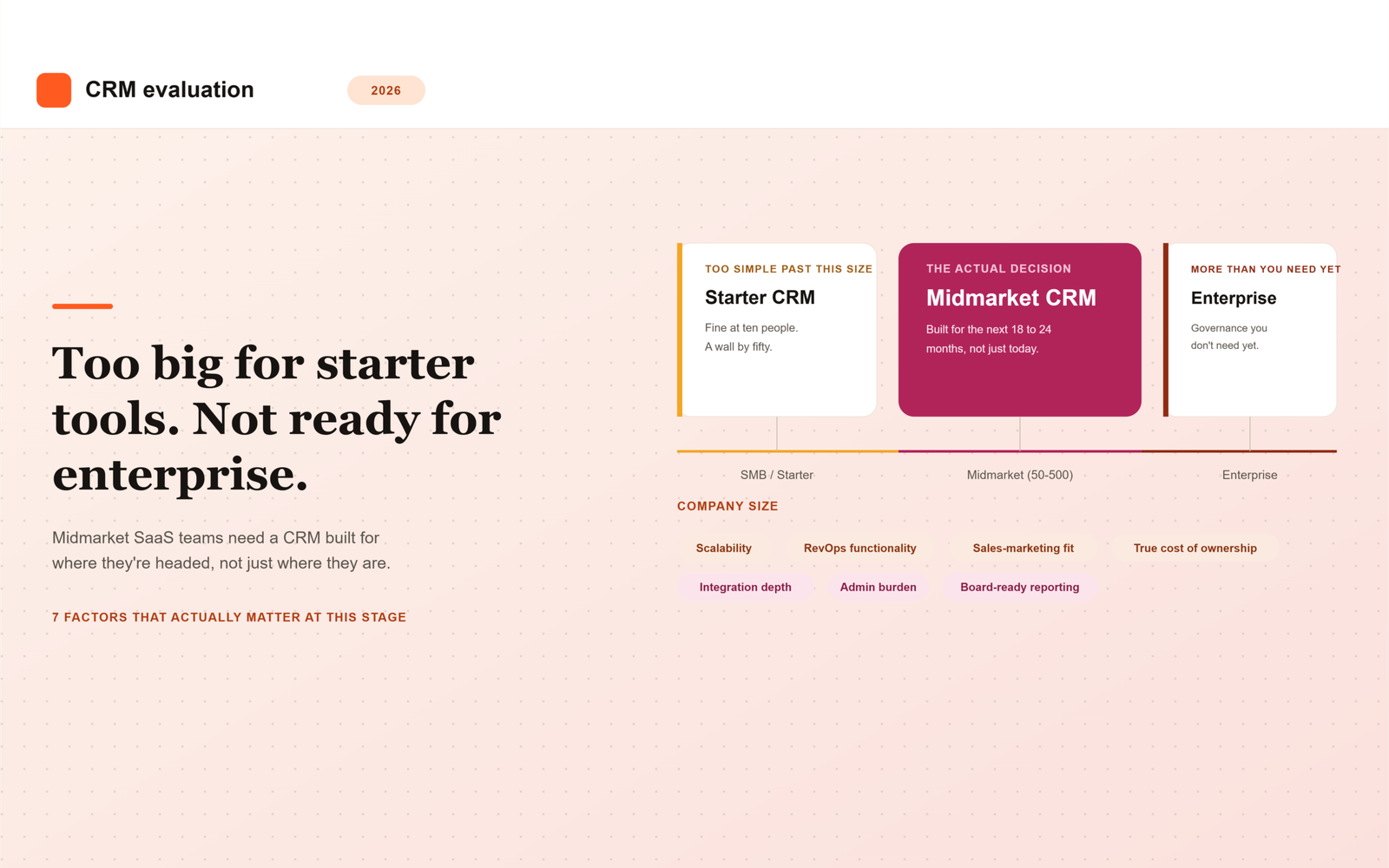
    7 CRM Factors for Midmarket SaaS Teams in 2026

    Midmarket SaaS teams sit in an awkward spot when choosing a CRM: too complex for a bare-bones starter tool, but not big enough to justify the cost and overhead of a fully customized enterprise implementation. Getting the choice right in 2026 comes down to a specific set of factors that matter more at this stage than at either end of the company-size spectrum.

    Most CRM comparisons are written for one of two audiences: early-stage founders picking their first system, or enterprise buyers running a formal RFP process. Midmarket teams end up borrowing advice from both, and neither fits particularly well. A checklist built for a five-person sales team ignores the reporting and alignment problems that show up once you have fifty reps. A checklist built for a Fortune 500 rollout assumes a dedicated admin team and a budget that most midmarket companies simply do not have.

    This guide covers the seven factors that matter specifically at midmarket scale, along with a practical way to score vendors against them.

    Why Midmarket Teams Need a Different Evaluation Lens

    Early-stage teams optimize for speed and low cost. They need something running by next week, and they can tolerate manual workarounds because the team is small enough to compensate informally. Enterprise teams optimize for customization and governance. They have the budget, the headcount, and the compliance requirements to justify a long, structured implementation.

    Midmarket SaaS teams, typically somewhere between 50 and 500 employees, with sales, marketing, and customer success functions that are established but still evolving, need to optimize for something else entirely: a system that scales with them for the next few years without requiring a disruptive re-platform in the middle of a high-growth window.

    This is also the stage where problems that were previously invisible start showing up in board meetings. A lead-routing gap that cost a few deals a month at 20 employees costs considerably more at 150. A reporting inconsistency between sales and marketing that nobody noticed before now shows up as two different pipeline numbers in the same slide deck. The CRM decision at this stage is really an infrastructure decision, not just a tool purchase.

    The 7 Factors That Matter Most

    These seven factors consistently separate a CRM decision that holds up for years from one that forces a painful redo within eighteen months.

    1. Scalability Without a Painful Re-Platform

    Choose a CRM that can genuinely support two to three times your current headcount and data volume without hitting a wall that forces a full migration. Ask vendors directly what breaks first as usage scales: record limits, automation complexity caps, or reporting performance, and at what company size their current customers typically outgrow the tier you’re considering.

    Vendors are often reluctant to volunteer this information directly, since it points customers toward a more expensive tier sooner than the sales team would prefer. Ask for specific examples of customers who outgrew the tier you’re evaluating, and what the migration process actually looked like for them.

    2. Native RevOps Functionality, Not Just Sales Pipeline Tracking

    By midmarket stage, most teams need real lead routing, scoring, and forecasting capability built in, or easily layered on, not just a pipeline kanban board with a few custom fields. Confirm what’s native versus what requires a third-party add-on and additional cost, since “supports lead scoring” often means “supports it through an app marketplace integration you’ll have to configure and maintain yourself.”

    Forecasting accuracy in particular tends to break down at midmarket size, once there are enough reps and enough deal volume that a manager can no longer sanity-check every opportunity by memory. A CRM with weak native forecasting infrastructure pushes that problem onto a RevOps hire who then has to build the missing pieces manually.

    3. Sales and Marketing Alignment Features

    Midmarket is usually where marketing and sales start actively tripping over each other: overlapping lead ownership, inconsistent MQL and SQL definitions, and reporting that doesn’t match between teams even though both are looking at supposedly the same pipeline. Prioritize CRMs with strong shared reporting and lead-lifecycle management, not just contact records that both teams happen to view separately.

    A useful test during evaluation: ask the vendor to show you exactly how a lead is scored by marketing, handed to sales, and tracked through to a closed deal, all inside one report. If that requires stitching together two separate dashboards, the alignment gap you’re trying to solve will likely persist regardless of which CRM you pick.

    4. Total Cost of Ownership, Not Just License Price

    Per-seat pricing looks manageable at midmarket headcount, but implementation, admin time, and add-on costs, especially for marketing automation and reporting, often double the real cost. Model total cost at your projected headcount 18 to 24 months out, not just today, since the sticker price you’re comparing rarely reflects what you’ll actually be paying once the team and the feature set both grow.

    Ask vendors for a realistic total cost breakdown at your projected size, including required add-ons, not just the base license. Several CRMs that look cheaper on the pricing page become more expensive than the alternative once you add the modules midmarket teams typically end up needing within the first year.

    5. Integration Depth With Your Existing Stack

    Midmarket teams usually already run a marketing automation platform, a billing system, and a customer success tool. Evaluate how cleanly the CRM integrates natively with what you already have, rather than assuming custom integration work will be trivial for your existing team to build and maintain.

    A native, well-maintained integration and a fragile third-party connector both show up as “supports integration” on a vendor’s feature page. The difference only becomes obvious once something breaks during a sync, so ask specifically how the integration handles field mapping conflicts and what happens when the connected system changes its API.

    6. Admin Burden and Internal Ownership

    Midmarket teams rarely have a large dedicated CRM administration function. Choose a platform your existing team, often a single RevOps or sales ops hire, can realistically maintain, rather than one that requires a certified specialist or a consulting partner just to keep running day to day.

    This factor gets overlooked most often during evaluation, since demos are run by the vendor’s most experienced solution engineers, not by the person who will actually be configuring workflows six months from now. Ask to see the admin interface directly, and ask how much training a typical new admin needs before they can make changes independently.

    7. Reporting That Holds Up in Board and Leadership Meetings

    By midmarket stage, leadership expects accurate pipeline coverage, forecast accuracy, and conversion metrics on demand. Confirm the CRM’s native reporting is trustworthy enough for these conversations without requiring manual spreadsheet reconciliation every reporting cycle.

    A good test is to ask the vendor to reproduce a report you currently build manually, using only their native reporting tools, live during the demo. If it takes several workarounds or an export to a spreadsheet to get there, that gap will resurface every single board cycle after you’ve signed the contract.

    Quick Comparison

    The table below summarizes why each factor carries more weight specifically at midmarket scale, compared to either an earlier or later stage.

    Factor Why It Matters Specifically at Midmarket
    Scalability Avoids a disruptive re-platform during a high-growth window
    Native RevOps functionality Pipeline tracking alone is no longer enough at this stage
    Sales-marketing alignment Handoff friction becomes a real revenue leak at this size
    True cost of ownership License price alone significantly understates real cost
    Integration depth Stack is established; poor integration creates daily friction
    Admin burden Most midmarket teams lack a large dedicated admin function
    Board-ready reporting Leadership expectations rise sharply at this stage

    How to Use This List When Evaluating Vendors

    Rather than treating these as a generic checklist, score each vendor against your specific 18 to 24 month headcount and revenue projections, not just your team’s size today. A CRM that fits perfectly right now but forces a re-platform in eighteen months often ends up costing more, in both dollars and disruption, than choosing slightly ahead of your current needs.

    A practical way to run this is to build a simple scorecard with these seven factors as rows and your shortlisted vendors as columns, then score each cell based on direct answers from the vendor rather than marketing copy. Where a vendor cannot answer a question concretely, for example, exactly what breaks first as usage scales, treat that gap itself as useful information about how the conversation will go after you’ve signed.

    Choose for Where You’re Headed, Not Just Where You Are

    Midmarket is a transitional stage, and the CRM decision should reflect that. The teams that get this right treat the decision as choosing infrastructure for the next phase of growth, not just solving today’s pipeline tracking problem.

    The most expensive CRM mistake at this stage is rarely picking a tool that’s too complicated. It’s picking one that looks simple and affordable today, then quietly running out of room exactly when the team can least afford a disruptive migration.

    Frequently Asked Questions

    How is a midmarket CRM decision different from a startup or enterprise one?

    A startup optimizes for speed and low cost, tolerating manual workarounds because the team is small. An enterprise optimizes for customization and governance, with the budget and headcount to support a long implementation. A midmarket team needs something in between: a system that scales for the next few years without a disruptive re-platform, evaluated against admin capacity and total cost, not just feature checklists built for either extreme.

    What’s the most common CRM mistake midmarket SaaS teams make?

    Choosing based on today’s headcount and today’s license price rather than where the company will be in 18 to 24 months. A CRM that fits perfectly now but hits a scalability wall shortly after often ends up costing more overall, once the disruption of a forced migration is factored in alongside the original savings.

    How much should we budget for total cost of ownership beyond the license fee?

    There’s no universal number, since it depends heavily on which add-ons your team ends up needing, but implementation, admin time, and required integrations for marketing automation and reporting commonly double the sticker price by the time a midmarket team is fully using the platform. Always ask vendors for a realistic total cost projection at your expected headcount, not just the base license quote.

    Do midmarket teams need a dedicated CRM administrator?

    Usually not a large dedicated function, but most midmarket teams do need at least one person, often a RevOps or sales ops hire, who can maintain the system without outside help. The right CRM should be realistic for that single person to administer day to day, rather than requiring a certified specialist or ongoing consulting support just to keep it running.

    How often should a midmarket team reevaluate its CRM?

    There’s no fixed schedule, but it’s worth revisiting the decision whenever the company approaches a major growth inflection, roughly doubling headcount, entering a new market, or adding a significantly different go-to-market motion. Waiting until the system is visibly breaking usually means the migration happens under more pressure and at a worse time than if it had been planned ahead of the wall being hit.

    What’s the difference between native RevOps functionality and third-party add-ons?

    Native functionality is built directly into the core platform and maintained by the CRM vendor as part of the base product. A third-party add-on is a separate tool, often from the app marketplace, that has to be configured, licensed, and maintained independently, and can break or change pricing without direct coordination with the CRM vendor. Confirming which is which before signing avoids discovering the difference only after something stops working.

  • What Is Positioning in GTM? A Beginner’s Guide

    What Is Positioning in GTM? A Beginner’s Guide

    What Is Positioning in GTM? A Beginner’s Explanation

    Positioning in GTM (go-to-market) is the work of defining the unique place your product occupies in a customer’s mind compared to every other option they could choose instead. It answers who the product is for, what problem it solves, and why it beats the alternatives. Good positioning shapes your messaging, pricing, and sales motion.

    If you’ve ever sat in a meeting where sales, marketing, and product all describe your product differently, you’ve already felt what happens when positioning is missing. It’s not a branding exercise. It’s the foundation everything else in your go-to-market plan gets built on.

    What does “positioning” actually mean in GTM?

    Go-to-market (GTM) is the overall plan for how a company brings a product to market and gets it in front of the right buyers. Positioning is one piece of that plan, and it’s arguably the most foundational one.

    At its core, positioning defines the unique space your product occupies in the customer’s mind relative to other options they’re weighing. It’s not a tagline or a slogan. It’s the underlying logic that explains why someone should pick you over the alternative, whether that alternative is a competitor, a manual process, or doing nothing at all.

    April Dunford, one of the most cited voices on this topic, describes positioning as the context-setting work that makes it obvious what your company does and what value it offers to your ideal customers. Her own definition is more specific: positioning explains how your product is the best in the world at delivering some kind of value that a clearly defined group of customers cares a lot about. That’s a mouthful, and she’s the first to admit it, but it’s precise for a reason. Vague positioning invites vague buying decisions.

    The concept itself isn’t new. Positioning as a formal idea traces back to a 1981 book by Al Ries and Jack Trout, though later work (Dunford’s especially) turned it into a repeatable process rather than just a theory.

    Why does positioning matter for your GTM strategy?

    Here’s the blunt version: if your positioning sounds like every other vendor in your category, buyers have no compelling reason to pick you. That’s not a marketing problem you can copywrite your way out of. It’s a strategy problem.

    A positioning statement sits at the core of your go-to-market strategy, and everything downstream (your messaging, your sales pitch, your onboarding, even your pricing page) gets built from it. When it’s solid, your whole team can explain what you do and why it matters in the same way, whether that’s a rep on a discovery call or a support agent onboarding a new account.

    When it’s missing or muddy, you get a familiar mess: reps improvising their own pitch, marketing running campaigns that don’t match what sales actually says, and buyers who can’t figure out why you’re different from the three other tools they’re evaluating. Honestly, most “messaging problems” companies bring to us aren’t messaging problems at all. They’re unresolved positioning problems wearing a messaging costume.

    Positioning also matters because it should inform how you actually sell, not just what you say. A product positioned for fast, self-serve adoption needs a different [[GTM motion]** than one positioned as a high-touch, enterprise-grade solution, and mismatching the two is one of the more common (and expensive) GTM mistakes we see. If you’re still deciding between a sales-led approach and a self-serve one, it’s worth reading our breakdown of GTM motion types before you lock in your positioning, since the two decisions really do influence each other.

    How is positioning different from messaging and branding?

    This trips up a lot of new founders, so let’s separate the three plainly.

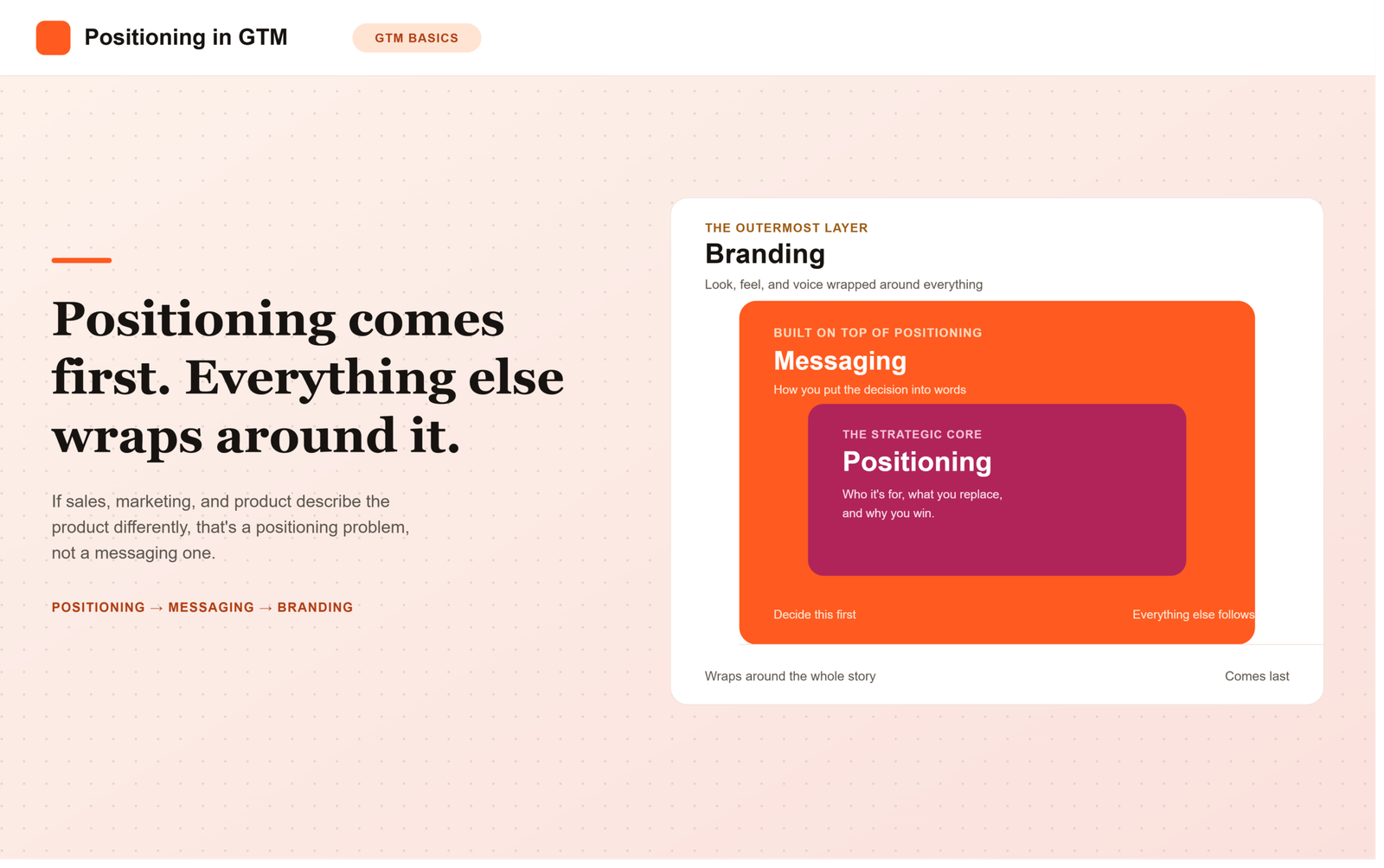
    • Positioning is the strategic decision: who this is for, what alternative you’re replacing, and what makes you the obviously better choice for that specific group.
    • Messaging is how you put that decision into words: the promise you make, how you deliver it, and why it matters to the buyer.
    • Branding is the look, feel, and voice wrapped around all of it.

    Positioning comes first. Messaging is built on top of it. Branding wraps around both. Skip the positioning step and jump straight to writing taglines, and you’ll end up with copy that sounds nice but doesn’t actually tell anyone why they should care.

    How do you actually build product positioning?

    There’s no single official template, but the process most practitioners (Dunford included) point to follows a similar pattern. Here’s a simplified version you can run through with your team:

    1. List the real alternatives. What would your customer do if your product didn’t exist? Include direct competitors and “do nothing” or manual workarounds.
    2. Identify what’s genuinely unique. What features or capabilities do you have that those alternatives don’t?
    3. Turn features into value. For each unique attribute, ask: so what does that actually let the customer do or achieve?
    4. Define who cares most. Not everyone will value that outcome equally. Narrow in on the segment that cares the most.
    5. Pick your market category. Choose the frame of reference that makes your value obvious to that specific segment, since the same product can be framed several different ways depending on the category you claim.

    Pro tip: run this exercise with sales, product, and leadership in the room, not just marketing. A lot of positioning failures aren’t actually positioning failures, they’re alignment failures, where the founder has the story right but the rest of the leadership team isn’t telling it the same way.

    Once your positioning is set, you’ll notice it shapes decisions well outside the marketing team. It influences how a product-led company designs its free trial, for instance. If you’re exploring a self-serve approach.

    What happens when positioning goes wrong?

    Weak positioning tends to show up as a pattern, not a single mistake. Products that read like every other tool in the category give buyers no compelling reason to choose them over the alternatives. You’ll also see it in a mismatched sales motion: an enterprise-style sales process bolted onto a product that should be self-serve, or vice versa. And you’ll see it in the classic cross-functional mess, where sales, marketing, and product each describe the product a little differently because no one agreed on the underlying story.

    FAQ

    Is positioning the same thing as a value proposition?
    No, though they’re closely related. Positioning is the broader strategic frame (who you’re for and why you beat the alternatives), and your value proposition is a specific, named statement that spells out the customer, the problem, and the differentiated solution.

    Who should own positioning inside a company?
    Product marketing often drives the process, but positioning shouldn’t live in one department. It needs input from the founder, sales, and product leadership, otherwise you end up with a story that marketing believes but no one else actually uses.

    Do early-stage startups need formal positioning, or is that a later-stage problem?
    Early stage is exactly when you need it most. Founders often get the story right instinctively through early customer conversations, but that instinct rarely survives the jump to a bigger team unless it’s written down and agreed on.

    How often should we revisit our positioning?
    Whenever something big shifts: new competitors enter, your market matures, or you move upmarket or downmarket. Positioning isn’t a one-time doc you file away after a launch.

    Can good positioning fix a weak sales motion?
    Not on its own. Positioning and your GTM motion need to match each other. Great positioning paired with the wrong sales process still creates friction for buyers.

  • Sales Pipeline vs. Sales Funnel: What’s the Difference?

    Sales Pipeline vs. Sales Funnel: What’s the Difference?

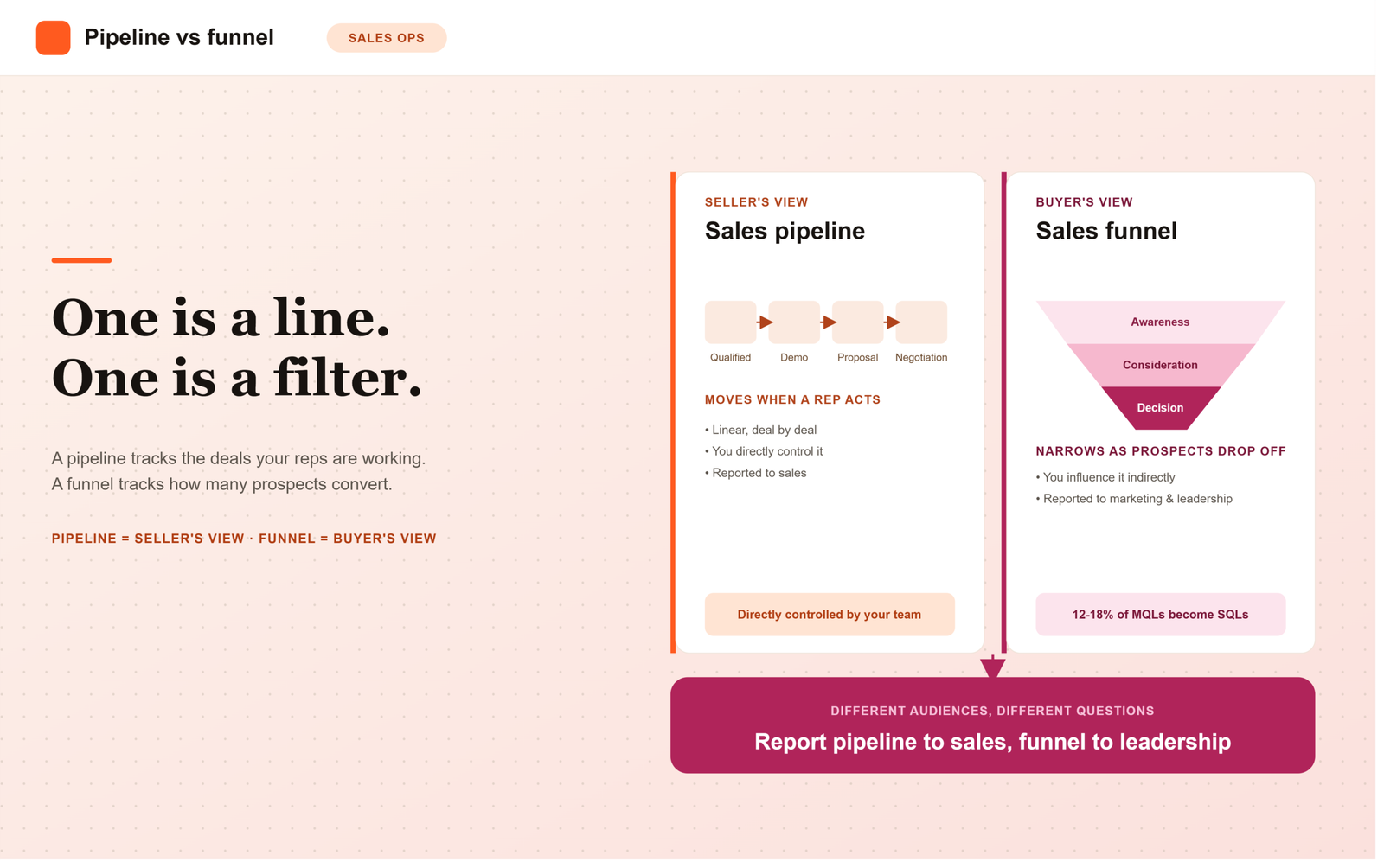
    A sales pipeline tracks the specific deals your sales team is working and the actions reps take to move each one forward. A sales funnel tracks the broader flow of prospects and measures what percentage convert at each stage of the buyer’s journey. One is about your team’s activity; the other is about volume and conversion rates.

    If you’ve ever sat in a pipeline review and someone said “pipeline” when they meant “funnel” (or vice versa), you’re not alone. The two terms get used interchangeably all the time, even by people who’ve been in sales for years.

    But they’re not the same thing, and mixing them up can cost you. If you’re reporting funnel conversion numbers when your VP actually wants pipeline health, you’re going to have an awkward meeting.

    What is a sales pipeline?

    A sales pipeline is your sales team’s internal view of every active deal, organized by stage. Think of it as a dashboard showing exactly where each opportunity stands in your sales process, from first contact to closed won or closed lost.

    Each deal in your pipeline sits in a stage like “Qualified,” “Demo Scheduled,” “Proposal Sent,” or “Negotiation.” A sales pipeline outlines the steps that a sales team takes to turn prospects into paying customers, and it’s built around internal processes and actions, not the buyer’s mindset.

    That’s an important distinction. A pipeline stage moves forward because a rep did something (sent a proposal, booked a demo) or because the buyer took a specific, observable action, not because someone “felt good” about the call.

    What is a sales funnel?

    A sales funnel is a visual representation of your potential customers moving through various stages in their decision-making process, from the moment they become aware of your product to the moment they buy.

    While pipeline stages track individual deals, the funnel is volume-focused. It shows how your potential customer base narrows down as people drop off at each stage. Picture 1,000 leads entering at the top; by the time you get to signed contracts, you might have 8. That drop-off, stage by stage, is exactly what the funnel shows.

    Most funnels follow a simple structure: awareness, consideration, and decision, though many teams add more granular stages depending on their sales motion.

    Sales pipeline vs. sales funnel: what’s actually different?

    Here’s the plain version. The pipeline focuses on the specific actions and stages a salesperson takes to move a deal forward (what the seller does), while the funnel represents the journey from the customer’s point of view, measuring conversion rates at each stage (what the buyer does).

    A few more ways to think about it:

    • Perspective: Pipeline = seller’s view. Funnel = buyer’s view.
    • Focus: Pipeline = individual deals and rep activity. Funnel = aggregate volume and conversion rates.
    • Shape: A pipeline is roughly linear (deals move stage to stage). A funnel narrows, because most leads drop off before they buy.
    • What you control: You can directly change your pipeline by adding or modifying sales tasks, but you can only influence your funnel indirectly, by improving lead quality and rep effectiveness.

    Honestly, most teams that struggle with forecasting aren’t struggling because they lack data. They’re struggling because they’re tracking pipeline activity but reporting it as if it tells them funnel-level conversion truth, and those are two different questions.

    Why does this distinction actually matter?

    It’s not just semantics. Pipeline data and funnel data answer different questions, and if you use the wrong one, you’ll draw the wrong conclusion.

    Say your VP asks why revenue is down this quarter. If you only look at the pipeline, you might see plenty of deals sitting in “Proposal Sent” and assume things are fine. But if you look at the funnel, you might notice conversion from lead to qualified opportunity has quietly dropped 30% over two months. That’s a top-of-funnel lead quality problem, not a closing problem, and you’d never catch it by staring at deal stages alone.

    This is also where the MQL-to-SQL handoff tends to break down. The biggest drop-off typically happens at the marketing-qualified-lead to sales-qualified-lead stage, where only 12 to 18% of MQLs actually become SQLs. If you’re not tracking that conversion rate specifically (a funnel metric), you won’t see the leak until it shows up as a pipeline shortage weeks later.

    Getting your pipeline stages right in the first place also feeds directly into forecasting accuracy, which is a topic we cover in more depth in our beginner’s guide to sales forecasting. And once your pipeline is clean, it’s worth checking whether you actually have enough of it. That’s where a pipeline coverage ratio comes in.

    How to use both without confusing your team

    Here’s a simple checklist for keeping the two straight:

    1. Name your pipeline stages around buyer actions, not seller effort. “Demo completed” is a better stage than “followed up.”
    2. Track funnel conversion rates separately from pipeline volume. Know your lead-to-MQL rate and MQL-to-SQL rate as distinct numbers.
    3. Report pipeline health to sales; report funnel conversion to marketing and leadership. Different audiences, different questions.
    4. Review both weekly. A healthy pipeline with a shrinking funnel is a warning sign your future pipeline is about to dry up.
    5. Keep your CRM as the single source of truth for both, so stage definitions don’t drift between what marketing calls a “lead” and what sales calls a “prospect.”

    Pro tip: if two people on your team can’t agree on what counts as an “opportunity” moving into the pipeline, fix that definition before you build any funnel or pipeline report. Every number downstream depends on it.

    FAQ

    Are sales pipeline and sales funnel the same thing?
    No. They describe the same general process (turning a prospect into a customer) but from different angles: the pipeline is the seller’s view of deal stages, and the funnel is the buyer’s view of conversion volume.

    Which one should I use for forecasting?
    Your pipeline is the primary input for forecasting, since it tracks the dollar value and stage of every open deal. The funnel helps you sanity-check that forecast by showing whether enough new opportunities are entering the top to sustain it.

    Can a small sales team skip the funnel and just track the pipeline?
    You can, but you’ll be flying a bit blind on lead quality. Even a rough funnel view (how many leads turn into qualified opportunities) helps you catch problems before they hit your pipeline.

    Do pipeline stages have to match funnel stages?
    Not exactly. The stages can overlap, but the pipeline is about what the deal needs next, while the funnel is about how many prospects are dropping off between stages. Some teams map them side by side, and that’s fine as long as everyone knows which report answers which question.

    What CRM feature actually shows the difference?
    Most CRMs display pipeline as a deal-stage board or Kanban view, and funnel data as a conversion report or drop-off chart. If your CRM only shows one of these, you’re missing half the picture.

  • GTM Motion Types Explained: PLG vs Sales-Led vs Hybrid

    GTM Motion Types Explained: PLG vs Sales-Led vs Hybrid

    What Is a GTM Motion? PLG vs. Sales-Led vs. Hybrid Explained

    If you’ve spent any time around SaaS founders or investors, you’ve probably heard someone say “what’s your GTM motion?” like it’s obvious. It isn’t, especially if you’re building your first company or your first revenue team.

    The term sounds more complicated than it is. Once you see the three main flavors side by side, picking one (or blending two) gets a lot less scary.

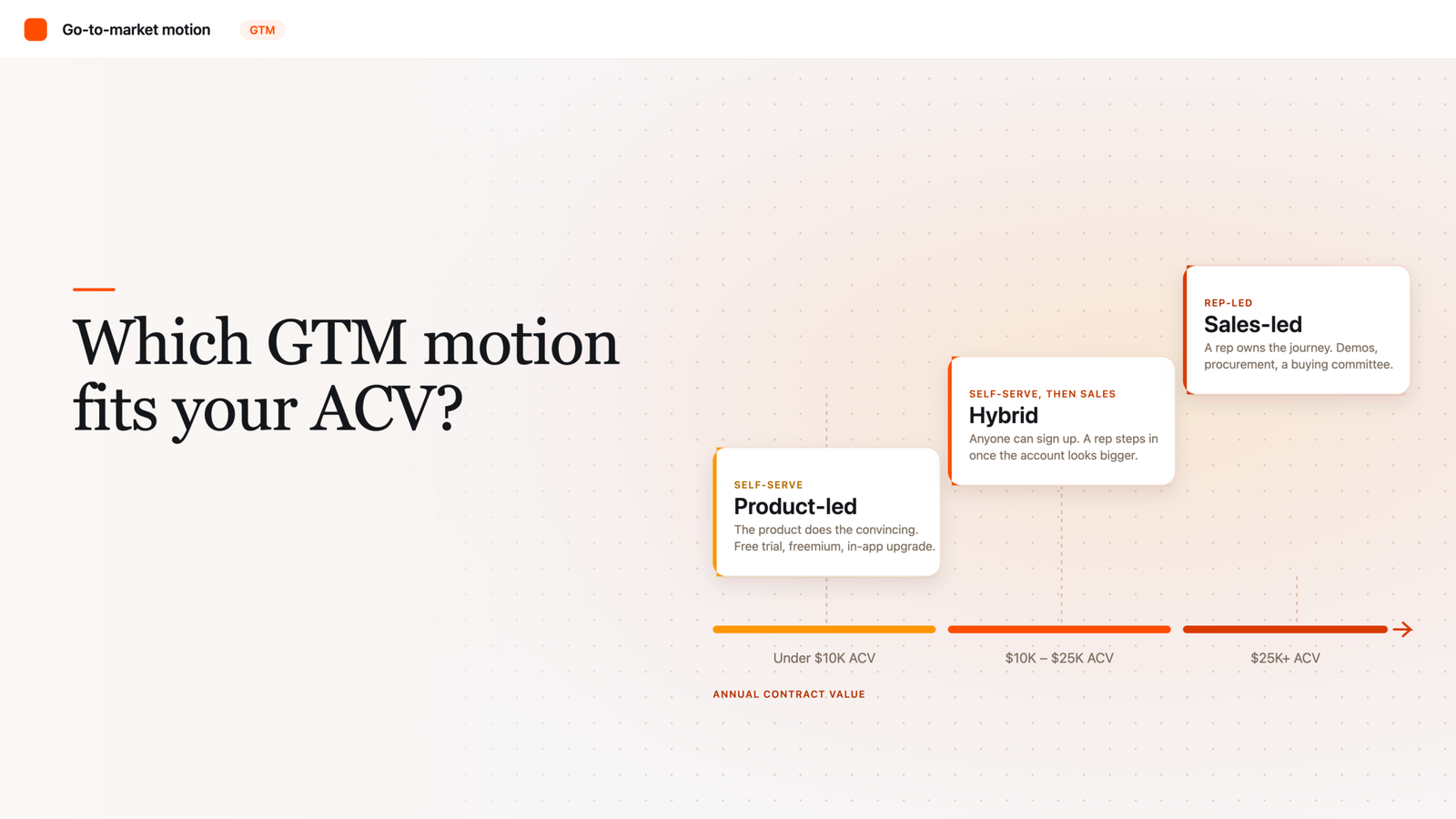
    A GTM (go-to-market) motion is the repeatable way a company gets its product in front of buyers and turns them into paying customers. The three core types are product-led (the product sells itself through self-serve trials), sales-led (reps drive the deal), and hybrid, which blends both depending on deal size and buyer type.

    What Is a GTM Motion, Exactly?

    A go-to-market motion is basically your company’s answer to three questions: who buys, how do they find out about you, and who actually closes the deal. Not a marketing plan, not a sales script, but the underlying operating model that shapes both.

    Most early-stage founders don’t choose a motion on purpose. They copy whatever the last company they worked at did, or whatever’s trending on LinkedIn that week. That’s a mistake, because the wrong motion for your price point and buyer type can quietly stall growth for years.

    What Is a Product-Led Growth (PLG) Motion?

    Product-led growth is a go-to-market strategy where the product itself is the primary driver of acquisition, activation, and expansion, not a salesperson. Users try the product themselves, usually through a free trial or a freemium plan (a free, limited version of the product), experience value, and then upgrade or expand on their own.

    The term was coined by Blake Bartlett at OpenView back in 2016, and it’s since become an umbrella for tactics like freemium models, self-guided product tours, and in-app upgrade prompts. Think Slack or Dropbox: you didn’t sit through a sales pitch before you started using them. You just signed up and started working.

    One reason PLG caught on so fast is cost efficiency. A product-led strategy can reduce customer acquisition cost by taking pressure off the sales team, since the product itself is doing a lot of the convincing. OpenView has also found that leading product-led growth companies grow significantly faster year over year than traditional SaaS companies relying purely on sales.

    But PLG isn’t free. It only works if the product delivers value fast, with little to no setup, and if a single user can get real benefit without needing five other people to sign off.

    What Is a Sales-Led GTM Motion?

    Sales-led growth flips the model: a human being, usually an account executive or sales development rep, owns most of the buyer’s journey. Instead of a free trial doing the convincing, sales and marketing create the need for the product and then walk a prospect through demos, proposals, and negotiation.

    This motion tends to fit complex products with higher price tags and multiple decision-makers. Industry benchmarks generally put sales-led growth as the better fit for deals above roughly $25,000 in annual contract value (ACV, the yearly revenue a customer contract is worth), especially when a buying committee, not just one person, has to approve the purchase.

    If you’re selling something that touches security reviews, procurement, or multiple departments, a self-serve trial usually can’t close that deal on its own. That’s where a rep earns their keep.

    What Is a Hybrid GTM Motion, and Why Is It So Common Now?

    A hybrid motion pairs sales-led and product-led strategies into a single go-to-market approach, aiming to capture the efficiency of self-serve while still being able to land larger, more complex accounts. In practice, that often means self-serve signup for smaller customers and a sales team stepping in once an account shows signs of being a bigger opportunity.

    This isn’t a niche approach anymore. Research from McKinsey points out that the lines between PLG and sales-led are already blurring: pure-play PLG companies are hiring sales teams to serve enterprise accounts, while traditional sales-led companies are building product-led experiences to win over smaller customers. Companies that pull off this blend well can see genuinely differentiated returns compared to sticking with one motion alone.

    Honestly, most companies that claim to be “pure PLG” past a certain size aren’t. Once you’re closing six-figure enterprise deals, somebody in a sales seat is involved somewhere in that process, even if the first touch was self-serve.

    How Do You Pick the Right GTM Motion for Your Business?

    There’s no universal right answer here, but there is a fairly reliable way to work through the decision. Run through these steps before you commit to a motion:

    1. Know your buyer, not just your market. Before anything else, get specific about who you’re actually selling to. This is your ICP (ideal customer profile), and if you haven’t nailed it down yet, it’s worth reading through what an ICP is and why it matters before you go further.
    2. Check your average contract value. Lower ACV products (roughly under $10K annually) tend to favor product-led motions. Higher ACV, complex deals tend to need sales involvement.
    3. Map the buying process. Is this a single-user decision, or does it need sign-off from IT, finance, and a department head? More stakeholders usually means more need for a human guiding the deal.
    4. Measure time-to-value. Can a user get real value in minutes, or does it take weeks of setup and training? Fast time-to-value supports self-serve; slow time-to-value usually needs sales-assisted onboarding.
    5. Size the addressable market for each segment. Understanding your TAM, SAM, and SOM (the total, serviceable, and obtainable market) helps you see whether your best opportunity sits in a high-volume, lower-price segment or a smaller, higher-price one, which points you toward PLG, sales-led, or a hybrid split between them.
    6. Validate with real usage data, not opinions. If self-serve signups are converting on their own, don’t force a sales layer on top of something that’s already working.

    Pro tip: don’t pick a motion because it sounds modern. Pick it because your ACV, buyer complexity, and time-to-value point you there, then adjust as you scale.

    FAQ

    Is PLG always cheaper than sales-led growth?
    Usually, yes, on a per-customer basis, since acquisition costs in a PLG motion don’t scale up proportionally with each new customer the way sales headcount does. But cheap doesn’t always mean better if your product needs a human to close bigger deals.

    Can a small startup run a hybrid motion from day one?
    Technically yes, but it’s rarely a good idea. Most companies start with one motion, prove it works, and layer in the second once they see a clear signal (like inbound signups from larger accounts) that justifies adding sales or self-serve on top.

    Does a hybrid motion mean I need two separate teams?
    Not necessarily two full teams, but you do need clear rules for handoffs. Segment by company size or by buying signal, and make sure everyone agrees on when a self-serve user gets routed to a rep.

    What’s the difference between a GTM motion and a GTM strategy?
    A GTM strategy is the bigger picture: your positioning, pricing, and target market. A GTM motion is the operational engine underneath it, specifically how deals actually get sourced and closed.

    How do I know if my GTM motion is broken?
    Watch for declining win rates, rising customer acquisition costs, or a sales team spending most of its time on deals too small to justify the effort. Any of those are signs it’s time to revisit the motion, not just the tactics underneath it.

  • RevOps vs Business Operations: What’s the Difference?

    RevOps vs Business Operations: What’s the Difference?

    RevOps (Revenue Operations) manages the systems, data, and processes behind your sales, marketing, and customer success teams so they work as one revenue engine. Business Operations (BizOps) is broader: it covers strategy, finance, HR, and execution across the entire company, not just the revenue-generating side.

    If you’ve ever sat in a leadership meeting and heard someone say “isn’t that basically the same as ops?” you’re not alone. These two functions get lumped together constantly, and honestly, the confusion is understandable. Both promise to fix inefficiency. Both show up when growth stalls. But they solve different problems, and mixing them up can lead you to hire the wrong person for the wrong job.

    What Is RevOps, Exactly?

    RevOps stands for Revenue Operations. It’s the function responsible for aligning your sales, marketing, and customer success teams around shared data, shared processes, and shared goals so revenue grows in a predictable way.

    Think of RevOps as the team that makes sure a lead moving from a marketing campaign to a sales rep to a customer success manager doesn’t fall through the cracks along the way. Revenue operations is a strategic framework that brings together all revenue-related activities in an organization, unifying marketing, sales, and customer success (and often finance) under one operational umbrella instead of letting each team run its own tools and metrics.

    RevOps typically doesn’t touch the day-to-day execution within each department. A RevOps team is usually a strategic function, not one focused on daily firefighting: it builds the systems and reports that let leadership see the whole revenue picture, then gets out of the way so sales, marketing, and CS can execute.

    Most companies don’t need a dedicated RevOps hire on day one. RevOps most commonly starts to take shape once a company hits somewhere around the $5 to $10 million ARR mark, when the handoffs between departments start creating real friction.

    What Is Business Operations (BizOps)?

    Business operations, often shortened to BizOps, is a much wider net. It covers the full set of activities a company uses to turn its people, money, and resources into value: everything from supply chain and HR to marketing execution and financial planning.

    Where RevOps lives inside the revenue engine, BizOps sits above it. A BizOps team acts as connective tissue between departments, translating company strategy into execution across finance, product, operations, and yes, sometimes revenue too. BizOps professionals are cross-functional by design, working alongside product, marketing, engineering, sales, and customer success teams to build the systems that keep the whole business running smoothly.

    The easiest way to picture it: BizOps owns the connective tissue of the entire company, while RevOps owns the GTM (go-to-market) engine specifically. One is company-wide. The other is revenue-specific.

    So What’s Actually Different?

    Here’s the plain version:

    • Scope. RevOps focuses only on sales, marketing, and customer success. Business consulting or BizOps looks at the entire organization, including finance, HR, and long-term structure.
    • Question they answer. BizOps tends to answer “what should the company do next?” (market entry, org design, resourcing). RevOps answers “how is revenue actually generated day to day, and where is it leaking?”
    • Where value shows up. RevOps work shows up in pipeline conversion, deal velocity, and churn. BizOps work shows up in strategic decisions, budget allocation, and cross-departmental planning.
    • Who they report to. RevOps typically reports to a CRO or VP of Sales. BizOps often reports to the CEO or COO directly.

    I’ll say the quiet part out loud: most of the confusion between these two roles isn’t really about job titles. It’s about founders hiring a generalist, calling them “ops,” and hoping they’ll absorb both jobs by osmosis. That works for a while at 10 people. It stops working fast once you’ve got separate sales, marketing, and CS teams that don’t talk to each other.

    Why This Distinction Actually Matters

    Getting this wrong costs you in a very specific way: you either hire a systems administrator and expect strategic thinking, or you hire a strategist and wonder why your CRM is still a mess.

    Organizations that align sales, marketing, and customer success under a coordinated RevOps model tend to see real operational payoff. One widely cited 2020 study found companies could see an increase of up to 20% in sales productivity, a 200% increase in digital marketing ROI, and a 30% reduction in go-to-market expenses after adopting RevOps. Analyst firm Gartner had also projected that by 2025, 75% of the highest-growth companies would run some form of RevOps model, a sign of how mainstream the function has become.

    BizOps has its own payoff, just at a different altitude. Because it sits closer to company-wide strategy, its wins tend to show up in things like faster board reporting, cleaner financial planning, and fewer instances of departments (like Finance and Sales) disagreeing on basic numbers like revenue recognition.

    A Quick Checklist: Which One Do You Actually Need?

    1. Are your growing pains specific to sales, marketing, and customer handoffs? That’s a RevOps problem.
    2. Are they showing up company-wide, like hiring outpacing onboarding or finance and sales disagreeing on numbers? That points to BizOps.
    3. Are you under roughly $5M ARR? Most founders should own operational thinking themselves before hiring either role.
    4. Are you between $5M and $10M ARR with a clear GTM structure but messy handoffs? This is usually the right window to hire dedicated RevOps.
    5. Are you past Series B with a functioning GTM engine but a fraying broader org? That’s typically when BizOps becomes worth building out separately.

    Pro tip: if you’re not sure which one you need, look at where the complaints are coming from. If it’s reps complaining about lead handoffs and dashboards that don’t match, that’s RevOps. If it’s your CFO and your head of sales arguing about whose numbers are right, that’s a BizOps conversation.

    Can One Person Do Both?

    At an early-stage company, yes, and it’s often the most practical path. A RevOps leader who has already mastered cross-functional alignment and systems thinking has a lot of the exact skill set BizOps needs, just applied to a wider canvas. The two disciplines share the same underlying instinct: replace gut-feel decisions with data. Don’t expect that to scale forever, though. Once you’re managing separate GTM and company-wide operating rhythms, splitting the roles usually pays for itself.

    FAQ

    Is RevOps a type of business operations?
    You could think of it that way. RevOps is a specialized, narrower slice of business operations that focuses only on the revenue-generating side of the company: sales, marketing, and customer success.

    Do small startups need both RevOps and BizOps?
    Probably not yet. Most early-stage founders are better off owning operational thinking themselves and adding a dedicated RevOps hire around the $5 to $10 million ARR range, then considering BizOps later as the whole org grows more complex.

    Does RevOps replace sales operations?
    Not exactly. Sales operations supports the sales team specifically with things like territory mapping and forecasting, while RevOps sits above sales ops, marketing ops, and customer success ops, unifying all three into one coordinated function.

    What titles report into RevOps vs BizOps?
    RevOps usually reports to a Chief Revenue Officer or VP of Sales. BizOps tends to report to the CEO or COO, since it operates across the whole company rather than just the revenue side.

    Which one should I hire first?
    If your pain is specifically in how leads move between marketing, sales, and customer success, start with RevOps. If your pain is broader (finance, hiring, cross-department planning), you’re probably looking for a BizOps hire instead.


  • RevOps vs. CRO: How the Roles Actually Relate

    RevOps vs. CRO: How the Roles Actually Relate

    RevOps is a function that aligns your sales, marketing, and customer success teams around shared processes, data, and tools. A CRO (Chief Revenue Officer) is the executive who owns revenue outcomes across those same teams. RevOps is the system; the CRO is the person accountable for what that system produces.

    If you’re a founder or early revenue leader, you’ve probably heard both terms thrown around in the same breath, sometimes even as if they’re interchangeable. They’re not. Mixing them up can lead you to hire the wrong person, build the wrong reporting line, or expect one role to do a job it was never designed for.

    What Is RevOps, Exactly?

    Revenue Operations (RevOps) is the function responsible for connecting the systems, processes, and data behind your sales, marketing, and customer success teams so they work off the same playbook instead of three different ones. If you want the fuller picture of what this function covers day to day, our beginner’s guide to RevOps walks through it from the ground up.

    RevOps people live in the weeds: CRM configuration, lead routing, forecasting models, reporting dashboards. They’re the ones who notice when marketing counts a “qualified lead” differently than sales does, and they fix it.

    What Is a Chief Revenue Officer (CRO)?

    A Chief Revenue Officer (CRO) is a C-suite executive responsible for all revenue-generating functions in a company, typically sales, marketing, and customer success. Salesforce describes the CRO as responsible for every process that generates revenue in an organization, connecting functions that range from marketing and sales to customer success, pricing, and revenue operations itself.

    The CRO title showed up mostly in tech and SaaS companies, originally as a way to unify departments that used to operate in silos. That’s a useful thing to know, because it tells you the role was invented to solve a coordination problem, not just to add another executive seat.

    A CRO isn’t the same as a VP of Sales, even though the two roles sound similar on paper. A VP of Sales is focused purely on sales performance, while a CRO’s mandate stretches across marketing, customer success, and pricing decisions too. Some companies also use a Chief Sales Officer (CSO) title, but that role focuses specifically on the sales function and closing revenue, while a CRO’s broader mandate includes marketing, customer success, and revenue operations on top of sales.

    So How Do RevOps and the CRO Actually Relate?

    Here’s the simplest way to think about it: RevOps builds and runs the machine. The CRO is accountable for what the machine produces.

    In a lot of organizations, RevOps reports directly into the CRO. Having RevOps report to the CRO is one of the most common structures in the industry, and the Head or VP of RevOps often ends up functioning as the CRO’s right hand, translating strategy into the systems and processes that make it real. That’s not a coincidence. A CRO needs oversight across every revenue function, and RevOps is the operational layer that makes that oversight possible instead of just aspirational.

    Think of it this way: the CRO sets the destination and decides what “good” looks like for growth. RevOps builds the roads, checks the fuel gauges, and flags when a wheel is about to fall off. Neither one works well without the other, but they’re clearly not the same job.

    That said, this reporting relationship isn’t universal, and it depends heavily on company size and stage. We cover the different ways RevOps can be structured, including when it should sit under a CRO versus a CEO or COO, in our post on RevOps org structure models.

    Why Do Companies Confuse the Two?

    Honestly, most of the confusion comes from job postings, not from the roles themselves. RevOps jobs sometimes get listed under titles like Chief Revenue Officer or VP of Revenue Operations, which blurs the line for anyone browsing job boards trying to understand the field.

    Add to that the fact that a Director of RevOps and a CRO both care about “revenue,” and it’s easy to see why people flatten the two into one idea. But their approaches differ: a CRO focuses on revenue strategy, go-to-market planning, and directly leading revenue-generating teams, while a Director of RevOps focuses on the operational infrastructure, the processes, systems, data, and analytics, that let those teams actually execute. In most companies, the Director of RevOps reports up to the CRO or an equivalent executive, not the other way around.

    Do You Need a CRO, a RevOps Hire, or Both?

    Most early-stage companies don’t need a CRO. They need someone fixing the operational mess first. Here’s a rough way to think through it:

    1. You’re pre-Series B and sales/marketing keep tripping over each other. Start with a RevOps hire, not an executive. You need someone untangling CRM data and lead handoffs before you need someone setting revenue strategy at the board level.
    2. You already have a functioning RevOps layer but no single owner of revenue outcomes. This is often the point where a CRO makes sense, since the operational foundation (data, systems, forecast rhythm) is already there for an executive to actually use.
    3. Your sales, marketing, and customer success leaders don’t trust each other’s numbers. That’s a RevOps problem first. A CRO without reliable data underneath them is just another executive guessing.
    4. You’re scaling past the point where the CEO can manage revenue alignment personally. This is a classic trigger for adding a CRO, especially once ARR and headcount both cross a threshold where cross-functional friction becomes the actual bottleneck, not lack of demand.

    Pro tip: if you’re not sure whether your company has hit the tipping point for a dedicated operational hire, our post on signs your company needs a dedicated RevOps hire has a more detailed checklist.

    One more thing worth saying plainly: a CRO hired into a company with no RevOps foundation is set up to fail before they even start. That’s part of why CRO tenure tends to run short. A recent analysis placed average CRO tenure somewhere between 17 and 25 months, and other industry commentary points to an even blunter figure, an average CRO lifespan of around 18 months, compared to roughly 7 years for CEOs and 5 for CFOs. A lot of that comes down to expectations versus support: CFOs inherit established financial systems, but CROs are often handed a bloated, inefficient revenue engine and told to make it work, without a proven playbook to lean on.

    That’s not a knock on the people taking these jobs. It’s a structural problem, and RevOps is usually the fix.

    FAQ

    Does RevOps replace the need for a CRO?
    No. RevOps handles the operational layer (systems, data, process), while a CRO owns the strategic accountability for revenue outcomes across teams. Most growing companies eventually need both, just not necessarily at the same time.

    Who does RevOps report to if there’s no CRO yet?
    It varies by company. RevOps commonly reports to a CEO, COO, or CRO depending on stage and structure, and our post on RevOps org structure breaks down when each model makes sense.

    Is a CRO the same as a VP of Sales with a bigger title?
    Not really. A VP of Sales is focused only on sales, while a CRO’s mandate spans marketing, customer success, and pricing decisions as well. Some companies use “CRO” loosely, but the intended scope is meaningfully broader.

    Can one person be both the RevOps lead and the CRO?
    In very early-stage companies, yes, it’s common for one person to wear both hats temporarily. As the company scales, though, the operational workload and the strategic workload usually get too big for one seat.

    Why do so many CROs leave within two years?
    A big part of it is inheriting broken systems with no existing playbook to fix them, which is a very different situation than a CFO or CEO typically walks into. Building out RevOps before or alongside a CRO hire is one of the more practical ways to avoid that trap.